75
EN
U
minipool Quarz
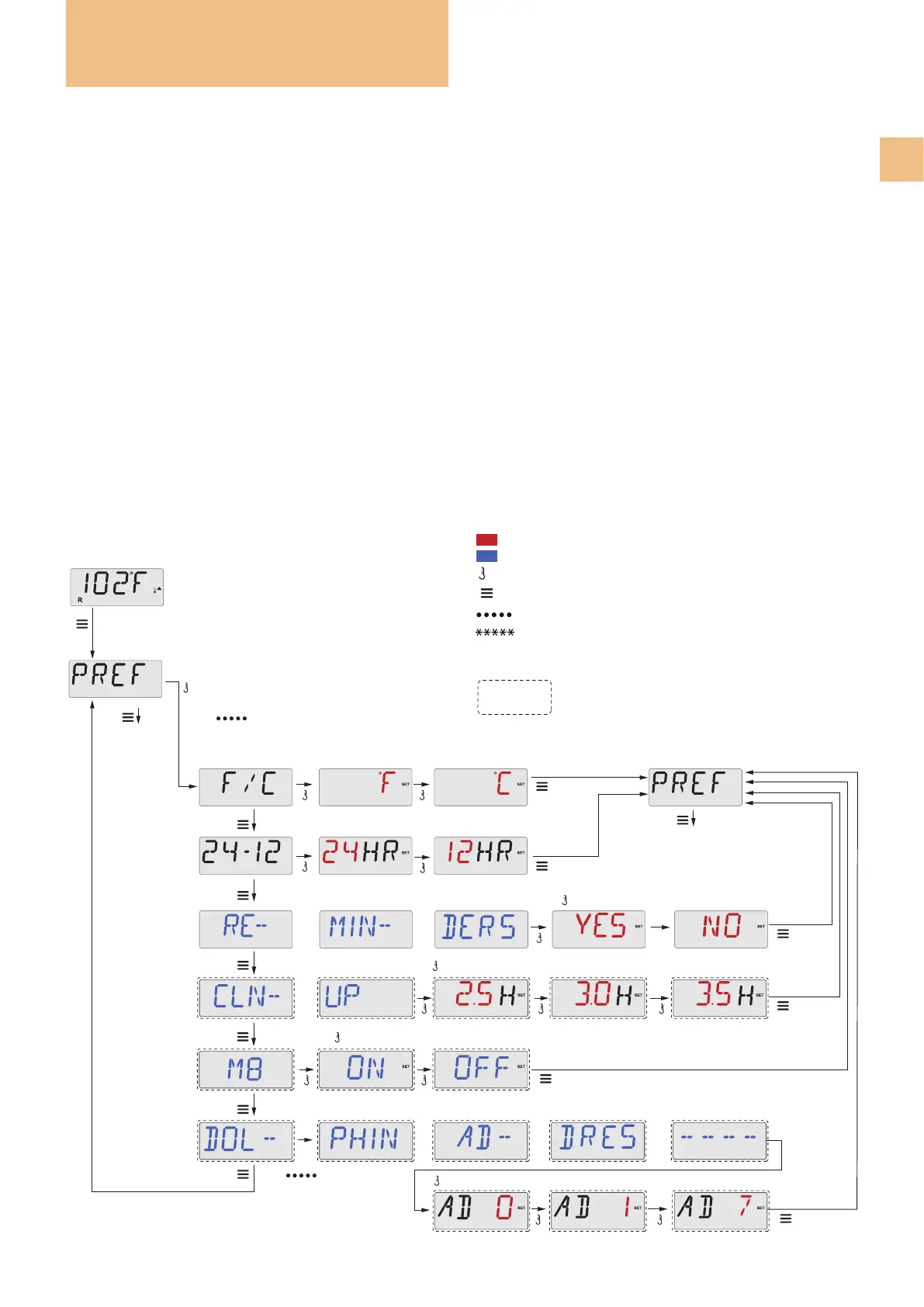
PREFERENCES
F / C (Display Temp) Changes the temperature between Fahrenheit and Celsius.
12 / 24 (Time display) Changes the clock between 12 hr and 24 hr display.
RE-MIN-DERS Turns the display of reminder messages (like “Clean Filter”) On or Off.
Note: Reminders continue to run in the background even when not displayed. So turning the Reminders display On
or Off does not reset any Reminder counts.
CLN-UP Clean-up cycle duration is not always enabled, so it may not appear. When it is available, set the length of
time Pump 1 will run after each use. 0-4 hours are available.
M8 (This message may not appear on all systems). On systems that have M8, it is enabled by default. It can be
disabled (or re-enabled) here. M8 reduces the polling intervals when the water temperature in the spa is stable.
DOL-PHIN-AD-DRES (Dolphin II and Dolphin III) Applies to RF Dolphin only.
(This message may not appear depending on the conguration)
When set to 0, no addressing is used. Use this setting for a Dolphin Remote which is factory set for no address by
default. When set between 1 and 7, the number is the address. (See the Dolphin manual for details).
Changes between Yes and No
Changes between F° and C°
*****
Wait to
Revert
*****
Wait to
Revert
*****
Wait to
Revert
*****
Wait to
Revert
*****
Wait to Revert
Set
Set
Set
Set
Set
Changes the clock between 12 hr and 24 hr display.
Press Menu/Select
To show the first item in the preference menu
for 12-24
Press Menu/Select for REMINDER
*****
Wait to Revert
Set
Press Menu/Select
Only with
Cleaning Cycle
activated.
Only RF Dolphin.
Or
a few seconds
Press Menu/Select for CLEANING
Press Menu/Select
repeatedly until
PREF appears.
Main Screen
To the next item
in the
Main Menu (UTIL)
To the next item
in the
Main Menu (UTIL)
To view the current settings and set the number of hours (0-4) at half-hour intervals.
To view the current settings and to set the address numbers for Dolphin II and Dolphin III (0-7)
to show the Address Menu for Dolphin II and Dolphin III
Or
wait a few seconds
to return to the main screen
Press Menu/Select for CLEANING
Changes between On and Off
Key
+
-
Indicates a change in the display.
Indicates a continuous or intermittent message - every 1/2 second.
A temperature button, used for “Action”
Menu/Select button
Waiting time that keeps the last change to a menu item.
Wait time in which the initial settings are restored
by cancelling the changes made.
Indicates a Menu Item that Depends on a Manufacturer
Conguration and may or may not appear.
Use


 To Next Page