T5
-7-
Fitting and Removing the
Dust Extractor Spout
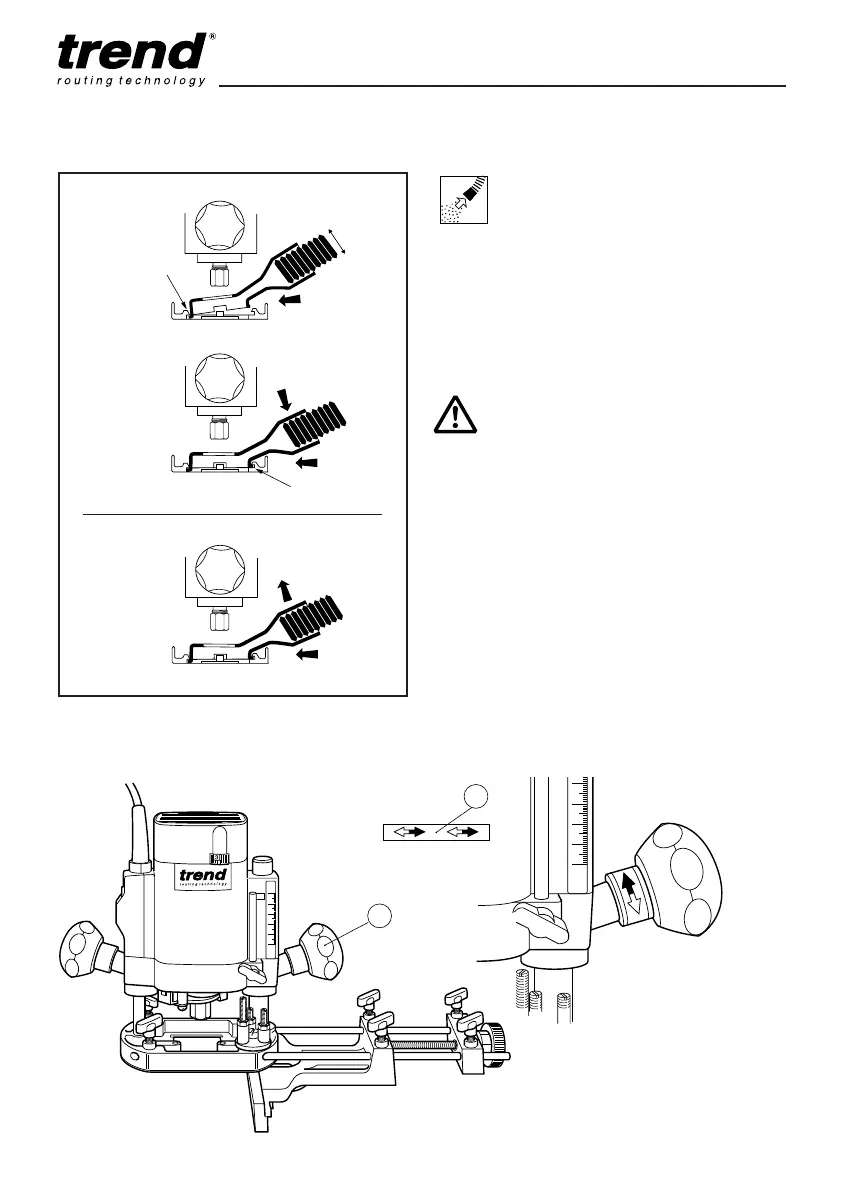
■ Insert the extractor spout in channel ‘A’ of the
routing base.
The extractor spout is suitable for dust
extractors with a hose diameter of 35mm.
■ Press the extractor spout down and forward
until it latches into channel ‘B’.
Dismantle in reverse order.
Whenever possible use the dust
extraction spout with a suitable
extractor when routing.
Fitting the plunge grip knob direction
arrow sticker
■ Remove direction arrow (2) from backing
paper and apply to plunge locking grip knob
(1).
■ Orientate label so that solid arrow head points
away from the front of the router.
■ Wrap arrow around grip knob neck, ensure it
is correctly positioned and firmly stuck down.
Fitting Dust
Extractor
Spout
Removing
Dust
Extractor
Spout
ASSEMBLY & ADJUSTMENT
The direction arrows identify the
plunge locking grip knob and the
direction for locking and unlocking
the router carriage.
MANU-T5 v8.0 1/9/05 12:06 pm Page 7


 To Next Page