6 VSD2H Variable Speed Drives Data Sheet TA201104 Issue 3, 08-Oct-2013
VSD2H Data Sheet
HARDWARE (continued)
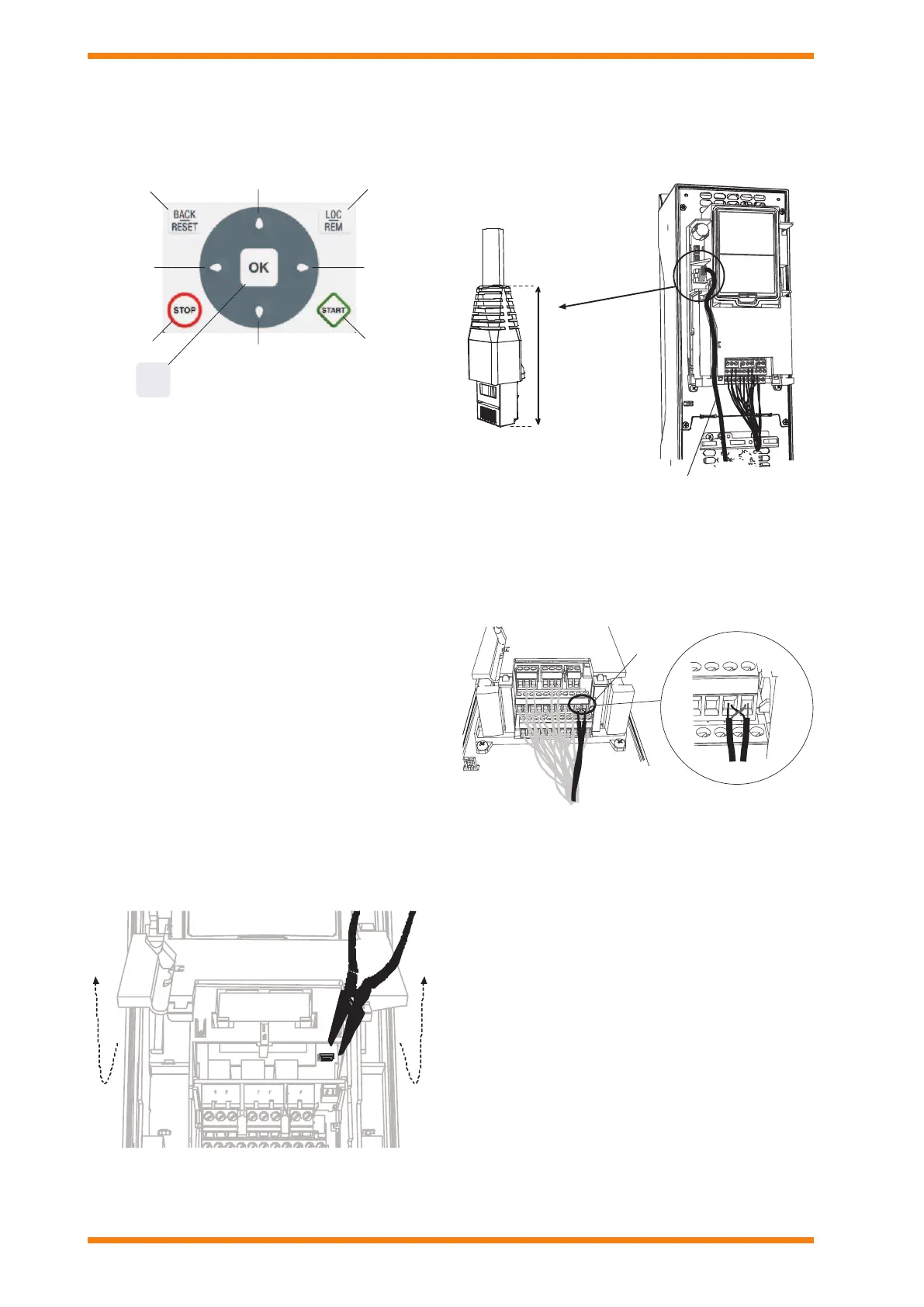
The keypad has nine buttons which are used for controlling the
drive, setting parameters, and monitoring values. The buttons
are the same for both types of keypad.
Scrollmenu up
Increase va lue
Scrollmenu down
Decrease value
Move cursorlef t
Move backward in me nu
Exit edit mo de
Resetfaultswithlongpre ss
Change cont rolplace
Stop butt on
Ente ractivelevel/ite m
Confirmselecti on
OK
Startbutton
Move cursorright
The keypad is the control source by default (i.e. Local) but it
can be changed to Remote at any time by pressing the LOC/
REM button. (The control source has to be changed to Remote/
Fieldbus for the NXNI or NXIP to control the drive.)
The main menu consists of 7 individual items which are browsed
using up and down buttons, the submenus under these menus
are then browsed by selecting OK.
Quick setup: A group of the parameters most commonly used
during installation and commisioning
Monitoring: This enables parameters to be monitored only.
Parameters: This enables the parameters to be edited.
First the group of parameters is selected, then the individual
parameter. The actual meanings of the parameters vary with
the conguration being used.
Diagnostics: This enables current and historical faults to
be viewed, faults to be reset , and counters and software
information to be viewed.
I/O and hardware: This selects Basic I/O, any additional boards
in slots D or E (an NXNI or NXIP in slot D would be shown as
OPTCO), Real time clock, the drive fan, keypad settings and
eldbus (RS485 or Ethernet) parameters.
User settings: Language, application, parameter backup and
restore to and from keypad.
Favourites: (advanced commissioning keypad only) This
enables the user to collect a set of parameters from any of the
keypad menus.
Digital Input Isolation: The digital inputs (DI1 to DI6) can be
isolated from ground by removing a link on the control board
as shown.
Ethernet Connection: The Ethernet connection for BACnet
over IP or MODBUS TCP is situated under the cover to the left
of the control keypad, and the cable is run in a channel cut in the
plastic ap. A shielded RJ45 connector should be used.
RS485 Connection: The RS485 connection for BACnet over
MS/TP or MODBUS RTU uses terminals A and B (A negative,
B positive) in the basic I/O board terminal set. STP (Shielded
Twisted Pair), type Belden cable 9841 or similar should be used.
The terminator (see above DIP Sw 1) should only be switched
on if the unit is at one end of the bus.
B
20 A
11
89
10
12
B
13
14
15 161718 19
20 A
1
11
234 567
8910
21 2223 242526
2829
RS485
terminals
(A andB)
Real Time Clock: The VSD2H has a real time clock with timer
functions. The unit comes complete with a Real Time Clock
battery installed to maintain the time during power failure..
Integrated RFI-lter: The units have integrate RFI lters,
enabling them to comply with EN61800-3 category C2 (suitable
for public electricity networks such as buildings).
Integrated DC choke: The units are equipped with DC chokes
to reduce harmoncs (THD), enabling them to comply with
EN61000-3-12.
Integrated stress removal: Stress removal and 360°
grounding of power cables inside the unit with clamps. No need
for extra glands.


 To Next Page
 Loading...