EasyManua.ls Logo

TRENDnet AC3200 - Basic Route er Settings; Access Your R Router Managem Ent Page; Network St Atus

TRENDnet AC3200
64 pages
Print Icon
To Next Page IconTo Next Page
To Previous Page IconTo Previous Page
Loading...
©Copyright
2
TREND
n
BasicRo
u
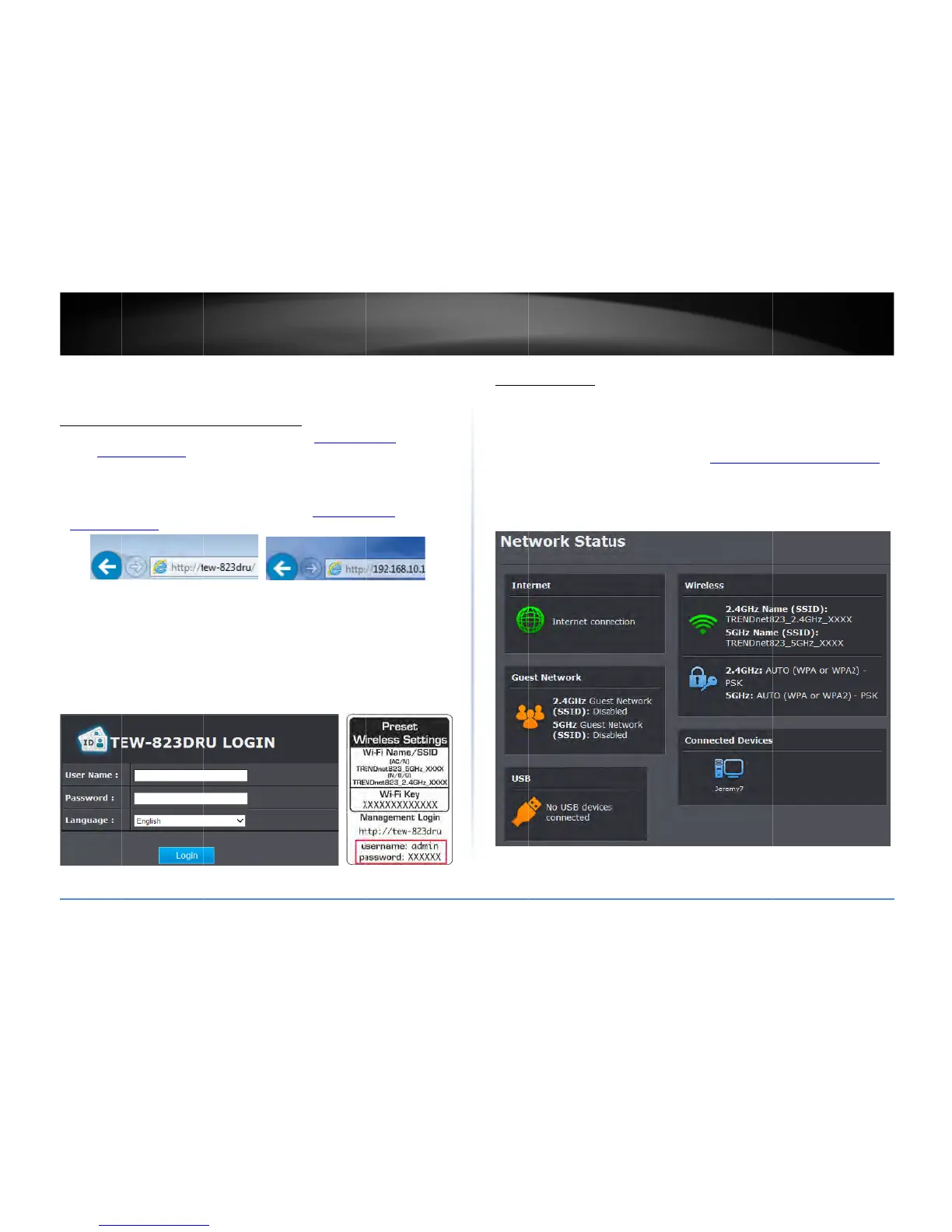
Accessyo
Note:Yourro
u
addresshttp:
/
(e.g.Internet
E
frequentlyin
t
1.Openyour
w
http://192.
1
2.Foradded
s
the
Password
therouter.
En
click
Login
.
UserName
:
Password:
(
Note:User
N
2
014TRENDnet.Al
l
n
etUser’sG
u
u
terSettin
g
urrouterma
u
termanagement
/
/192.168.10.1isa
E
xplorer®,Firefox
®
t
hisUser’sGuide.
w
ebbrowserand
g
1
68.10.1.Yourrou
t
s
ecurity,theroute
r
onastickeronth
e
teryour
Usernam
e
:
admin

xxxxxxxx)
N
ameandPasswo
r
l
RightsReserved.
u
ide
g
s
nagementp
a
pageURL/domain
ccessedthrought
h
®
,Chrome™,Safari
®
g
otoURL/domain
t
erwillpromptyo
u

r
ispreconfigured
w
e
sideoftheroute
r
e
and
Password
,s
e
r
darecasesensiti
v

a
ge
namehttp://tew
8
h
euseofyourInte
r
®
,Opera™)andwi
l
namehttp://tew
8
u
forausername
a
w
ithauniquepass
r
andonthelabel
o
e
lectyourpreferr
e
v
e.

8
28druorIP
r
netwebbrowser
l
lbereferenced
8
28druorIPaddre
a
ndpassword.
word.Youcanfin
d
o
nthebottomof
e
dlanguage,then
ss
d
Net
w
Basic>
Thisse
c
devices
1.Logi
n
onp
a
2.Click
w
orkStatus
NetworkStatus
c
tiondisplaysabri
e
.
n
toyourrouterm
a
a
ge9).
on
Basic
andclick
e
fsummaryofthe
a
nagementpage(
s
on
NetworkStatu
router’sbasicset
t
s
eeAccessyourr
o
s
.

TEW828
D
t
ingsandtheconn
e
o
utermanagemen
t
D
RU
9
e
cted
t
page

Related product manuals