EasyManua.ls Logo

TRENDnet AC3200 - Page 39

TRENDnet AC3200
64 pages
Print Icon
To Next Page IconTo Next Page
To Previous Page IconTo Previous Page
Loading...
©Copyright
2
TREND
n
Openad
e
Thisrouterca
usingtheVirt
u
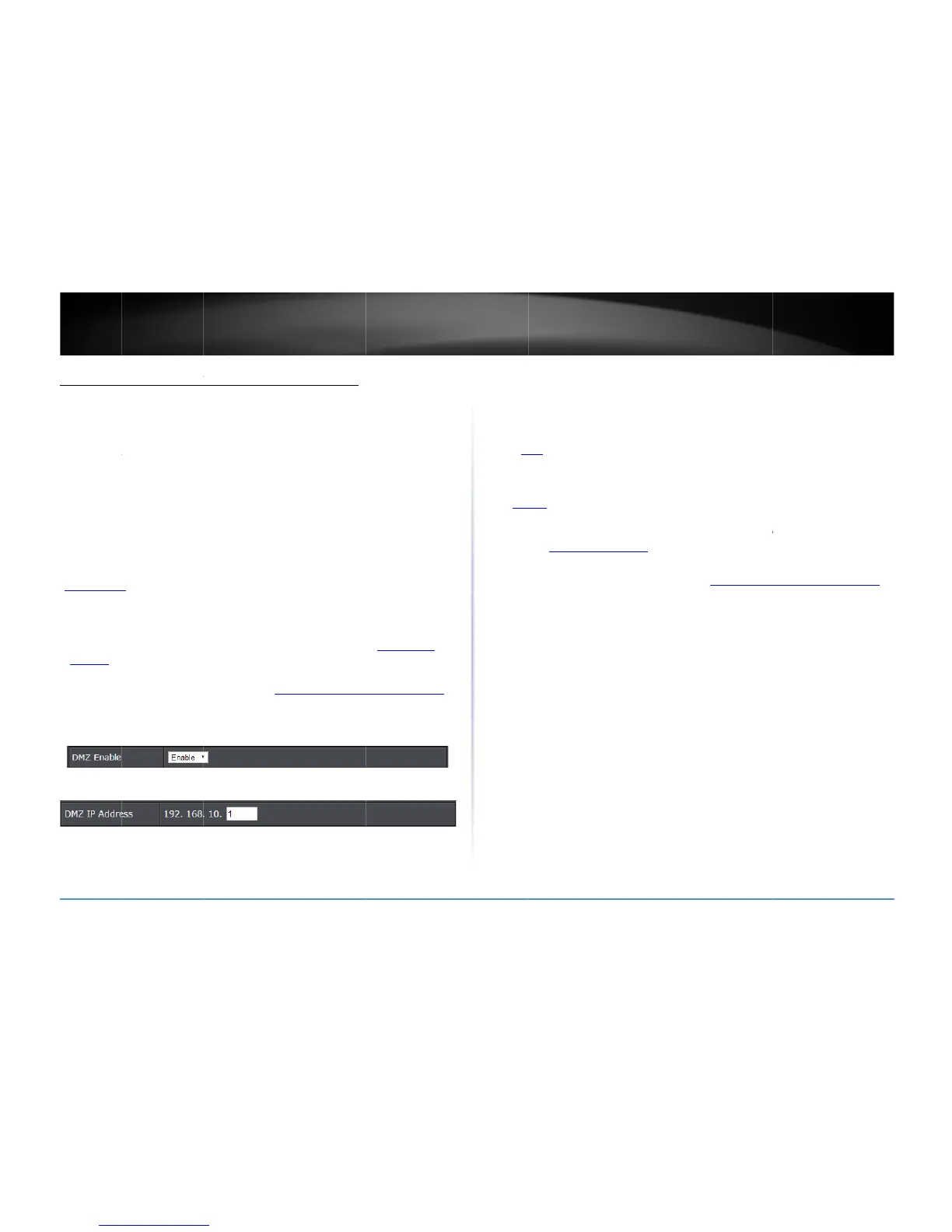
DMZ
A
dvanced>F
i
Youmaywan
t
toallowanyo
n
thatmakesal
l
andforwards
TheDMZfeat
u
very
insecure
Internetattac
Itisstronglyr
e
VirtualServe
theInternet.
1.Makethec
o
astaticIPa
d
Networkse
c
Internet.
2.Logintoyo
u
onpage9).
3.Clickon
Ad
v
4.Clickthe
D
M
5.EntertheI
P
Internet.
6.Tosavech
a
2
014TRENDnet.Al
l
n
etUser’sG
u
e
viceonyou
r
nprovideaccesst
o
u
alServer,Special
i
rewall>DM
Z
t
toexposeaspeci
f
n
etoaccessit.Yo
u
l
theportsandser
v
themtoasingleI
P
u
reisaneasyway
technologyandw
i
ks.
e
commendedtou
s
ronpage36)to
a
o
mputerornetwo
d
dress.Signingup
c
tionpage31)will
u
rroutermanage
m
v
anced
andclick
F
i
M
ZEnable
dropd
o
P
addressyouassi
g
a
nges,click
Apply
.
l
RightsReserved.
u
ide
r
networkto
t
o
devicesonyourl
Application,meth
o
f
iccomputerord
e
u
rrouterincludes
t
v
icesavailableon
t
P
address(comput
e
ofallowingaccess
i
llopenlocalarea
n
s
e
VirtualServer
(
a
a
llowaccesstoyo
u
rkdevice(forwhi
c
foraDynamicDN
S
provideidentifica
t
m
entpage(seeA
c
i
rewall
,thenclick
o
o
wnlist,andselec
t
g
nedtothecompu
t
t
heInternet
ocalare anetwork
o
d(DMZNOTreco
e
viceonyournetw
o
t
heDMZ(Demilita
r
t
heWAN/Internet
e
rornetworkdevi
fromtheInternet
n
etworktogreate
r
a
lsocalledportfo
r
u
rcomputersorne
c
hyouareestablis
h
S
service(outlined
t
ionoftherouter’
s
c
cessyourrouter
m
o
n
DMZ
.
t
Enable
.
t
erornetworkde
v
totheInternet
mmended).
o
rktotheInterne
t
r
izedZone)featur
e
sideoftherouter
ce)onyournetwo
however,itisa
r
threatsfrom
r
warding,see
tworkdevicesfro
m
h
ingaDMZlink)h
a
inIdentifyYour
s
networkfromth
e
m
anagementpage
v
icetoexposetot
h
t
e
rk.
m
a
s
e
h
e
Virtual
A
dvanc
Virtual
S
require
ordevi
c
(seeD
usedb
y
(TREN
D
yourn
e
toGa
m
Since
m
Server
p
(outlin
e
1.Logi
n
onp
a
2.Click
3.Revi
e
Checkt
R
R
I
1
P
a
P
P
c
N
P
p
Server
ed>Firewall>Vir
t
S
erver(alsocalled
dbyaspecificapp
c
e)onyournetwo
r
MZonpage36)i
n
y
anapplication.A
n
D
netIPcamerasde
f
e
tworktobeablet
o
m
ingsectiononp
a
m
ostISPsconstantl
y
p
ort(s)fromtheIn
t
e
dinIdentifyYour
n
toyourrouterm
a
a
ge9).
on
Advanced
and
e
wthevirtualserv
e
heoptiontothel
e
R
uleEnable
Che
c
R
uleName
Enter
PAddress:
Entert
h
1
92.168.10.101).
P
rotocol
:Selectth
e
a
ndUDP).

P
ublicPort
Enter
P
rivatePort
Ente
c
onnectingdevice
s
N
ote:
ThePublicP
o
P
ort(alsoknowna
s
p
ortnumberforbo
t
ualServer
portforwarding)
a
lication)andforw
a
r
k.Usingthisfeatu
n
whichDMZforw
a
n
examplewould
b
f
aulttoHTTPTCP
p
o
viewitoverthe
I
a
ge39.
y
changeyourho
m
t
ernetitisrecom
m
Networksectionp
a
nagementpage(
s
clickon
Firewall
,t
e
rsettings.Click
A
d
e
ftmostoftheent
r
c
ktheoptiontoen
anameforthevi
r
h
eIPaddressofth
e
protocolrequire
d
theportnumber
u
rtheportnumber
s
documentationf
o
o
rtcanbeassigne
d
s
portredirection),
thsettings.Please
a
llowsyoutodefin
a
rdthemtoasingl
reismoresecure
c
a
rdsallportsinste
a
b
eforwardingapo
r
p
ort80forremote
I
nternet.Toopen
s
m
eIPaddress,tob
e
m
endedtosetupD
y
age31).
s
eeAccessyourr
o
henclickon
Virtu
a
d
d
tosavesetting
s
r
ytoenableandu
n
ablethevirtualse
r
r
tualserver.
edevicetoforwa
r
d
foryourdevice.
T
u
sedtoaccessthe
requiredbyyour
d
o
rreferencetoth
e
d
adifferentportn
u
howeveritisreco
m
refertothedevic
e

TEW828
D
especificports(u
s
eIPaddress(aco
m
c
omparedtousin
g
a
dofonlyspecific
r
ttoanIPcamera
accesswebrequ
e
s
everalportspleas
e
abletoaccessth
e
y
namicDNSservic
o
utermanagemen
t
a
lServer
.
s
.
n
checktodisable.
r
ver.
r
dtheport(e.g.
T
CP
,
UDP,
or
Both
devicefromtheI
n
d
evice.Refertoth
e
e
networkport(s)r
u
mberthanthePr
i
m
mendedtouset
h
e
documentationt
o
D
RU
36
s
edor
m
puter
g
DMZ
ports
e
sts)on
ere
f
er
e
Virtual
e
t
page
(TCP
n
ternet.
e
equired.
i
vate
h
esame
o

Related product manuals