© Copyright 2013 TRENDnet. All Rights Reserved.
TRENDnet User’s Guide
TEW-711BR
38
Special Applications
Access > Special AP
Special applications (also called port triggering) is typically used for online gaming
applications or communication applications that require a range of ports or several
ports to be dynamically opened on request to a device on your network. The router will
wait for a request on a specific port or range of ports (or trigger port/port range) from a
device on your network and once a request is detected by your router, the router will
forward a single port or multiple ports (or incoming port/port range) to the device on
your network. This feature is not typically used as most devices and routers currently
use UPnP (Universal Plug and Play) to automatically configure your router to allow
access for applications. See “Enable/disable UPnP on your router” on page 33
.
Note: Please refer to the device documentation to determine if your device supports
UPnP first, before configuring this feature.
1. Log into your router management page (see “Access your router management page”
on page 27
).
2. Click on Access, and click on Special AP.
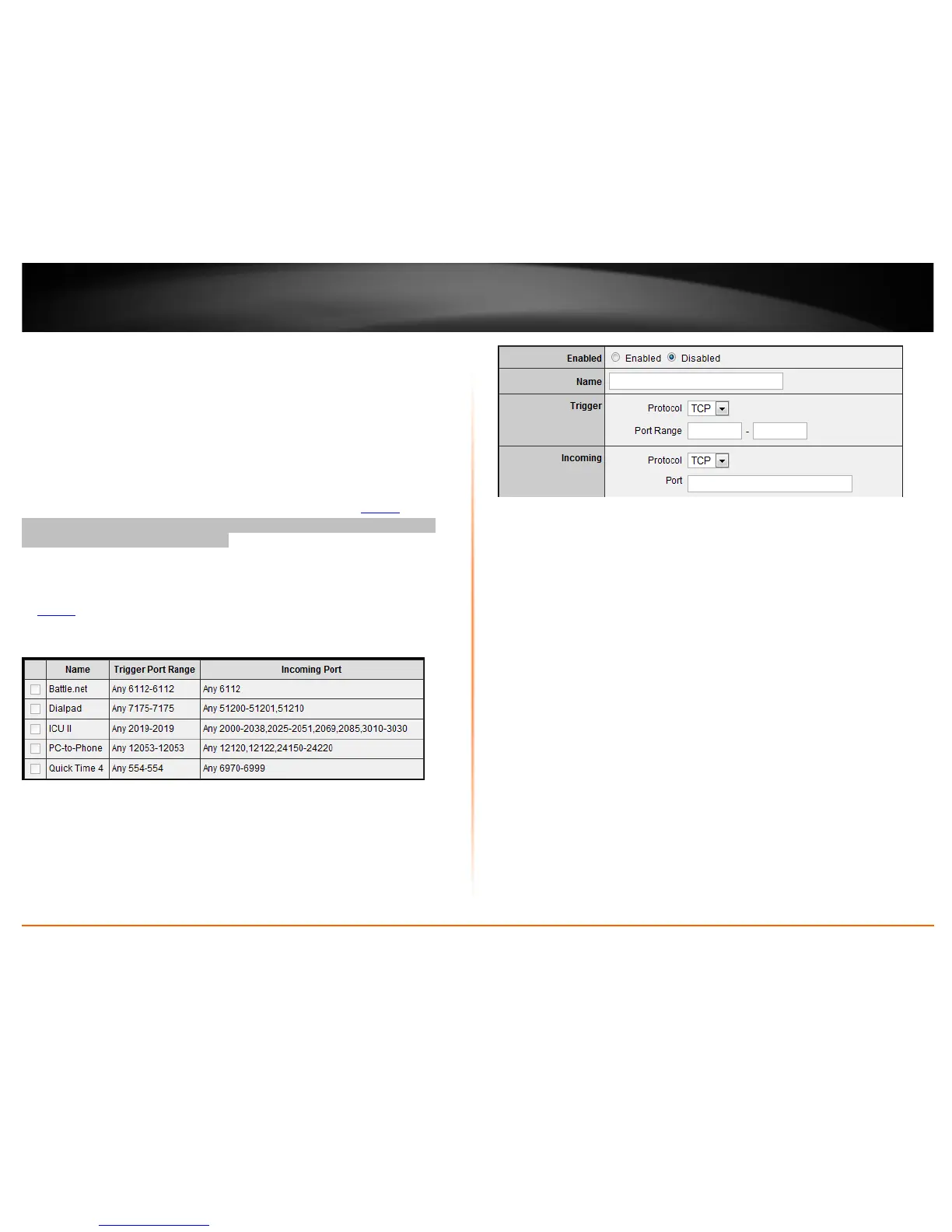
To simplify configuration, there is a list of commonly used pre-defined special
application entries to modify, otherwise, you can choose to manually add a new special
application.
3. Review the special application settings.
• Enabled – Selecting Enabled turns on the special application and selecting
Disabled turns it off.
• Name – Enter a name for the special application.
• Trigger – Port or port range requested by the device.
o Protocol – Select the protocol requested by the device. TCP, UDP, or you
can select Both to choose both TCP and UDP.
o Port Range – Enter the ports or port range requested by the device.
(e.g. 554-554 or 6112-6112).
Note: Please refer to the device documentation to determine which ports and protocols
are required.
• Incoming – Port(s) forwarded to the device.
o Protocol – Select the protocol to be forwarded to the device. TCP,
UDP, or you can select Both to choose both TCP and UDP.
o Port Range – Enter the ports or port range to be forwarded to the
device.
(e.g. 2000-2038,2069,2081,2200-2210).
Note: Please refer to the device documentation to determine which ports and protocols
are required.




 To Next Page