N300 / AC1200 PoE Wireless Access Point (TEW-755AP / TEW-821DAP)
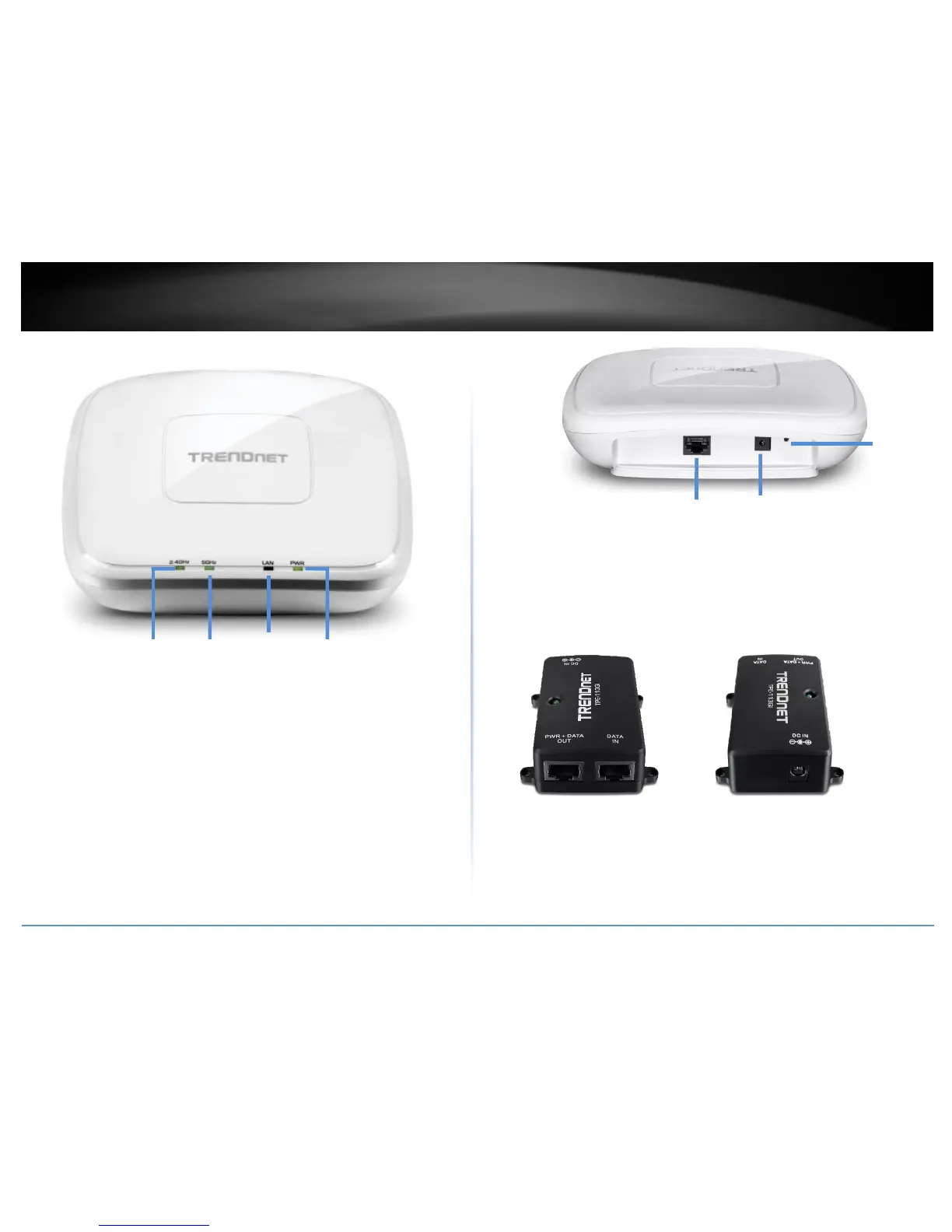
2.4GHz: This LED indicator turns green when the wireless is enabled. The LED
indicator blinks during data transmission
5GHz: This LED indicator turns green when the wireless is enabled. The LED
indicator blinks during data transmission (Note: Only available on TEW-821DAP dual
band access point)
LAN: This LED indicator turns green when the access point LAN port is connected.
The LED indicator blinks during data transmission
PWR: This indicator turns green when the device is powered.
Gigabit port: Plug an Ethernet cable (also called network cables) from
your access point to your router and wired network devices.
Power port: Connect the power adapter from your access point power port to
an available power outlet.
Reset button: Use a sharp tool to press and hold this button for 10 seconds to
reset the access point.
Gigabit 802.3af PoE Injector (TPE-113GI)
PWR+DATA OUT – Connects to your PoE access point supplying both power and
data 1000BASE-T via Ethernet cable, standard 802.3af PoE compliant.
DATA IN – Connects your PoE access point to your network (switch or router)
1000BASE-T via Ethernet cable.
DC IN – Connects the 48V DC, 0.5 power adapter to power on the PoE injector and
deliver power to the PoE access point.



 To Next Page
 Loading...










