EasyManua.ls Logo

TRENDnet TPE-TG82ES - User Manual

TRENDnet TPE-TG82ES
59 pages
Print Icon
To Next Page IconTo Next Page
Loading...

TRENDnetUser’sGuide
CoverPage

Table of Contents

Question and Answer IconNeed help?

Do you have a question about the TRENDnet TPE-TG82ES and is the answer not in the manual?

Summary

Product Overview

Switch Features

Details the capabilities and benefits of the 8-Port Gigabit EdgeSmart PoE+ Switch.

Package Contents

Lists all items included in the product package, such as the switch, installation guide, and power adapter.

Network Management Features

Highlights the web-based management interface and its features like traffic control, LACP, RSTP, VLAN, QoS, and monitoring.

Monitoring Capabilities

Covers support for SNMP, SNMP Trap, and Port Mirroring for network monitoring solutions.

Troubleshooting Features

Mentions traffic statistics and cable diagnostic tests for troubleshooting network issues.

Compact and Fanless Design

Describes the switch's compact metal housing suitable for wall mounts and its fanless design for quiet operation.

Product Hardware Features

Front Panel Overview

Identifies and describes components visible on the front panel, including ports and LEDs.

Rear Panel Overview

Identifies and describes components visible on the rear panel, such as the AC power port.

LED Indicators Explained

Explains the status conveyed by Power and PoE MAX LED indicators on the switch.

Reset Button Functionality

Details the function of the reset button for rebooting or resetting the switch to factory defaults.

Basic Installation and Port LEDs

Port LED Indicators (Link;Activity)

Explains the meaning of port LEDs indicating link status and activity at different speeds.

Port LED Indicators (PoE Status)

Explains the meaning of port LEDs indicating PoE power status and budget.

System Configuration

System Management Navigation

Navigation paths for accessing System Management, IPv4 Setup, and Administration sections within the switch interface.

Save System Settings

Procedure to save applied configuration changes to the switch's NV-RAM.

Connecting Devices to the Switch

Connect Network Devices

Guides on connecting computers and network devices to the switch's Gigabit Ethernet PoE+ ports.

Switch Management Interface

Access Management Page

Instructions for logging into the switch's web-based management interface using a browser.

View Switch Information

Provides system uptime, firmware version, boot loader, MAC address, IPv4 info, and administration details.

Switch Information Details

Administration Information

Explains system name, location, and contact settings for identifying the switch.

Automatic Network Features

Describes the status of the DHCP client mode for automatic IP address assignment.

IP Address Information

Details the switch's MAC address, current IP address, subnet mask, and default gateway.

System Settings Configuration

Set System Information Parameters

Configures system name, location, and contact information for switch identification.

Save System Configuration

Saves the configured system settings to the switch's NV-RAM.

Network IP Settings

Configure Switch IPv4 Settings

Sets the switch's IP address, subnet mask, default gateway, and IP mode (Static/DHCP).

Save IPv4 Configuration

Saves the configured IPv4 settings to the switch's NV-RAM.

Administration and Security

Change Administrator Password

Procedure to change the administrator password for secure access to the management page.

Add Administrator Accounts

Allows creation of additional administrative user accounts for switch management.

Save Administration Settings

Saves the changes made to administrator password and accounts to the switch's NV-RAM.

System Timeout and SNMP

Configure Web Idle Timeout

Configures the duration of inactivity before the switch logs out a user from the management page.

Configure SNMP Global Settings

Manages SNMP agent status, trap settings, and authentication traps for network monitoring.

Configure SNMP Trap Settings

Enables SNMP traps for port link status, authentication, cold/warm starts for network event notification.

SNMP Community Settings

Configure SNMP Community Table

Defines SNMP community names and access rights for managing the switch.

Save SNMP Community Settings

Saves the configured SNMP community settings to the switch's NV-RAM.

SNMP Trap Management

Configure SNMP Host Settings

Specifies management devices that will receive SNMP traps from the switch.

Create Trap Host Entry

Procedure to add trap host table entries, including IP address, version, and community string.

Save SNMP Trap Configuration

Saves the configured SNMP trap host settings to the switch's NV-RAM.

Traffic Statistics and Power Saving

View Traffic Information

Displays inbound/outbound packet and byte counts per port for traffic analysis.

Save Traffic Statistics

Saves the traffic statistics configuration, allowing for later review.

Enable 802.3 az Power Saving

Activates the IEEE 802.3az Energy Efficient Ethernet feature to reduce power consumption.

Save Power Saving Settings

Saves the configured 802.3az power saving settings to the switch's NV-RAM.

Network Configuration - Physical Interfaces

Configure Physical Port Parameters

Configures port speed, duplex mode, flow control, admin status, and link status.

Network Configuration - Spanning Tree

Configure Spanning Tree Protocol (STP)

Guides on enabling STP/RSTP, setting modes, traps, and topology changes for network loop prevention.

Spanning Tree Port Settings

Configure RSTP Port Settings

Configures per-port settings for Rapid Spanning Tree Protocol (RSTP), including Port Fast.

Save Spanning Tree Configuration

Saves the configured Spanning Tree Protocol settings to the switch's NV-RAM.

Trunk and Link Aggregation

Configure Port Trunk Settings

Enables port trunking (Link Aggregation) for increased bandwidth and redundancy.

Configure LACP Global Settings

Enables the Link Aggregation Control Protocol (LACP) for managing link aggregation.

Define Channel Groups

Allows selection of ports to be trunked together within specific Trunk IDs.

Save Trunk Configuration

Saves the configured trunk settings to the switch's NV-RAM.

Port Mirroring Configuration

Configure Port Mirror Settings

Monitors ingress/egress traffic by copying it to a specified port for analysis.

Save Port Mirror Configuration

Saves the configured port mirroring settings to the switch's NV-RAM.

Loopback Detection Configuration

Configure Loopback Detection

Enables detection and prevention of network loops by monitoring port activity.

Save Loopback Detection Settings

Saves the configured loopback detection parameters to the switch's NV-RAM.

Static Unicast Entries

Add Static Unicast Entries

Adds static unicast entries with VLAN ID, MAC address, and port membership.

Save Static Unicast Configuration

Saves the static unicast address entries to the switch's NV-RAM.

Static Multicast Entries

Add Static Multicast Entries

Adds static multicast entries with VLAN ID, MAC address, and group members.

Save Static Multicast Configuration

Saves the static multicast address entries to the switch's NV-RAM.

IGMP Snooping Configuration

Configure IGMP Snooping

Enables IGMP snooping and configures multicast group memberships for efficient multicast traffic delivery.

Save IGMP Snooping Settings

Saves the IGMP snooping configuration parameters to the switch's NV-RAM.

Bandwidth Control Features

Configure Storm Control

Sets thresholds to limit broadcast, multicast, and unknown unicast traffic to prevent network storms.

Configure Ingress Rate Limiting

Sets ingress rate limits per port to control incoming traffic bandwidth.

Save Bandwidth Configuration

Saves the configured storm control and rate limiting settings to the switch's NV-RAM.

Rate Limiting and VLAN Management

Configure Egress Rate Limiting

Sets egress rate limits per port to control outgoing traffic bandwidth.

Save Egress Rate Settings

Saves the configured egress rate limiting settings to the switch's NV-RAM.

Create and Manage VLANs

Organizes network ports into groups (VLANs) for simplified management and segmentation.

Configure Tagged VLAN Settings

Defines VLAN ID and Name for creating tagged VLANs, with default Management VLAN.

VLAN Port Configuration

Assign VLAN Port Membership

Assigns ports as tagged, untagged, or not member to specific VLANs for network segmentation.

Save VLAN Port Configuration

Saves the configured VLAN port assignments to the switch's NV-RAM.

VLAN Port and Forwarding Settings

Configure VLAN Port Settings

Modifies port VLAN ID (PVID), frame types, and ingress filtering for network traffic.

Save VLAN Port Configuration

Saves the configured VLAN port settings to the switch's NV-RAM.

Configure VLAN Forwarding Table Mode

Selects the forwarding table mode (IVL or SVL) for VLAN traffic handling.

Save Forwarding Table Settings

Saves the selected VLAN forwarding table mode to the switch's NV-RAM.

VLAN Forwarding Table and Private VLANs

View VLAN Dynamic Forwarding Table

Displays dynamically generated forwarding table entries for connected devices.

Save Forwarding Table Settings

Saves the VLAN forwarding table configurations to the switch's NV-RAM.

Create Private VLAN

Creates a secure VLAN that isolates members and prevents communication with other VLANs.

Save Private VLAN Settings

Saves the configured private VLAN settings to the switch's NV-RAM.

Voice VLAN Configuration

Configure Voice VLANs Overview

Details the Voice VLAN feature for maintaining high-quality voice traffic and outlines configuration procedures.

Voice VLAN Parameters Explained

Explains CoS priority, Organization Unique Identifiers (OUIs), and port settings for Voice VLANs.

Voice VLAN Settings Configuration

Create Voice VLAN

Configures voice VLAN status, VLAN ID, and CoS priority for voice traffic.

Save Voice VLAN Settings

Saves the configured voice VLAN settings to the switch's NV-RAM.

Configure Voice VLAN OUI Settings

Configures Organization Unique Identifier (OUI) settings to identify IP phone manufacturers for voice VLANs.

Voice VLAN OUI Configuration

Configure Voice VLAN OUIs

Defines OUIs for IP phone manufacturers, including user-defined OUIs and MAC addresses.

Save OUI Configuration

Saves the configured Voice VLAN OUI settings to the switch's NV-RAM.

Quality of Service (QoS) Configuration

Configure CoS Priority

Sets Class of Service (CoS) priority levels for voice traffic to ensure quality.

Save CoS Priority Settings

Saves the configured CoS priority settings to the switch's NV-RAM.

Configure Port Priority

Assigns user priority levels to ports, influencing internal processing of frames.

Save Port Priority Settings

Saves the configured port priority mappings to the switch's NV-RAM.

DSCP and Scheduling Settings

Configure DSCP Class Mapping

Maps DSCP values to specific egress queues (Low, Medium, High, Highest) for traffic prioritization.

Save DSCP Settings

Saves the configured DSCP class mapping settings to the switch's NV-RAM.

Configure Scheduling Algorithm

Selects the scheduling algorithm (Strict Priority or WRR) for port traffic management.

Scheduling Algorithm Settings

Configure Scheduling Algorithm

Sets the scheduling algorithm for managing packet transmission from queues.

Save Scheduling Algorithm Settings

Saves the selected scheduling algorithm to the switch's NV-RAM.

PoE Configuration Overview

Understanding PoE Configuration

Explains the benefits of PoE, defines Power Sourcing Equipment (PSE) and Powered Devices (PD).

PoE Power Budget and Prioritization

Details the PoE power budget and how port prioritization works when power requirements exceed availability.

PoE Settings Configuration

Configure PoE Power Settings

Configures the maximum PoE power threshold and the power shut-off sequence.

Save PoE Settings

Saves the configured PoE power settings to the switch's NV-RAM.

Configure Per-Port PoE Settings

Sets PoE status (enable/disable), classification, priority, and power limits for individual ports.

Save Per-Port PoE Settings

Saves the configured per-port PoE settings to the switch's NV-RAM.

PoE Port Settings Details

Configure User-Defined PoE Power

Sets user-defined maximum power consumption limits for individual switch ports.

Configure Legacy PoE Support

Enables legacy PoE support, sending passive PoE requirements to connected devices.

View PoE Port Status Indicators

Explains the meaning of Power (W), Voltage (V), and Current (mA) indicators on PoE ports.

Save PoE Port Settings

Saves the configured PoE port settings, including user-defined limits, to the switch's NV-RAM.

Switch Maintenance Procedures

Upgrade Switch Firmware

Provides instructions for downloading and installing firmware updates for the switch.

Firmware Upgrade Precautions

Lists essential precautions to prevent interruption or damage during firmware upgrades.

Configuration Management and Diagnostics

Backup and Restore Switch Configuration

Guides on backing up current settings to a file and restoring from a backup file.

Save;Restore Configuration via HTTP

Utilizes HTTP to save switch configurations to local storage or restore them.

Perform Cable Diagnostics Test

Tests cable pairs for integrity and estimates distance to identify faults.

Interpret Cable Test Results

Explains test result parameters like OK, Open, Short, Crosstalk, and Cable Fault Distance.

Cable Diagnostics Results and Rebooting

View Cable Diagnostic Table

Presents diagnostic results for each cable pair, including status and fault distance.

Understand Cable Test Results

Defines test result parameters such as OK, Open, Short, and Crosstalk for cable assessment.

Switch Reboot Procedures

Provides methods for rebooting the switch via hardware or software management interface.

Save Settings Before Reboot

Emphasizes saving current configuration to NV-RAM before rebooting to prevent data loss.

Factory Defaults and Management Utility

Reset Switch to Factory Defaults

Restores the switch to its original factory default settings, including IP address.

Factory Default Settings Overview

Lists the default administrator credentials, IP address, and subnet mask after a factory reset.

Utility Functions and Requirements

Details utility capabilities like discovery, setting modification, firmware upgrades, and lists system requirements.

Install Management Utility

Provides step-by-step instructions for downloading and installing the TRENDnet Management Utility.

Management Utility Installation Process

InstallShield Wizard Steps

Walks through the InstallShield Wizard, covering welcome, readiness, location, and completion stages.

Save Installation Settings

Allows review or change of installation settings before proceeding with the installation.

Using the Management Utility

Launch and Exit Utility

Instructions on launching the utility via desktop shortcut or Start Menu, and how to exit the application.

Network Device Discovery and Monitoring

Discover and Monitor Devices

Utilizes Discovery List and Monitor List features to find and observe network devices.

Discovery and Monitor List Definitions

Defines system words and parameters displayed in the Discovery and Monitor Lists for clarity.

Device Settings Management

Configure Device Settings

Modifies device IP address, subnet mask, gateway, group interval, system name, and IP mode.

Manage Device Access and Firmware

Covers firmware upgrades, web access, password changes, and DHCP refresh for device management.

Troubleshooting Common Issues

Resolve Access Issues

Provides steps to troubleshoot and resolve 'Page cannot be displayed' errors when accessing the switch.

Address IP Subnet Mismatch

Guides on configuring the switch IP to match the network subnet and saving the settings.

Reset Forgotten IP Address

Explains how to reset the switch to factory defaults if the IP address is forgotten.

Appendix - Network Configuration

Find Your IP Address

Provides methods for finding your IP address using command prompt or graphical interfaces on various OS.

Configure Static IP Address

Guides on setting a static IP address for network adapters on Windows and MAC OS.

Appendix - Network Details

Find IP Address on MAC OS

Details on finding IP addresses for Ethernet connections on MAC OS X and later versions.

Find Your MAC Address

Provides methods for locating your MAC address using command prompt or system preferences.

Regulatory and Safety Information

FCC Compliance and Interference

Details FCC compliance, interference statements, and measures to mitigate radio interference.

Safety Warnings and Compliance

Covers safety warnings, radiation exposure limits, RoHS compliance, EU declarations, and CE mark advisories.

Limited Warranty Information

TRENDnet Warranty Terms and Periods

Outlines TRENDnet's warranty policy, including non-transferability and specific component warranty periods.

Obtain RMA and Warranty Service

Details the process for obtaining a Return Material Authorization (RMA) and initiating warranty service.

Warranty Exclusions and Limitations

Warranty Exclusions and Void Conditions

Lists conditions that void the warranty, such as unauthorized modifications or misuse.

Limitation of Liability and Governing Law

Specifies liability limitations for damages and the governing law for the limited warranty.

Third-Party Software Licenses

Provides information on third-party software codes subject to GNU General Public License (GPL).

Product Specifications - Standards and Interface

Supported Standards and Compliance

Lists supported IEEE standards for networking protocols and features.

Device Interface and Data Rates

Details the device's physical interface, including ports, LEDs, reset button, and data transfer rates.

Performance Metrics

Specifies performance metrics such as switch fabric capacity, RAM buffer, MAC table size, and forwarding rate.

Management Features

Lists the supported management interfaces, including HTTP Web GUI.

Technical Specifications - Network Features

Spanning Tree and Link Aggregation

Details support for Spanning Tree Protocol (STP/RSTP) and Link Aggregation (LACP).

Quality of Service (QoS) Features

Outlines supported QoS features, including port-based QoS, CoS, and rate limiting.

VLAN and Multicast Features

Details support for various VLAN types (tagged, private, voice) and IGMP Snooping.

Port Mirroring Configurations

Specifies supported port mirroring modes, including one-to-one and many-to-one.

Technical Specifications - Advanced Features

Storm Control and Loopback Detection

Details support for Storm Control (broadcast, multicast) and Loopback Detection.

Special Features and Power Specifications

Highlights special features like PoE+, 802.3az power saving, and details power input/output specifications.

PoE Features and Environmental Specs

Covers PoE budget, per-port limits, fanless design, MTBF, operating temperature, and humidity.

Physical Dimensions, Weight, and Certifications

Provides physical dimensions, weight, and lists CE and FCC certifications.

Warranty Information

States the warranty type for the product.
Summary

Product Overview

Switch Features

Details the capabilities and benefits of the 8-Port Gigabit EdgeSmart PoE+ Switch.

Package Contents

Lists all items included in the product package, such as the switch, installation guide, and power adapter.

Network Management Features

Highlights the web-based management interface and its features like traffic control, LACP, RSTP, VLAN, QoS, and monitoring.

Monitoring Capabilities

Covers support for SNMP, SNMP Trap, and Port Mirroring for network monitoring solutions.

Troubleshooting Features

Mentions traffic statistics and cable diagnostic tests for troubleshooting network issues.

Compact and Fanless Design

Describes the switch's compact metal housing suitable for wall mounts and its fanless design for quiet operation.

Product Hardware Features

Front Panel Overview

Identifies and describes components visible on the front panel, including ports and LEDs.

Rear Panel Overview

Identifies and describes components visible on the rear panel, such as the AC power port.

LED Indicators Explained

Explains the status conveyed by Power and PoE MAX LED indicators on the switch.

Reset Button Functionality

Details the function of the reset button for rebooting or resetting the switch to factory defaults.

Basic Installation and Port LEDs

Port LED Indicators (Link;Activity)

Explains the meaning of port LEDs indicating link status and activity at different speeds.

Port LED Indicators (PoE Status)

Explains the meaning of port LEDs indicating PoE power status and budget.

System Configuration

System Management Navigation

Navigation paths for accessing System Management, IPv4 Setup, and Administration sections within the switch interface.

Save System Settings

Procedure to save applied configuration changes to the switch's NV-RAM.

Connecting Devices to the Switch

Connect Network Devices

Guides on connecting computers and network devices to the switch's Gigabit Ethernet PoE+ ports.

Switch Management Interface

Access Management Page

Instructions for logging into the switch's web-based management interface using a browser.

View Switch Information

Provides system uptime, firmware version, boot loader, MAC address, IPv4 info, and administration details.

Switch Information Details

Administration Information

Explains system name, location, and contact settings for identifying the switch.

Automatic Network Features

Describes the status of the DHCP client mode for automatic IP address assignment.

IP Address Information

Details the switch's MAC address, current IP address, subnet mask, and default gateway.

System Settings Configuration

Set System Information Parameters

Configures system name, location, and contact information for switch identification.

Save System Configuration

Saves the configured system settings to the switch's NV-RAM.

Network IP Settings

Configure Switch IPv4 Settings

Sets the switch's IP address, subnet mask, default gateway, and IP mode (Static/DHCP).

Save IPv4 Configuration

Saves the configured IPv4 settings to the switch's NV-RAM.

Administration and Security

Change Administrator Password

Procedure to change the administrator password for secure access to the management page.

Add Administrator Accounts

Allows creation of additional administrative user accounts for switch management.

Save Administration Settings

Saves the changes made to administrator password and accounts to the switch's NV-RAM.

System Timeout and SNMP

Configure Web Idle Timeout

Configures the duration of inactivity before the switch logs out a user from the management page.

Configure SNMP Global Settings

Manages SNMP agent status, trap settings, and authentication traps for network monitoring.

Configure SNMP Trap Settings

Enables SNMP traps for port link status, authentication, cold/warm starts for network event notification.

SNMP Community Settings

Configure SNMP Community Table

Defines SNMP community names and access rights for managing the switch.

Save SNMP Community Settings

Saves the configured SNMP community settings to the switch's NV-RAM.

SNMP Trap Management

Configure SNMP Host Settings

Specifies management devices that will receive SNMP traps from the switch.

Create Trap Host Entry

Procedure to add trap host table entries, including IP address, version, and community string.

Save SNMP Trap Configuration

Saves the configured SNMP trap host settings to the switch's NV-RAM.

Traffic Statistics and Power Saving

View Traffic Information

Displays inbound/outbound packet and byte counts per port for traffic analysis.

Save Traffic Statistics

Saves the traffic statistics configuration, allowing for later review.

Enable 802.3 az Power Saving

Activates the IEEE 802.3az Energy Efficient Ethernet feature to reduce power consumption.

Save Power Saving Settings

Saves the configured 802.3az power saving settings to the switch's NV-RAM.

Network Configuration - Physical Interfaces

Configure Physical Port Parameters

Configures port speed, duplex mode, flow control, admin status, and link status.

Network Configuration - Spanning Tree

Configure Spanning Tree Protocol (STP)

Guides on enabling STP/RSTP, setting modes, traps, and topology changes for network loop prevention.

Spanning Tree Port Settings

Configure RSTP Port Settings

Configures per-port settings for Rapid Spanning Tree Protocol (RSTP), including Port Fast.

Save Spanning Tree Configuration

Saves the configured Spanning Tree Protocol settings to the switch's NV-RAM.

Trunk and Link Aggregation

Configure Port Trunk Settings

Enables port trunking (Link Aggregation) for increased bandwidth and redundancy.

Configure LACP Global Settings

Enables the Link Aggregation Control Protocol (LACP) for managing link aggregation.

Define Channel Groups

Allows selection of ports to be trunked together within specific Trunk IDs.

Save Trunk Configuration

Saves the configured trunk settings to the switch's NV-RAM.

Port Mirroring Configuration

Configure Port Mirror Settings

Monitors ingress/egress traffic by copying it to a specified port for analysis.

Save Port Mirror Configuration

Saves the configured port mirroring settings to the switch's NV-RAM.

Loopback Detection Configuration

Configure Loopback Detection

Enables detection and prevention of network loops by monitoring port activity.

Save Loopback Detection Settings

Saves the configured loopback detection parameters to the switch's NV-RAM.

Static Unicast Entries

Add Static Unicast Entries

Adds static unicast entries with VLAN ID, MAC address, and port membership.

Save Static Unicast Configuration

Saves the static unicast address entries to the switch's NV-RAM.

Static Multicast Entries

Add Static Multicast Entries

Adds static multicast entries with VLAN ID, MAC address, and group members.

Save Static Multicast Configuration

Saves the static multicast address entries to the switch's NV-RAM.

IGMP Snooping Configuration

Configure IGMP Snooping

Enables IGMP snooping and configures multicast group memberships for efficient multicast traffic delivery.

Save IGMP Snooping Settings

Saves the IGMP snooping configuration parameters to the switch's NV-RAM.

Bandwidth Control Features

Configure Storm Control

Sets thresholds to limit broadcast, multicast, and unknown unicast traffic to prevent network storms.

Configure Ingress Rate Limiting

Sets ingress rate limits per port to control incoming traffic bandwidth.

Save Bandwidth Configuration

Saves the configured storm control and rate limiting settings to the switch's NV-RAM.

Rate Limiting and VLAN Management

Configure Egress Rate Limiting

Sets egress rate limits per port to control outgoing traffic bandwidth.

Save Egress Rate Settings

Saves the configured egress rate limiting settings to the switch's NV-RAM.

Create and Manage VLANs

Organizes network ports into groups (VLANs) for simplified management and segmentation.

Configure Tagged VLAN Settings

Defines VLAN ID and Name for creating tagged VLANs, with default Management VLAN.

VLAN Port Configuration

Assign VLAN Port Membership

Assigns ports as tagged, untagged, or not member to specific VLANs for network segmentation.

Save VLAN Port Configuration

Saves the configured VLAN port assignments to the switch's NV-RAM.

VLAN Port and Forwarding Settings

Configure VLAN Port Settings

Modifies port VLAN ID (PVID), frame types, and ingress filtering for network traffic.

Save VLAN Port Configuration

Saves the configured VLAN port settings to the switch's NV-RAM.

Configure VLAN Forwarding Table Mode

Selects the forwarding table mode (IVL or SVL) for VLAN traffic handling.

Save Forwarding Table Settings

Saves the selected VLAN forwarding table mode to the switch's NV-RAM.

VLAN Forwarding Table and Private VLANs

View VLAN Dynamic Forwarding Table

Displays dynamically generated forwarding table entries for connected devices.

Save Forwarding Table Settings

Saves the VLAN forwarding table configurations to the switch's NV-RAM.

Create Private VLAN

Creates a secure VLAN that isolates members and prevents communication with other VLANs.

Save Private VLAN Settings

Saves the configured private VLAN settings to the switch's NV-RAM.

Voice VLAN Configuration

Configure Voice VLANs Overview

Details the Voice VLAN feature for maintaining high-quality voice traffic and outlines configuration procedures.

Voice VLAN Parameters Explained

Explains CoS priority, Organization Unique Identifiers (OUIs), and port settings for Voice VLANs.

Voice VLAN Settings Configuration

Create Voice VLAN

Configures voice VLAN status, VLAN ID, and CoS priority for voice traffic.

Save Voice VLAN Settings

Saves the configured voice VLAN settings to the switch's NV-RAM.

Configure Voice VLAN OUI Settings

Configures Organization Unique Identifier (OUI) settings to identify IP phone manufacturers for voice VLANs.

Voice VLAN OUI Configuration

Configure Voice VLAN OUIs

Defines OUIs for IP phone manufacturers, including user-defined OUIs and MAC addresses.

Save OUI Configuration

Saves the configured Voice VLAN OUI settings to the switch's NV-RAM.

Quality of Service (QoS) Configuration

Configure CoS Priority

Sets Class of Service (CoS) priority levels for voice traffic to ensure quality.

Save CoS Priority Settings

Saves the configured CoS priority settings to the switch's NV-RAM.

Configure Port Priority

Assigns user priority levels to ports, influencing internal processing of frames.

Save Port Priority Settings

Saves the configured port priority mappings to the switch's NV-RAM.

DSCP and Scheduling Settings

Configure DSCP Class Mapping

Maps DSCP values to specific egress queues (Low, Medium, High, Highest) for traffic prioritization.

Save DSCP Settings

Saves the configured DSCP class mapping settings to the switch's NV-RAM.

Configure Scheduling Algorithm

Selects the scheduling algorithm (Strict Priority or WRR) for port traffic management.

Scheduling Algorithm Settings

Configure Scheduling Algorithm

Sets the scheduling algorithm for managing packet transmission from queues.

Save Scheduling Algorithm Settings

Saves the selected scheduling algorithm to the switch's NV-RAM.

PoE Configuration Overview

Understanding PoE Configuration

Explains the benefits of PoE, defines Power Sourcing Equipment (PSE) and Powered Devices (PD).

PoE Power Budget and Prioritization

Details the PoE power budget and how port prioritization works when power requirements exceed availability.

PoE Settings Configuration

Configure PoE Power Settings

Configures the maximum PoE power threshold and the power shut-off sequence.

Save PoE Settings

Saves the configured PoE power settings to the switch's NV-RAM.

Configure Per-Port PoE Settings

Sets PoE status (enable/disable), classification, priority, and power limits for individual ports.

Save Per-Port PoE Settings

Saves the configured per-port PoE settings to the switch's NV-RAM.

PoE Port Settings Details

Configure User-Defined PoE Power

Sets user-defined maximum power consumption limits for individual switch ports.

Configure Legacy PoE Support

Enables legacy PoE support, sending passive PoE requirements to connected devices.

View PoE Port Status Indicators

Explains the meaning of Power (W), Voltage (V), and Current (mA) indicators on PoE ports.

Save PoE Port Settings

Saves the configured PoE port settings, including user-defined limits, to the switch's NV-RAM.

Switch Maintenance Procedures

Upgrade Switch Firmware

Provides instructions for downloading and installing firmware updates for the switch.

Firmware Upgrade Precautions

Lists essential precautions to prevent interruption or damage during firmware upgrades.

Configuration Management and Diagnostics

Backup and Restore Switch Configuration

Guides on backing up current settings to a file and restoring from a backup file.

Save;Restore Configuration via HTTP

Utilizes HTTP to save switch configurations to local storage or restore them.

Perform Cable Diagnostics Test

Tests cable pairs for integrity and estimates distance to identify faults.

Interpret Cable Test Results

Explains test result parameters like OK, Open, Short, Crosstalk, and Cable Fault Distance.

Cable Diagnostics Results and Rebooting

View Cable Diagnostic Table

Presents diagnostic results for each cable pair, including status and fault distance.

Understand Cable Test Results

Defines test result parameters such as OK, Open, Short, and Crosstalk for cable assessment.

Switch Reboot Procedures

Provides methods for rebooting the switch via hardware or software management interface.

Save Settings Before Reboot

Emphasizes saving current configuration to NV-RAM before rebooting to prevent data loss.

Factory Defaults and Management Utility

Reset Switch to Factory Defaults

Restores the switch to its original factory default settings, including IP address.

Factory Default Settings Overview

Lists the default administrator credentials, IP address, and subnet mask after a factory reset.

Utility Functions and Requirements

Details utility capabilities like discovery, setting modification, firmware upgrades, and lists system requirements.

Install Management Utility

Provides step-by-step instructions for downloading and installing the TRENDnet Management Utility.

Management Utility Installation Process

InstallShield Wizard Steps

Walks through the InstallShield Wizard, covering welcome, readiness, location, and completion stages.

Save Installation Settings

Allows review or change of installation settings before proceeding with the installation.

Using the Management Utility

Launch and Exit Utility

Instructions on launching the utility via desktop shortcut or Start Menu, and how to exit the application.

Network Device Discovery and Monitoring

Discover and Monitor Devices

Utilizes Discovery List and Monitor List features to find and observe network devices.

Discovery and Monitor List Definitions

Defines system words and parameters displayed in the Discovery and Monitor Lists for clarity.

Device Settings Management

Configure Device Settings

Modifies device IP address, subnet mask, gateway, group interval, system name, and IP mode.

Manage Device Access and Firmware

Covers firmware upgrades, web access, password changes, and DHCP refresh for device management.

Troubleshooting Common Issues

Resolve Access Issues

Provides steps to troubleshoot and resolve 'Page cannot be displayed' errors when accessing the switch.

Address IP Subnet Mismatch

Guides on configuring the switch IP to match the network subnet and saving the settings.

Reset Forgotten IP Address

Explains how to reset the switch to factory defaults if the IP address is forgotten.

Appendix - Network Configuration

Find Your IP Address

Provides methods for finding your IP address using command prompt or graphical interfaces on various OS.

Configure Static IP Address

Guides on setting a static IP address for network adapters on Windows and MAC OS.

Appendix - Network Details

Find IP Address on MAC OS

Details on finding IP addresses for Ethernet connections on MAC OS X and later versions.

Find Your MAC Address

Provides methods for locating your MAC address using command prompt or system preferences.

Regulatory and Safety Information

FCC Compliance and Interference

Details FCC compliance, interference statements, and measures to mitigate radio interference.

Safety Warnings and Compliance

Covers safety warnings, radiation exposure limits, RoHS compliance, EU declarations, and CE mark advisories.

Limited Warranty Information

TRENDnet Warranty Terms and Periods

Outlines TRENDnet's warranty policy, including non-transferability and specific component warranty periods.

Obtain RMA and Warranty Service

Details the process for obtaining a Return Material Authorization (RMA) and initiating warranty service.

Warranty Exclusions and Limitations

Warranty Exclusions and Void Conditions

Lists conditions that void the warranty, such as unauthorized modifications or misuse.

Limitation of Liability and Governing Law

Specifies liability limitations for damages and the governing law for the limited warranty.

Third-Party Software Licenses

Provides information on third-party software codes subject to GNU General Public License (GPL).

Product Specifications - Standards and Interface

Supported Standards and Compliance

Lists supported IEEE standards for networking protocols and features.

Device Interface and Data Rates

Details the device's physical interface, including ports, LEDs, reset button, and data transfer rates.

Performance Metrics

Specifies performance metrics such as switch fabric capacity, RAM buffer, MAC table size, and forwarding rate.

Management Features

Lists the supported management interfaces, including HTTP Web GUI.

Technical Specifications - Network Features

Spanning Tree and Link Aggregation

Details support for Spanning Tree Protocol (STP/RSTP) and Link Aggregation (LACP).

Quality of Service (QoS) Features

Outlines supported QoS features, including port-based QoS, CoS, and rate limiting.

VLAN and Multicast Features

Details support for various VLAN types (tagged, private, voice) and IGMP Snooping.

Port Mirroring Configurations

Specifies supported port mirroring modes, including one-to-one and many-to-one.

Technical Specifications - Advanced Features

Storm Control and Loopback Detection

Details support for Storm Control (broadcast, multicast) and Loopback Detection.

Special Features and Power Specifications

Highlights special features like PoE+, 802.3az power saving, and details power input/output specifications.

PoE Features and Environmental Specs

Covers PoE budget, per-port limits, fanless design, MTBF, operating temperature, and humidity.

Physical Dimensions, Weight, and Certifications

Provides physical dimensions, weight, and lists CE and FCC certifications.

Warranty Information

States the warranty type for the product.
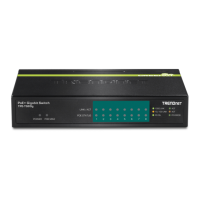
TRENDnet TPE-TG82ES Specifications

General IconGeneral
BrandTRENDnet
ModelTPE-TG82ES
CategorySwitch
LanguageEnglish

Related product manuals