Need help?
Do you have a question about the TRENDnet TV-VS1P and is the answer not in the manual?
Lists items included in the product package.
Outlines necessary hardware and software for installation and operation.
Specifies operating systems, CPU, and memory for the software utility.
Connect the provided network cable from the router to the Ethernet port.
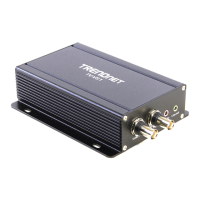
Connect BNC cables to the Video IN and Video OUT connectors.
Connect the power adapter to the device and a power outlet.
Insert CD-ROM, run autorun.exe, and follow the Installation Wizard.
Launch the IPSetup application from the Start menu after installation.
Access configuration via browser, verify MAC address, and log in.
Install necessary ActiveX or Java plugins for live video viewing.
Connect TV-VS1P to a PoE switch using a network cable.
Connect TV-VS1P to a PoE injector via network cables and power cord.
Resolve CD-ROM menu issues and IP Setup detection problems.
Address DHCP availability and live view loading errors.
Procedures for forgotten passwords and understanding LEDs/buttons.
 General
| Model | TV-VS1P |
|---|---|
| Category | Media Converter |
| Fiber Distance | Up to 20km |
| Fiber Type | Single-Mode |
| Transmission Distance | Up to 20km |
| Humidity | 10% to 90% non-condensing |
| Media Type | Fiber |
| Transmission Type | Video |
| Power Consumption | 2.5W |
| Power Supply | 5V DC |
| Weight | 0.1 kg |
| Operating Temperature | 0°C to 50°C |
| Ports | 1 x BNC |
| Connector Type | BNC |


 To Next Page