Need help?
Do you have a question about the TRENDnet TU-S9 and is the answer not in the manual?
Lists all items included in the product packaging.
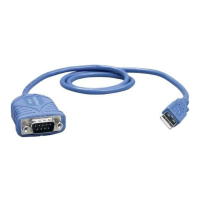
Highlights the key functionalities and benefits of the USB to Serial Converter.
Details the physical components and connections of the USB to Serial Converter.
Illustrates how the USB to Serial Converter connects various devices to a PC.
Step-by-step guide for installing the driver on Windows 7 and Vista operating systems.
Instructions for installing the driver on older Windows versions like XP, 2000, ME, and 98SE.
Confirms successful driver installation by checking Device Manager for proper recognition of the USB to Serial Converter.
Instructions for installing the driver on Mac OS X version 10.7.
Steps to install the driver on Mac OS X versions 10.1 through 10.6.
Details the hardware and performance characteristics of the USB to Serial Converter.
Outlines the terms, conditions, and duration of the product's warranty coverage.
Specifies the legal jurisdiction that governs the limited warranty terms.
 General
| Data Transfer Rate | Up to 230 Kbps |
|---|---|
| Serial Interface | RS-232 |
| Connector | DB9 Male |
| Power Mode | Bus-powered |
| Type | Converter |
| Interface | USB |
| Compatibility | Windows, Mac |

 To Next Page