Security Configuration
Security Options
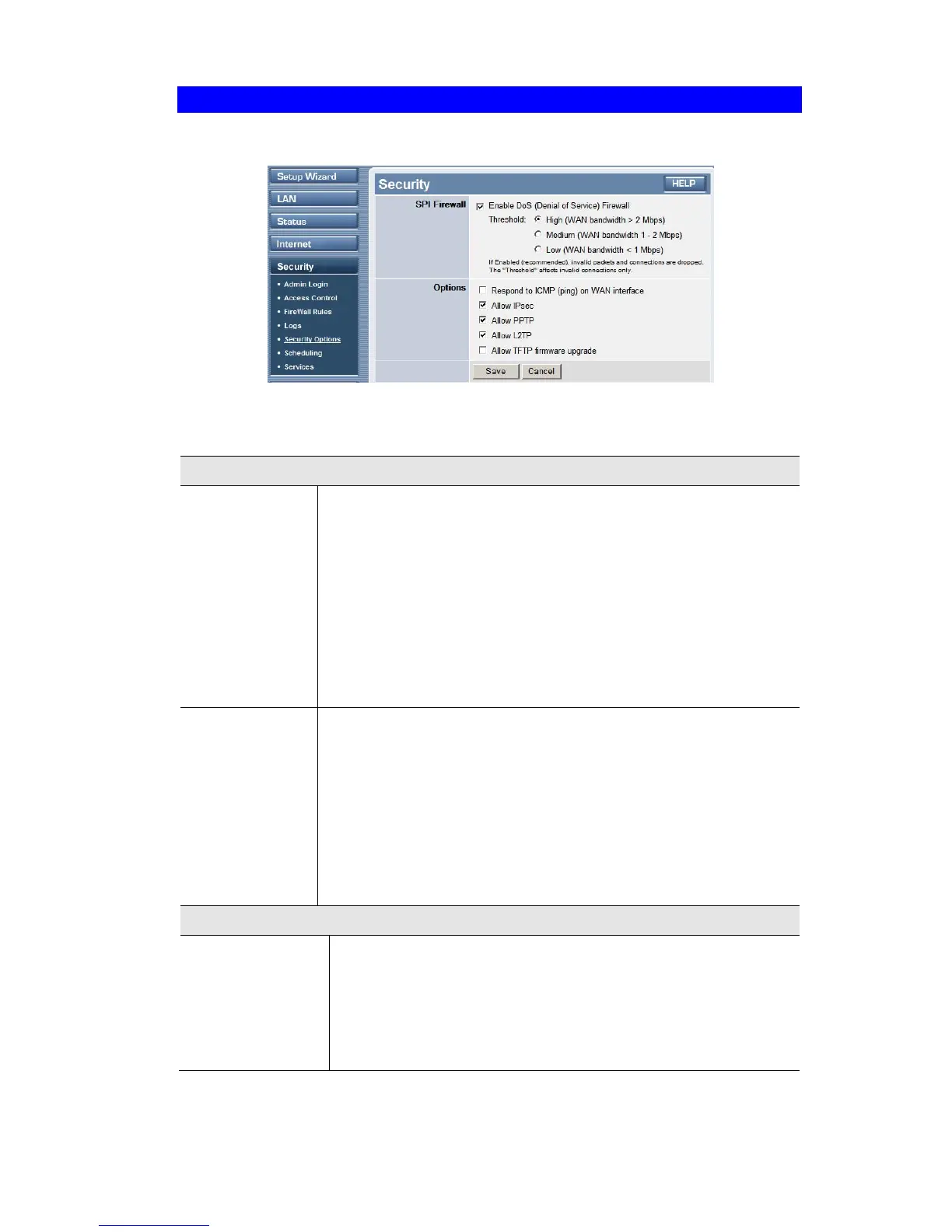
This screen allows you to set Firewall and other security-related options.
Figure 42: Security Options Screen
Data - Security Options Screen
Firewall
Enable DoS
Firewall
If enabled, DoS (Denial of Service) attacks will be detected and
blocked. The default is enabled. It is strongly recommended that this
setting be left enabled.
Note:
• A DoS attack does not attempt to steal data or damage your PCs,
but overloads your Internet connection so you can not use it - the
service is unavailable.
• This device uses "Stateful Inspection" technology. This system can
detect situations where individual TCP/IP packets are valid, but
collectively they become a DoS attack.
Threshold
This setting affects the number of "half-open" connections allowed.
• A "half-open" connection arises when a remote client contacts the
Server with a connection request, but then does not reply to the
Server's response.
• While the optimum number of "half-open" connections allowed
(the "Threshold") depends on many factors, the most important
factor is the available bandwidth of your Internet connection.
• Select the setting to match the bandwidth of your Internet connec-
tion.
Options
Respond to ICMP
(ping)
The ICMP protocol is used by the "ping" and "trace route" programs,
and by network monitoring and diagnostic programs.
• If checked, the TW100-BRV304 will respond to ICMP packets
received from the Internet.
• If not checked, ICMP packets from the Internet will be ignored.
Disabling this option provides a slight increase in security.
69














 To Next Page