Microsoft VPN
VPN Examples
This section describes some examples of using the TW100-BRV304 in common VPN situa-
tions.
Example 1: Connecting 2 TW100-BRV304s
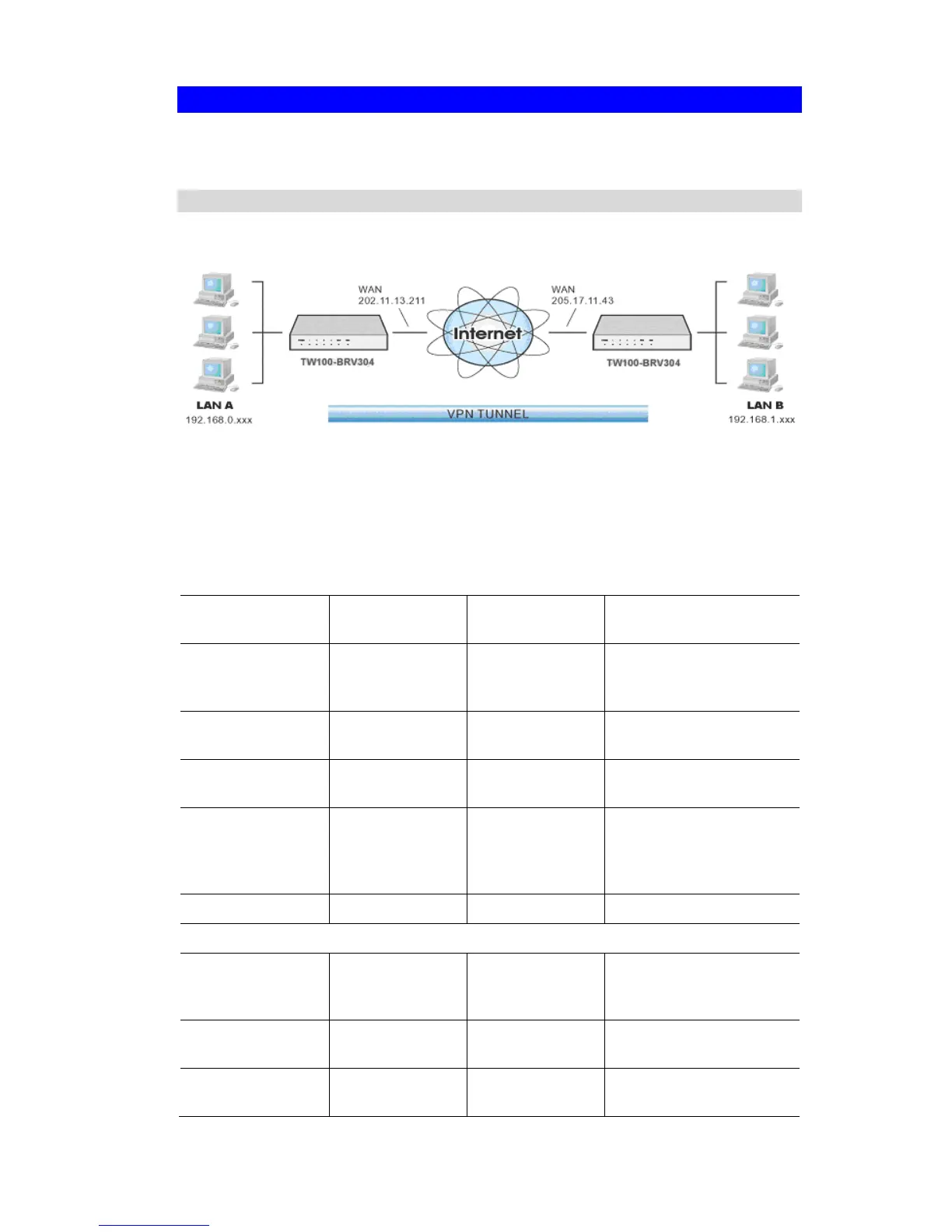
In this example, 2 LANs are connected via VPN.
Figure 56: Connecting 2 TW100-BRV304s
Note
• The LANs MUST use different IP address ranges.
• Both endpoints have fixed WAN (Internet) IP addresses.
Configuration Settings
Setting LAN A Gate-
way
LAN B Gate-
way
Notes
Name Policy 1 Policy 1 Name does not affect
operation. Select a mea-
ningful name.
Remote Endpoint 205.17.11.43 202.11.13.211 Other endpoint's WAN
(Internet) IP address.
Local
IP addresses
Any Any Use a more restrictive
definition if possible.
Remote
IP addresses
192.168.1.1 to
192.168.1.254
192.168.0.1 to
192.168.0.254
Address range on other
endpoint.
Use a more restrictive
definition if possible.
Key Exchange IKE IKE Must match
IKE SA Parameters
IKE Direction Both ways Both ways Does not have to match.
Either endpoint can block
1 direction.
Local Identity IP address IP address IP address is the most
common ID method
Remote Identity IP address IP address IP address is the most
common ID method
87














 To Next Page