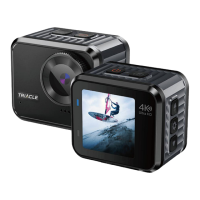
3. System Setting
If need to set the Video/Mode system setting, verify it is in Video/Photo interface
correspondingly, long press OK button to enter setting interface. When the Setting
interface appears, press the OK button to enter the“Settings menu”. Repeatedly
press the Up/Down button to cycle through main options press the OK button to select
your preferred option.
Video Settings
4K60FPS,4K30FPS,2.7K30FPS,
1080P120/60/30FPS, 720P240/120/60/30FPS
1080P4X, 1080P 2X, 720P 8X,720P 4X,
0.5s/1s/2s/5s/10s/30s/60s
On/Off(4K30FPS,2.7K30FPS,108060PFPS,
1080P30FPS support )
On/Off(4K30FPS,2.7K30FPS,108060PFPS,
1080P30FPS,720P60FPS,720P30FPS support )
Auto/Sunny/Cloudy/Incandescent/Fluorescence
Average Metering / Center Metering / Spot
Metering / Matrix Metering
Auto/100/200/400/800/1600/3200/6400



 To Next Page