EasyManua.ls Logo

TriBrer EPN90 - Threshold Settings - Interface; Interface Navigation

TriBrer EPN90
24 pages
Print Icon
To Next Page IconTo Next Page
To Previous Page IconTo Previous Page
Loading...
10
PON- Threshold set
Threshold
Unit : dBm
OLT:1490nm
ONT:1310nm
VDO:1550nm
OVER FALT : OVER FALT :
OVER FALT :
03.0
LOW WRNG: LOW WRNG:
LOW WRNG:
-20.0
LOW FALT : LOW FALT :
LOW FALT :
-30.0
03.0
-20.0
-30.0
03.0
-20.0
-30.0
NUM: 5
Threshold
REF/
dBm/dB
F/P
mode
ReCall
Save
Enter
>2S PERM
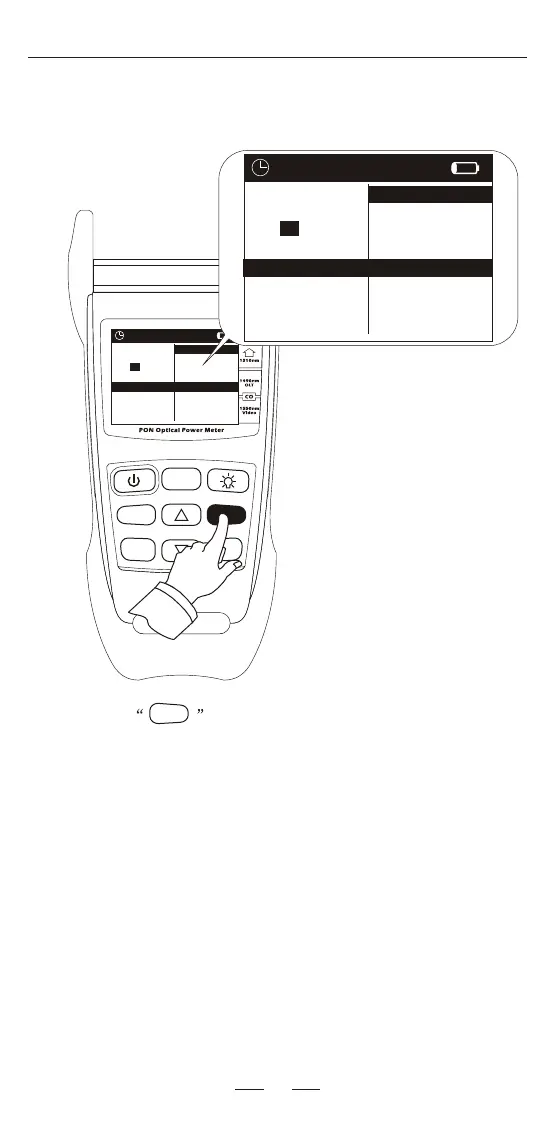
Press the key, user can shift the interface. The upper
right picture shows the threshold set interface.
User can set these 10 thresholds. Please see page 11 for details.
Threshold
Threshold
Unit : dBm
OLT:1490nm
ONT:1310nm
VDO:1550nm
OVER FALT : OVER FALT :
OVER FALT :
03.0
LOW WRNG: LOW WRNG:
LOW WRNG:
-20.0
LOW FALT : LOW FALT :
LOW FALT :
-30.0
03.0
-20.0
-30.0
03.0
-20.0
-30.0
NUM: 5

Related product manuals