EasyManua.ls Logo

TriBrer EPN90 - PON Data Storage; Accessing History; Saving and Navigating Data

TriBrer EPN90
24 pages
Print Icon
To Next Page IconTo Next Page
To Previous Page IconTo Previous Page
Loading...
PON- Data Storage
Threshold
REF/
dBm/dB
F/P
mode
ReCall
Save
Enter
>2S PERM
12
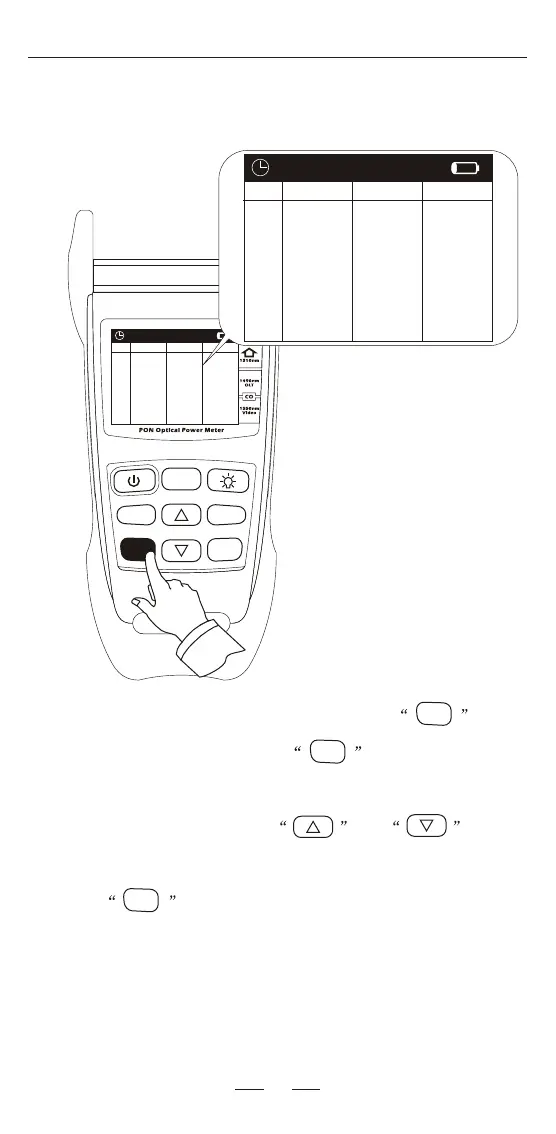
When in PON testing interface, user can press key to
the History interface. And press the key for 2 seconds to
save the current value.
In the History interface, press and key to
change the history page.
Press key again back to the testing interface.
ReCall
Save
ReCall
Save
ReCall
Save
0001
0002
0003
0004
0005
0006
0007
0008
0009
0010
1310nm
0.00
0.00
0.00
0.00
0.00
0.00
0.00
0.00
0.00
0.00
1490nm
0.00
0.00
0.00
0.00
0.00
0.00
0.00
0.00
0.00
0.00
1550nm
0.00
0.00
0.00
0.00
0.00
0.00
0.00
0.00
0.00
0.00
History
0001
0002
0003
0004
0005
0006
0007
0008
0009
0010
1310nm
0.00
0.00
0.00
0.00
0.00
0.00
0.00
0.00
0.00
0.00
1490nm
0.00
0.00
0.00
0.00
0.00
0.00
0.00
0.00
0.00
0.00
1550nm
0.00
0.00
0.00
0.00
0.00
0.00
0.00
0.00
0.00
0.00
History

Related product manuals