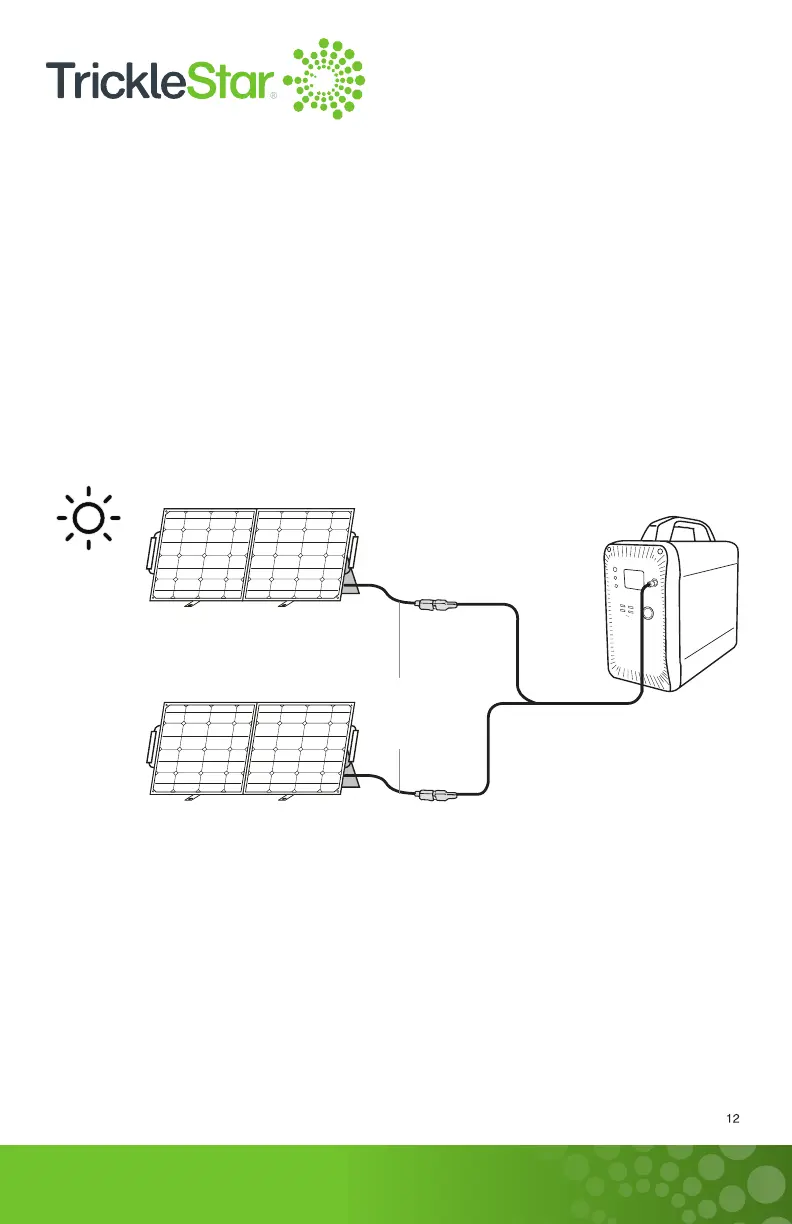
Two units 100 W Solar Panels
with Anderson connector
(Only available with TS6015SC)
0.31 in. (8 mm)
charging input port
Solar panel
charging
cable
To charge your PowerStation1500 with two units of Solar Panels, place your Solar
Panels where it can get as much sunlight as possible. You may use the supplied nails
to secure your Solar Panels in case the weather condition is too windy. Plug in the
supplied Y Anderson to DC 7909 Adapter cable to the connecting cables from each
of the Solar Panels. Then, insert the DC 7909 connector from the other end of the
adapter cable into the 0.31 in. (8 mm) charging input port at the PowerStation1500.
The display screen would light up and the charging power would be displayed. The
PowerStation1500 is fully charged when all the battery segments stopped flashing and
remained solid.
3. Charging from two units of 100 W Portable Solar Panels
TakeNote:
1. Please fully charge the PowerStation1500 before storage and charge it at least
once every three to six months to maintain optimum performance.
2. Keep the PowerStation1500 away from moisture, as well as corrosive and
combustible materials.



 To Next Page