TRIDENT AIR MINI-2
www.tridentair.sg pg. 6
INSTRUCTIONS FOR USE
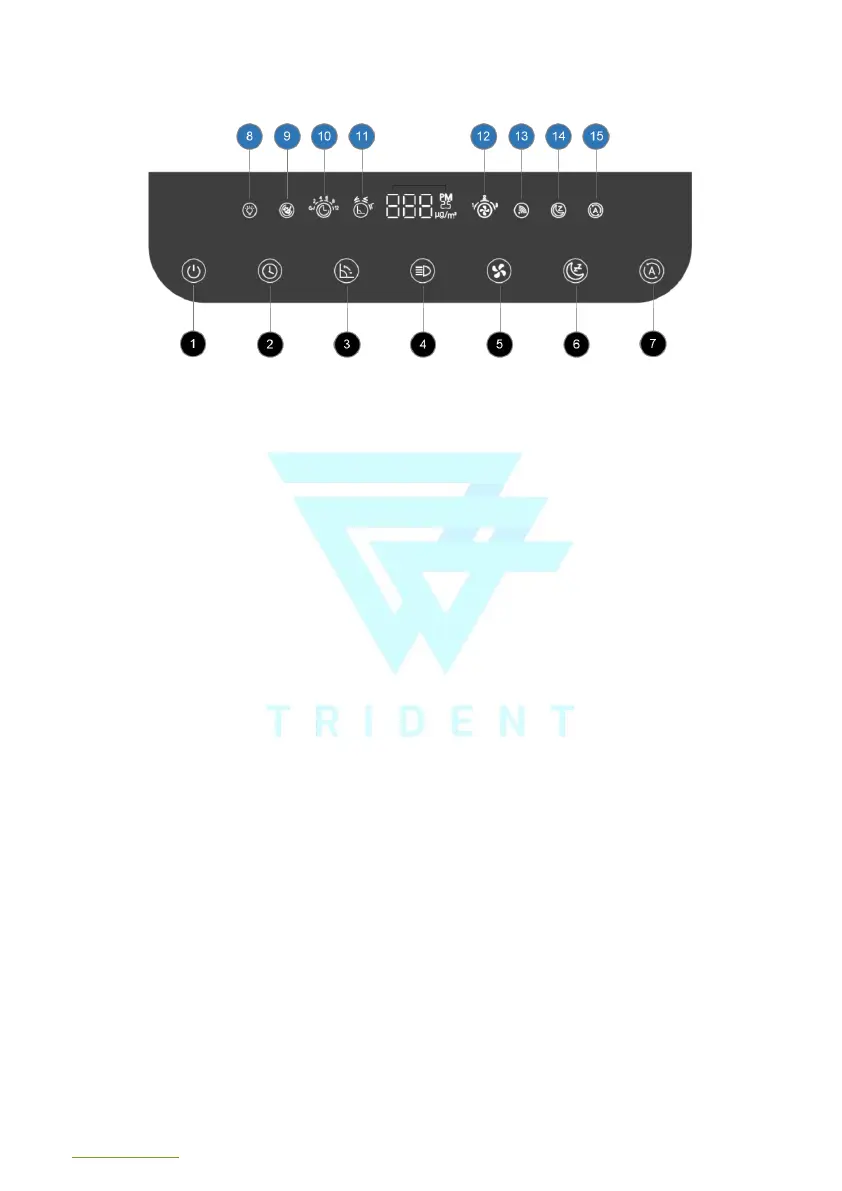
1. ON/OFF: The power button icon turns red whenever the wall socket connected to Trident is turned on.
Pressing the power button will turn the power on or off accordingly. All keys will illuminate in white when
the machine is turned on.
2. TIMER / FILTER RESET: Quickly pressing the timing icon, shifts the timer from 2, 4, 6, 8, 12 Hours.
Display icon 10 will appear as appropriate. Long press this button for 3 secs to reset the “wash filter”
reminder.
3. FAN LOUVER ANGLE / WIFI: Shifts angle of louvers at 30, 60, and 90 degrees, as shown on the display
icon 11. Long press button to enter WIFI-enabled configuration mode, and phone app will be able to
search for device to add.
4. LIGHTS ON/OFF: Press the button to turn on and off the sensor lights and control panel lights.
5. FAN SPEED: Press the button quickly to switch to speeds 1–2–3 and simultaneously display icon 12.
6. SLEEP: Press this button to enter sleep mode, where the lights are turned off and fan is reduced to low
speed.
7. AUTO: Press this button to enter into AI-mode where fan speed increases according to the air quality
detected by both built-in PM2.5 and TVOC sensors.
8. LIGHTS ON/OFF DISPLAY
9. FILTER WASH REMINDER DISPLAY
10. TIMER DISPLAY
11. FAN LOUVER ANGLE DISPLAY
12. FAN SPEED DISPLAY
13. WIFI DISPLAY
14. SLEEP MODE DISPLAY
15. AUTO MODE DISPLAY



 To Next Page