8 Applications
106 Trimble M3 Total Station User Guide
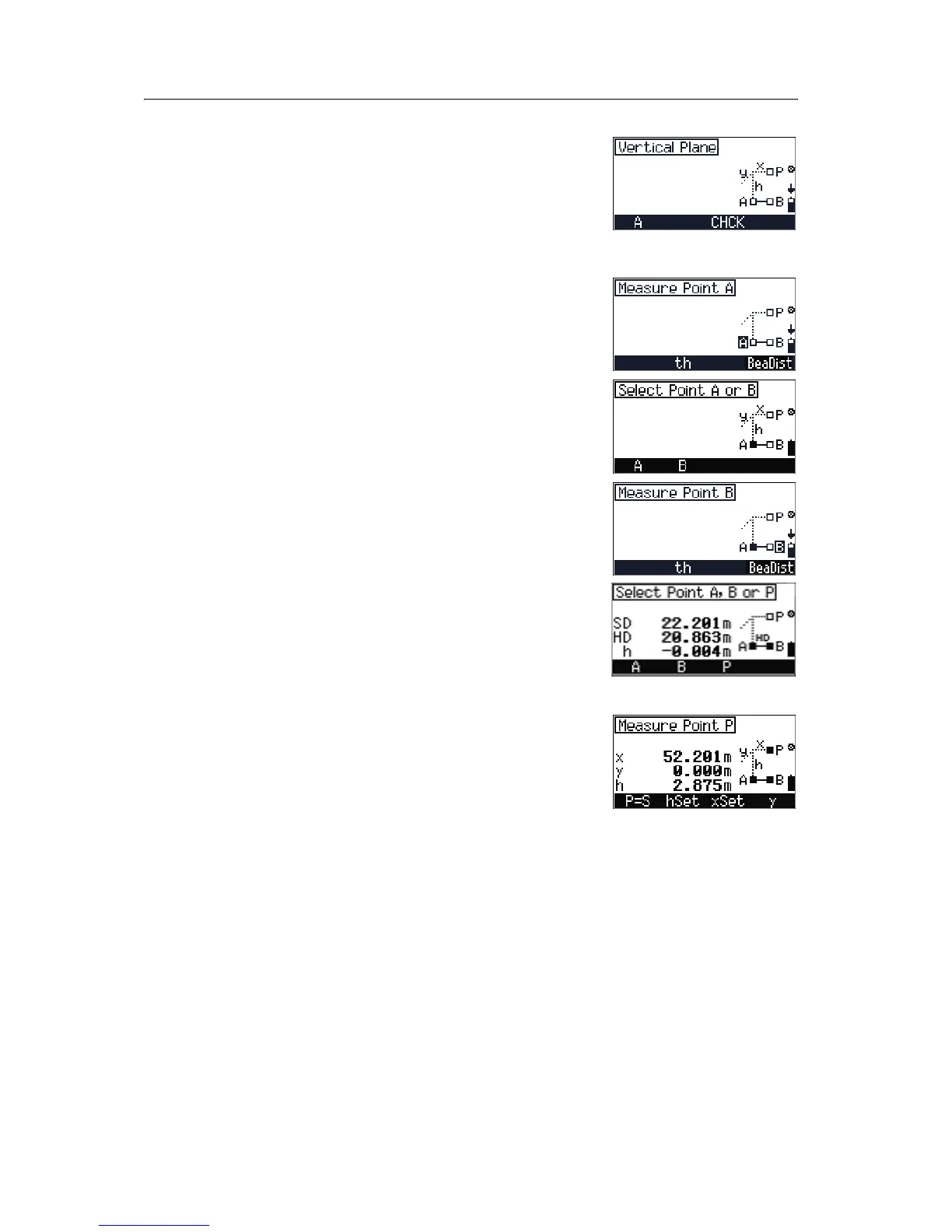
The Vertical Plane screen appears. Do one of the
following:
• To adjust C&I, press [F3] CHCK. See Checking and
adjusting the compensator (C) and index (I),
page 119.
• To take a measurement to point A, press [F1] A.
In the
Measure Point A screen, do one of the
following:
• To change target height, press [F2] th.
• To measure point A, press [MEAS/ENT].
The
Select Point A or B screen appears. Do one
of the following:
• To remeasure point A, press [F1] A.
• To measure point B, press [F2] B.
In the
Measure Point B screen, do one of the
following:
• To change target height, press [F2] th.
• To measure point B, press [MEAS/ENT].
The
Select Point A, B, or P screen appears.
Do one of the following:
• To remeasure point A, press [F1] A.
• To remeasure point B, press [F2] B.
• To measure point P, press [F3] P.
In the
Measure Point P screen, do one of the
following:
• To define the point P as the Station point, press
[F1] P=S.
• To input the offset h, press [F2] hSet.
• To input the offset x, press [F3] xSet.
• To input the offset y, press [F4] y.



 To Next Page