8
ST2 PRO
IN
OUT
GPIO 1-8ANA. INPUTS
DIG. INPUTS
ANA. OUTPUTSDIG. OUTPUTS
WORD
CLOCK
21
2
1
1 2
3
3
4
4
1
ON
OFF
L AUX INPUT R INPUT OUTPUT DC IN TB REMOTE SLATE CUE AMP OUT REMOTE
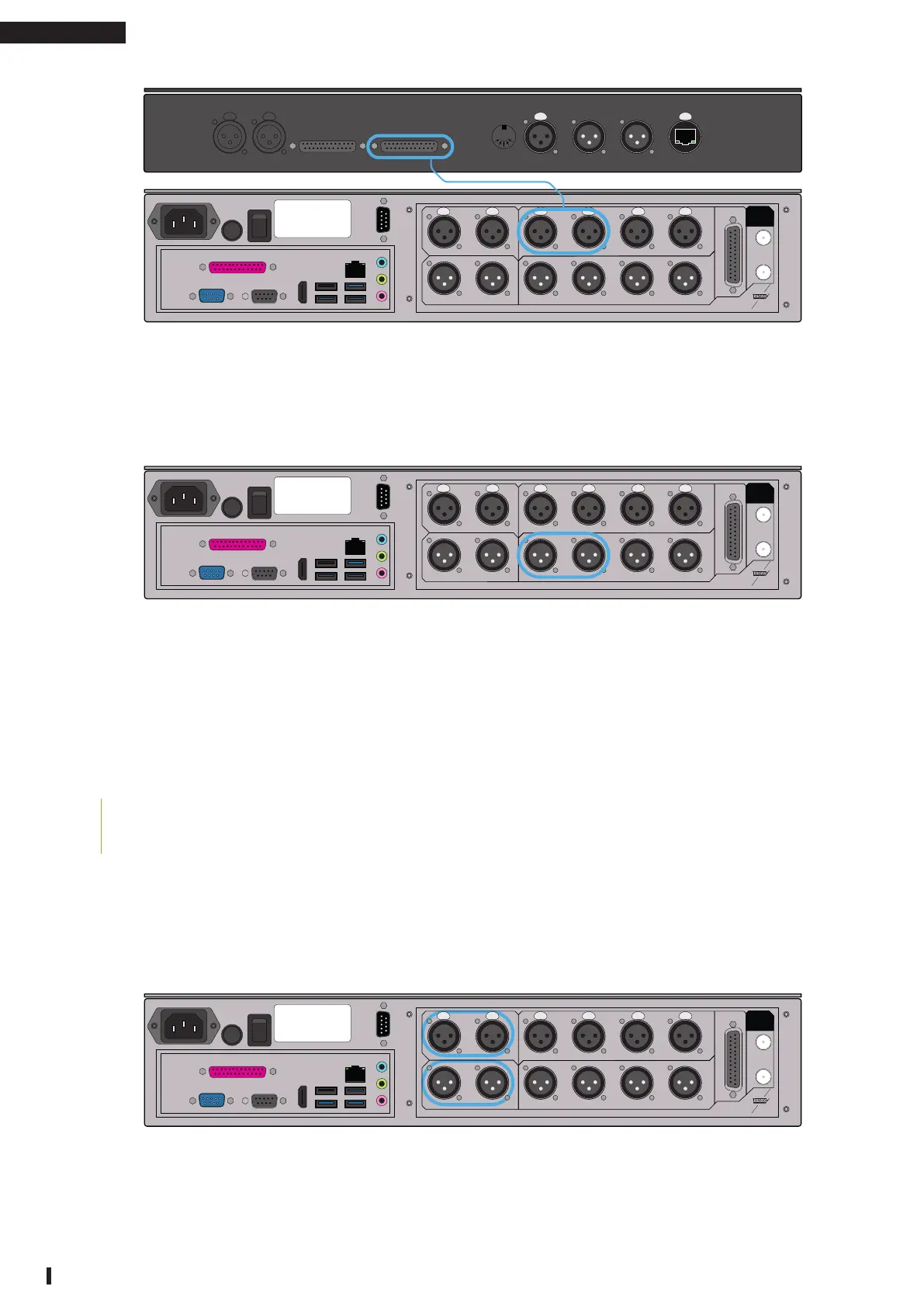
Figure 1: Using a monitor controller
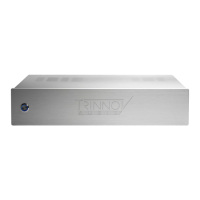
Then, make sure to plug the speakers to the ST2 Pro. Take the two cables that feed your main
Left and Right speakers and plug them into the analog outputs 1 and 2 to the ST2 Pro.
IN
OUT
GPIO 1-8ANA. INPUTS
DIG. INPUTS
ANA. OUTPUTSDIG. OUTPUTS
WORD
CLOCK
21
2
1
1 2
3
3
4
4
1
ON
OFF
L AUX INPUT R INPUT OUTPUT DC IN TB REMOTE SLATE CUE AMP OUT REMOTE
Figure 2: Plugging the speakers to the ST2 Pro
This wiring will work with any other monitoring controller (Avocet, SPL, …) and even controller
outputs from a console (SSL, Neve, …).
1.2 | YOU ARE USING SOURCES WITH DIGITAL OUTPUTS
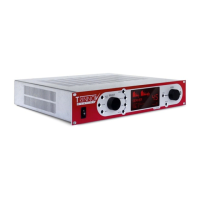
If in the digital domain (meaning you have your own set of digital audio
converters or use loudspeakers with digital inputs):
Insert the ST2 Pro as an AES insert or directly output to your speakers through AES if they
have a digital input. If so, ensure that the system clock and synchronization parameters are
correctly set (see user manual for more information).
IN
OUT
GPIO 1-8ANA. INPUTS
DIG. INPUTS
ANA. OUTPUTSDIG. OUTPUTS
WORD
CLOCK
21
2
1
1 2
3
3
4
4
1
ON
OFF
L AUX INPUT R INPUT OUTPUT DC IN TB REMOTE SLATE CUE AMP OUT REMOTE
Figure 3: Using digital io



 To Next Page