4
Vacuum T Integratedube Amplifier
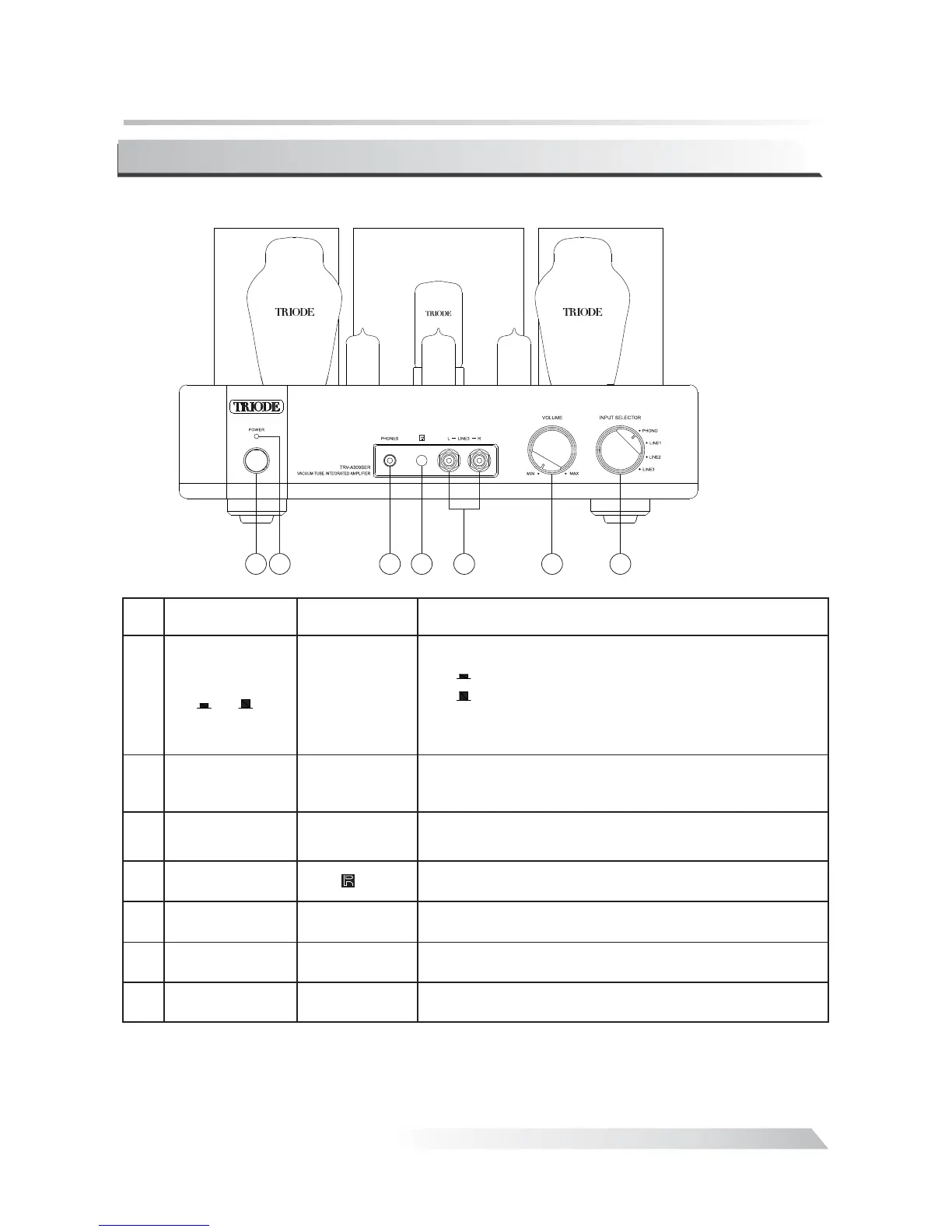
Front Panel:
①
②
③
Power
Indicator
Switch the amplifier:
Switch on;
Switch off.
Note:Unplug the power cord if you are not going to
use the product for an extended period of time.
ON/OFF
ON
OFF
“”:
“”:
Power Switch
/()
ON OFF
Name Marks Description
Indicating the operation mode. If switched on the
will keep lighting.
LED
Headphone
Socket
Helping you enjoy the high-qualified music alone.
No.
1
3
4 5 6 7
2
④
⑤
⑥
⑦
Signal Inputs Used for source input(CD, AUX1,AUX2).
Volume Switch
Remote Sensor
Window
Input Selector
POWER
PHONES
INPUTS
VOLUME
INPTU SELECTOR
Receiving the remote signal.
Controlling the mail volume
Selecting the input signals
.
.
12AU712AX712AU7
!""#!""#
5AR4


 To Next Page