Select the Settings button group【RIGHT】key,focus values
increase sequentially.
Select the Settings button group【LEFT】key,focus values
decrease sequentially.
15
16
Stroboscopic flash mode(Multi)
Using Multi mode,you can issue a series of quick flash,it can shoot
multiple images of moving objects on a photo,you can set the flash
frequency (number of flashes per second can use Hz to show),the
number of flashes and flash output.During repeated Multi mode,Single
exposure create a strobe effect of multiple exposures.This mode is often
used when shooting moving objects.
To prevent the flash head overheat and damage,do not perform more
than 10 times in a row strobe flash burst.Between twice repeated
exposure operation please let flash plenty of time for the call
After flash work for 10 times please let it cool for at least 15
if you are trying to perform more than 10 times in a row strobe flash
burst the flash may automatically stop to prevent overheating of the
flash head.If this happens,please let the flash cool for at least 15
minutes.Please use a new battery or a fully charged battery to operate
this mode.
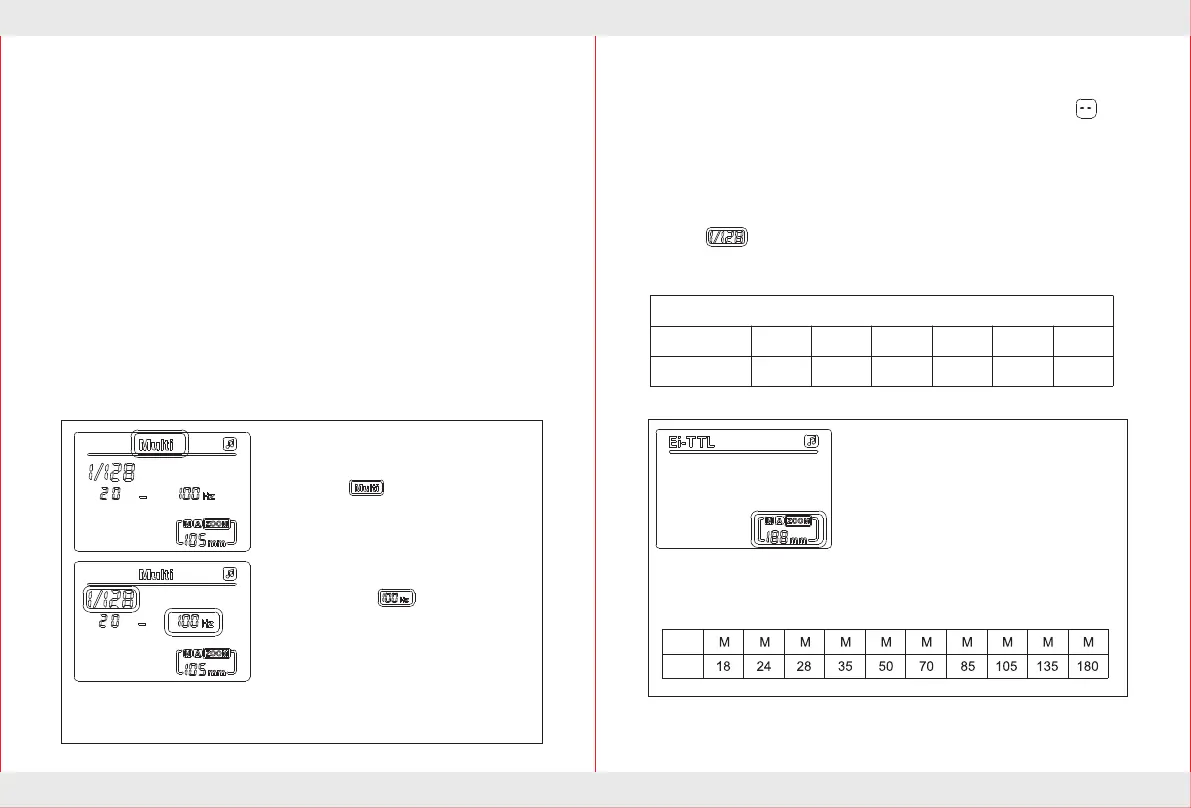
Under Strobe mode (Multi),It support flash power,time of flash as
well as frequency regulation.
Select the flash mode
Press 【MODE】 mode button until the
LCD display .
Select the setting button group
【MIDDLE】key of settings button
group to display flicker,Press
select settings button group 【LEFT】
【RIGHT】 to set the frequency.The
available flash frequency is 1HZ-
199HZ.After value setted then select
the setting button group 【MIDDLE】
key to confirm.
Frequency setting
The number of flashes set
Press select the Settings button group 【MIDDLE】 key until LCD
display flashing. Select the Settings button group 【LEFT】
【RIGHT】 key to set the flash power.After Values is setted and
then select the Settings button group 【MIDDLE】 key to confirm.
Exposure power setting
1-40
1-20
1-12
1-8
1-4
1-2
1-128
1-64
1-132
1-16
1-8
1-4
Flash power and the number of flash relational tables
Flash power
Flash number
Press the zoom button 【ZOOM】 key
to display the zoom data flashing,Select
the Settings button group 【LEFT】
【RIGHT】key to set the appropriate
focal length value,After focal length
value have been setted,Press 【ZOOM】
key to confirm.
【ZOOM】Zoom settings
back.
minutes,
Select the Settings button group 【MIDDLE】key to display
flashing,Select the Settings button group 【LEFT】 【RIGHT】key to
set the number of flashes,the available number of flashes for 1-40.After
Values setted and then select the Settings button group 【MIDDLE】
key to confirm.
A
Autom atic


 To Next Page
 Loading...