25
26
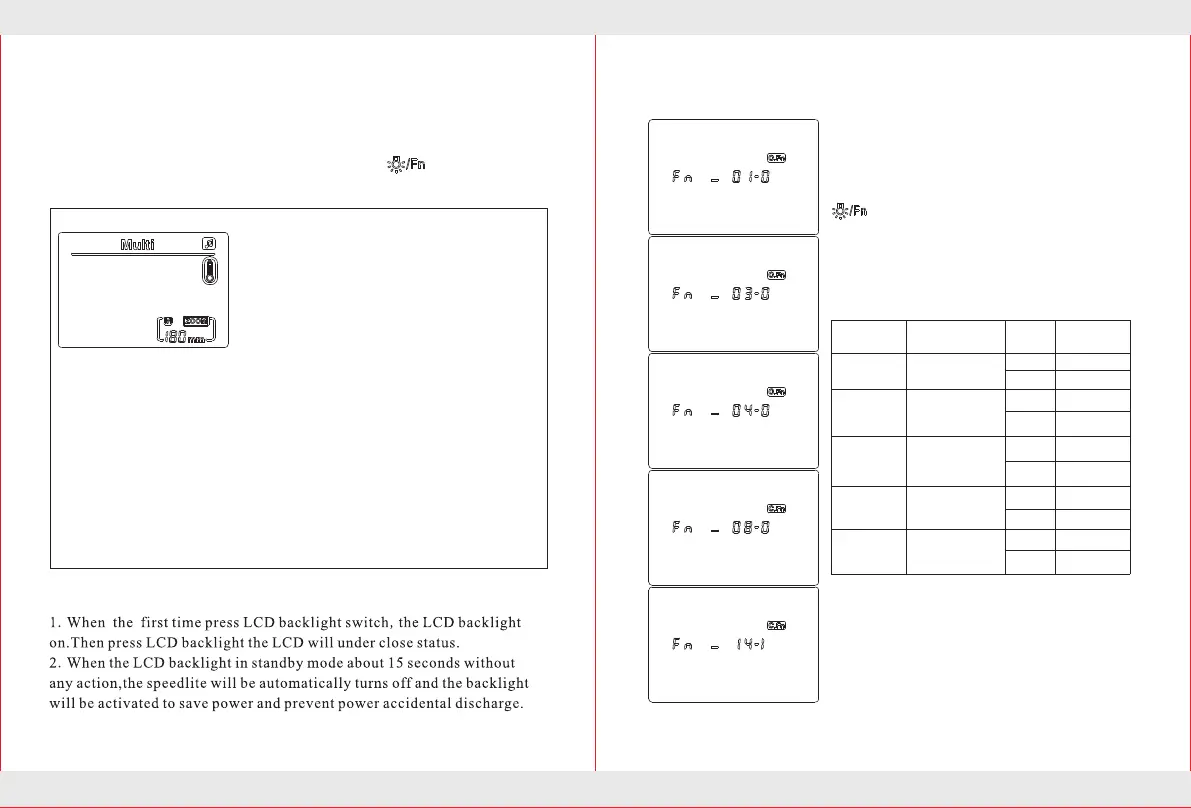
You can follow your shooting preferences
custom flash function.Use a custom function
to complete the set.
Press the "custom function setting button”
to the shown on the left.
Choose the functionality they
need,press【up】【down】key setting
Custom function settings
Note: Fn number of 00 ~ 13 options can be
accessed through the camera menu of
"External flash custom function Settings"
to set up; The Numbers for: 00, 02, 05, 06,
07, 09, 10, 11, 12, 13 option has been
disabled. (Internal Canon cameras menu)
C.Fn-01
C.Fn-03
0
1
0
1
Custom
Function No.
Function
Auto power off
Set ID
Settings and
descriptions
on
off
on
off
-→0→+
0→-→+
C.Fn-04
0
1
C.Fn-08
0
1
on
off
C.Fn-14
0
1
on
off
Flash exposure
bracketing
auto cancel
Flash exposure
bracketing
sequence
Af-assist beam
firing
Buzzer switch
1.A long ring: call back to complete
2.Two short sound: boot or call back to
complete normal flash.
3.Two long beeps: flash call back
unfinished.
4.Three short blasts: 30 minutes without
Voice prompts:
Different sound ways will prompt the different working conditions of
the speedlite so as to make you focus on shooting only.
Long press the custom function setting button to custom
settings the buzzer switch will be turned on or off.
operation automatically turn off or shut
down.
5.Four short beeps: low battery shutdown
(call back timeout).
6.The display will show continuous
shortness beep: flash overheating, to enter
the overheating protection .enter
overheating protection the display will
show overheating protection icon.
Backlight tips


 To Next Page