23
24
Bounce flash
High-speed burst modle
The camera menu access (only Canon newer models)
It may be operated by a camera flash menu access in support of E-TTL
(Canon) the newest camera.In the flash control menu “External flash
function settings”and “External flash Custom settings”can set the flash
parameters;such as switching E-TTL mode / manual flash mode and
multiple flash mode (Multi),wirelessflash setting,exposure bracketing,
exposure compensation,focal length and advanced options function etc..
2.Wireless induction lighting light
The improved wireless triggering sensor trigger have higher sensor
sensitivity, S1,S2 mode can work in the outdoor environment,wireless
trigger sensing have distance of 15 meters.
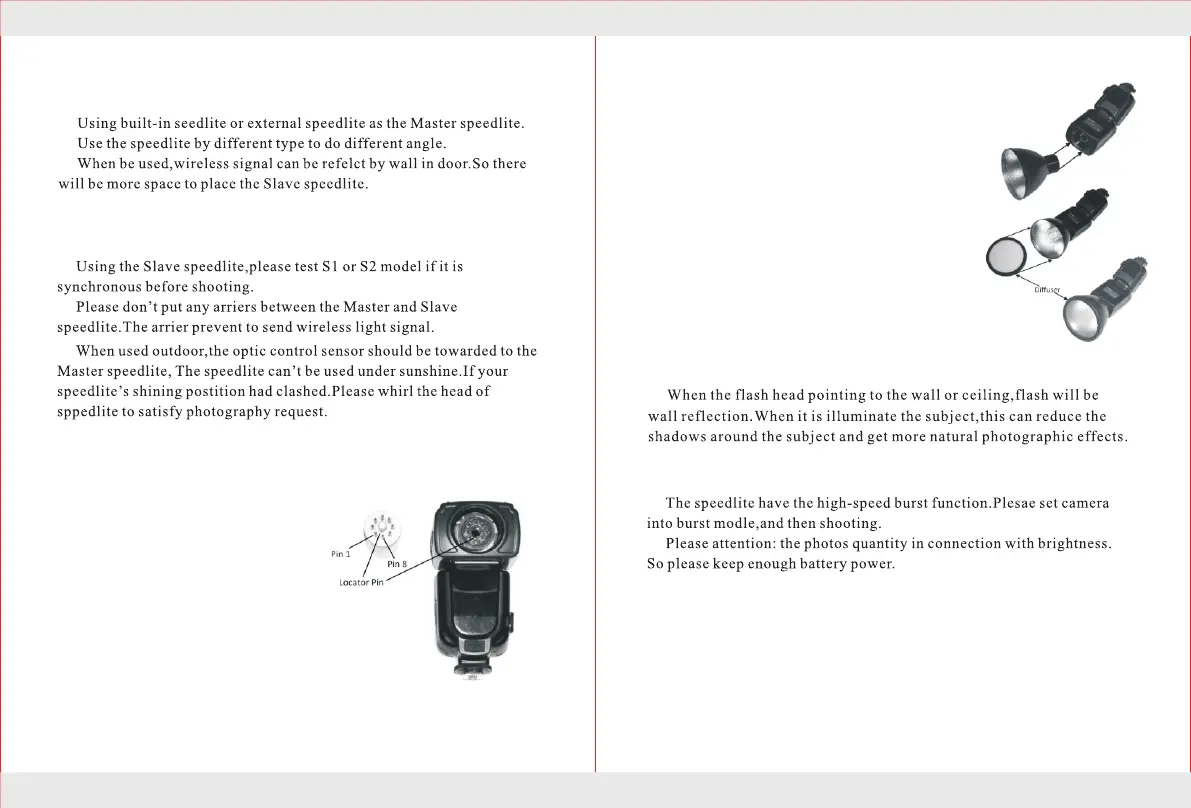
Installing the bare bulb
1. Notice that the bootom of the bare
bulb has eight metal pins positioned
in a circle around a large plastic pin.
2.The center pin has a locator tab which
is situated between pin 1 and pin 8.
3.In sert the bar e bulb into the 8- pin
socket located at the top of the flash
head. Align the locator tab of the bulb
with the locator slot in the 8-pin socket.
Be sure the flash bulb is pushed completely
into the bulb socket.
Attaching the bare bulb reflector
1. When desired, the flash head’s Reflector can be threaded
into the flash head directly around the flash bulb.
2.Use caution when screwing the reflector into the
light head. It is possible to crossthread the two
pieces. The reflector will fit snugly after 6½ turns.
Attaching the diffuser
1. If desired, the 4½-in Diffuser can be slipped
onto the outside of the Reflector.
2.The diffuser is removed by simply pulling it off the
reflector.


 To Next Page