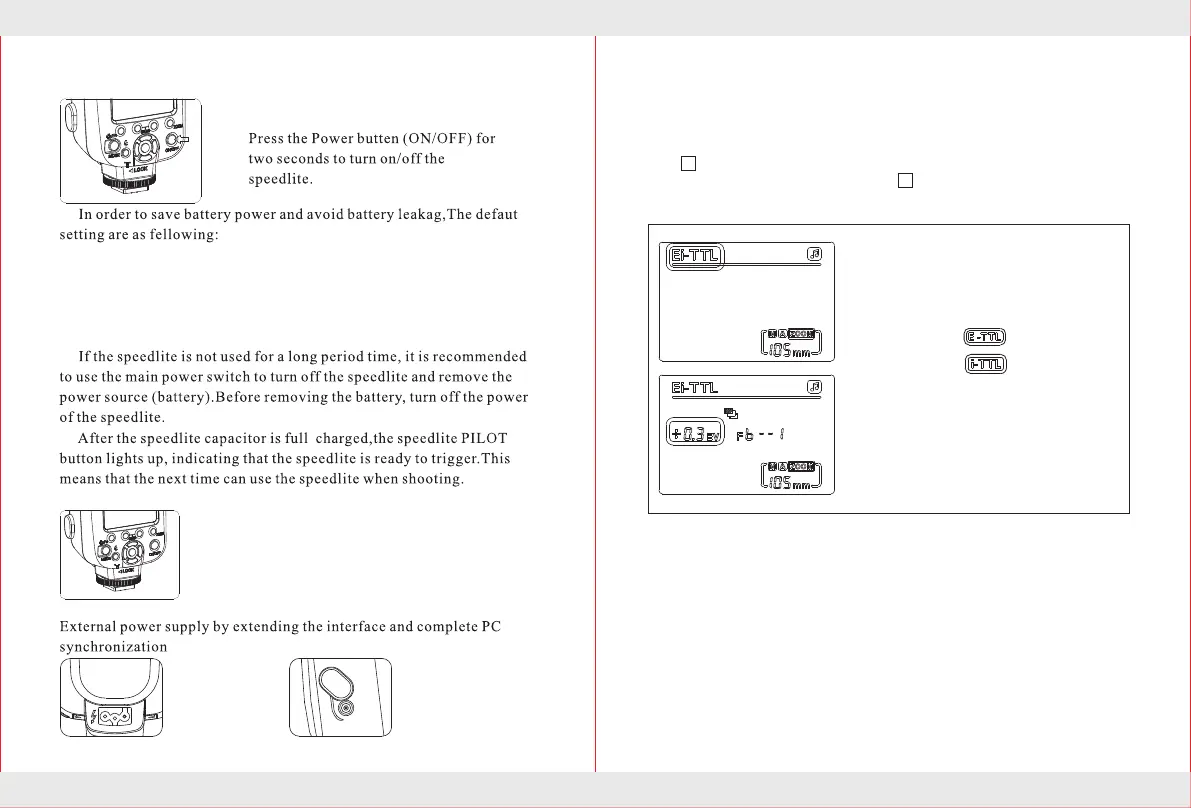
1.The external
power connector
Provides more
adequate power.
2.Conetect with the
PC sync
Make sure camera
and speedlite
synchronized flash.
9
10
,When the speedlite do
not working within 60 seconds,the CPU automatically into
hibernation.In this case press any key to wake up the speedlite.When the
speedlite does not work for more than 30 minutes,the CPU will shut
down automatically.
After automatically shut off the power opened
TTL Flash
Set the camera's shooting mode to <P>( Program automatic exposure)
or < >(Auto),when fully automatic flash will make photography
became as simple as <P> mode and < > mode under normal automatic
exposure.
Set the flash exposure compensation
value
1.Select the flash mode
2.Press 【MODE】 mode button until
the LCD display
Canon
Nikon
Set the flash exposure compensation
value.
When press five select button settings
group【Up】【Down】to set the
compensation value.
1.Select the Settings button group【RIGHT】keys,power values increase
sequentially.
Select the Settings button group【LEFT】keys,power values decrease
sequentially.
2.The compensation value is in the range of +3.0EV to -3.0EV.
The compensation value icon:
0EV→+0.3EV→+0.7EV→+1.0EV→+1.3EV→+1.7EV→.. ..→+3.0EV
0EV→-0.3EV→-0.7EV→-1.0EV→-1.3EV→-1.7EV→.. ..→-3.0EV
State of charge indicator
Before shooting,confirmed that flash charging
indicator light and camera viewfinder lights
have been lit.
Extended Interface
Turn on the power


 To Next Page