11
6.2.2 Local Console OSD Navigation
When in the Local Console OSD, you can use your keyboard and mouse to access its features.
• TocloseoutoftheLocal Console OSD, click the [X] attheupperrightcorneroftheOSDorpressthe[Esc] key.
• Tologout,pressthe[F8] key, click the F8 atthetopoftheOSD,orclickthezZzsymbolintheupperrighthandcorneroftheOSD.
• TomovethroughtheOSDlistonelineatatime,clicktheupanddowntrianglesymbols( , ) or use the [ ] and [ ] keyboard keys. If there are
more entries than appear on the screen, the screen will scroll.
• Tomoveupordownonescreenatatime,clicktheUpandDownArrowsymbols(
,
), or use the [Pg Up] and [Pg Dn] keyboard keys. If there
are more entries than appear on the screen, the screen will scroll.
• Toactivateaport,double-clickit,orhighlightitandpressthe [Enter]key.Onceaportisaccessed,theOSDwillcloseandthescreenofthe
computer connected to the port will be displayed.
6.3 Logging Into the KVM over IP
TherearethreemethodsthatcanbeusedtoconnecttotheKVMswitchoverIP;Web Browser, AP Windows Client and AP Java Client.
6. KVM Operation
(
continued
)
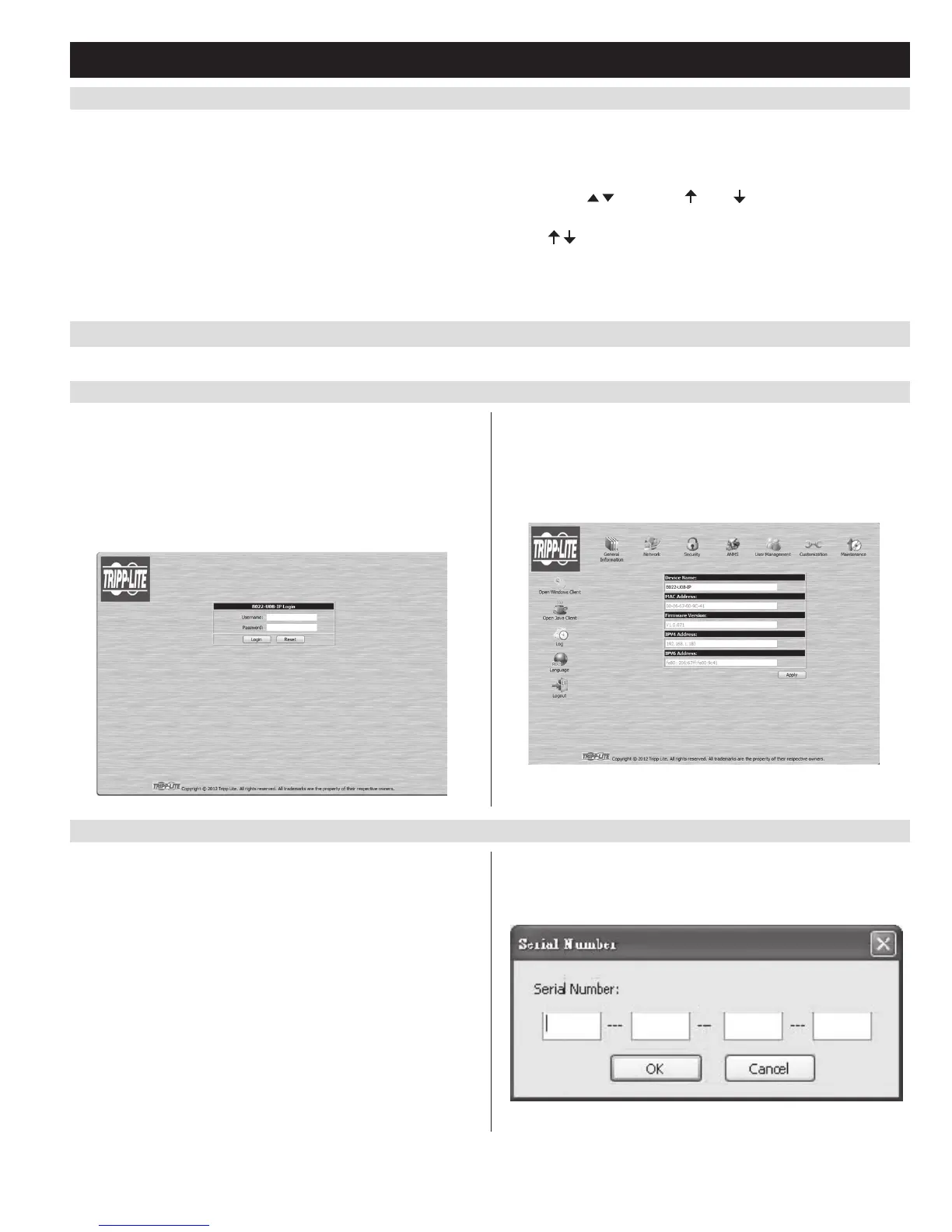
6.3.1 Logging In via Web Browser
1. OpenyourwebbrowserandtypeintheIPaddressoftheKVM.
(See Network Setup – IP Address Configuration section in the
Owner’sManualfordetailsondeterminingtheKVMsIPaddress.)
2. A screen will appear asking you to provide a username and password.
Note: If you are first prompted by a screen that says the website’s
security certificate cannot be trusted, click on the link to proceed
anyway; the certificate can be trusted.
3. IfaccessingtheKVMforthersttime,enterintheusername
administrator and the password password. For security purposes,
it is strongly recommended that you change the username and
password on this account to something unique. When you have
enteredyourusernameandpassword,theKVMwebinterfacewill
appear with the following page displayed:
6.3.2 Logging In via the AP Windows Client
IntheeventyoudonotwanttoconnecttotheKVMswitchviaweb
browser,youcanusetheAPWindowsClientlocatedontheCD
toprovidenon-browseraccesstotheKVMswitchviaaWindows
computer.
Note: The AP Windows Client requires that DirectX 8.0 or higher be
installed on your computer.
1. SavetheAPWindowsClientfromtheCDtoadesiredlocationon
your Windows computer.
2. Double-clickonthele,andfollowtheinstallationinstructionsthat
follow.
3. When the installation is complete, an icon will be added to your
desktop, and a program entry will be made in the Windows start
menu. (Start > All Programs > B022-U08-IP)Double-clickonthe
icon or select the program entry in the start menu to open the AP
Windows Client.
4. Ifthisisthersttimethatyouarerunningtheutility,adialogbox
appears requesting you to input your serial number. The serial
numbercanbefoundontheCDthatcomeswiththeKVM.Keyin
the serial number (5 characters per box), then click OK.


 To Next Page
 Loading...