4
Installation
3 - Static IP Address Assignment/Terminal Menu
Configuration Settings
3-1
Determine IP Information: BeforeassigningastaticIPaddress,you'llneedto
knowtheIPaddress,gatewayaddressandsubnetmask.Ifyoudonothavethis
information, contact your network administrator for assistance.
3-2
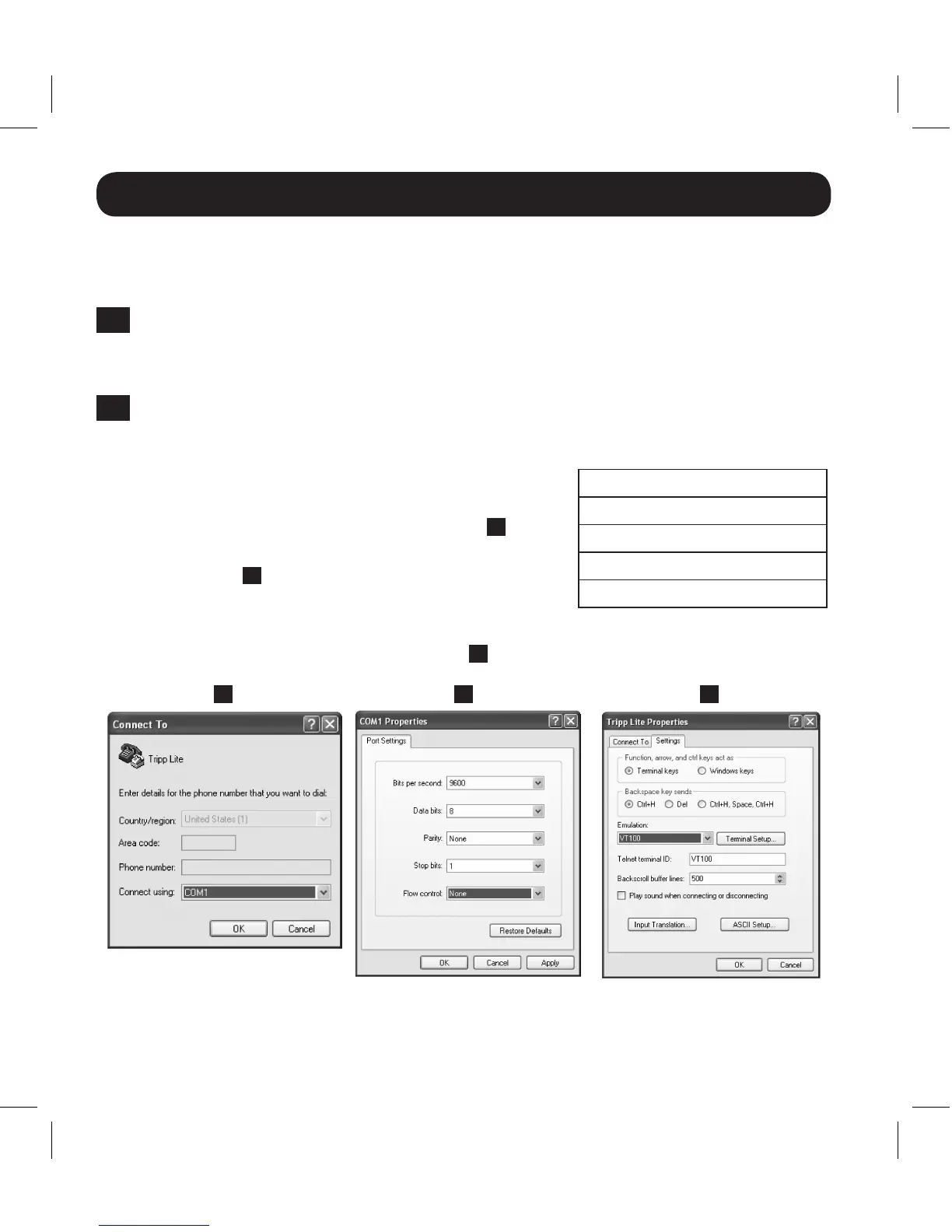
Configure Terminal Emulation Program: OpenaVT100-compatibleterminal
emulationprogram(suchastheHyperTerminalprogrambundledwithMicrosoft
®
Windows
®
)onacomputerwithanavailableDB9
serialport.Anotebookcomputermaybethe
most convenient choice. Set the terminal
emulation program to use the COM port
1
that
correspondstotheDB9serialport.Specifythe
parameters
2
required to communicate with the
SRCOOLNET terminal interface:
If the terminal emulation program supports multiple emulation modes, you may
alsoneedtospecifyVT100emulation
3
.
Bits per second: 9600
Databits: 8
Parity: None
Stop bits: 1
Flow control: None
1 2 3
13-08-187 93-32CA.indb 4 9/27/2013 9:25:20 AM



 To Next Page