7
Filling the water trough
1. Fill the Water Trough (5) with clean cold water up to the ‘MAX WATER
LEVEL’ mark on the side of the water trough
2. When in use, ensure the water level is always sufficient to keep the
grinding surface of the Grindstone (6) wet
Engaging the drive system
1. Tighten the Torque Adjustment Knob (10) by turning it clockwise until it is
tight up against the body of the machine. This will engage the drive system
2. After use, always loosen the torque adjustment knob. This will help to
ensure the drive wheel retains its correct shape
Using the stone grader
• Use the Stone Grader (14) to dress the surface of the grindstone for fine or
coarse grinding:
For coarse grinding, to remove a large amount of material quickly (for example,
to shape a blade):
• Apply the coarse side of the stone grader to the grindstone to roughen the
grinding surface
For fine grinding, to sharpen the blade:
• Apply the smooth side of the stone grader to the grindstone to provide a
finer surface, ideal for sharpening the blade in preparation final polishing of
the cutting edge on the leather honing wheel
Using the square edge jig
For use with the Support Arm (11) and Angle Guide (17) to set the blade at
exactly the correct angle for sharpening
1. Loosen the knobs on the Square Edge Jig (13)
2. Place the blade in the jig so that one edge of the blade is positioned
against the end stops (Image A)
3. Tighten the knobs to fasten the blade in position
Using the support arm
• The Support Arm (11) can be attached for grinding with or against the
direction of rotation of the grindstone
For grinding against the direction of rotation:
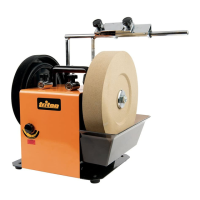
1. Place the Support Arm (11) in the Vertical Mounts (2)
(Image B)
For grinding and honing with the direction of rotation:
2. Place the Support Arm (11) in the Horizontal Mounts (9) (Image C)
WARNING: Honing must ONLY be carried out WITH the direction of rotation.
• Working against the direction of rotation removes larger amounts of
material more quickly than working with the direction of rotation
• Working with the direction of rotation can be used for very precise
sharpening of a blade for finer tools and is used for honing
• Take your time and practise the set up with various types and sizes of
blades so that you can achieve the correct sharpening angle and ensure
the blade to be sharpened is square across the surface of the grindstone
• In general, for sharpening, position the support arm in the vertical mounts
and sharpen against the direction of rotation
• NEVER place the support arm in the vertical mounts when using the leather
honing wheel. Attempting to hone the blade against the direction of rotation
will cause severe damage to the honing wheel
Using the angle guide
• Use the Angle Guide (17) to set the blade at exactly the correct angle for
sharpening (Image D)
1. Mount the blade in the Square Edge Jig (13) and place the support arm
in the mount
2. Use the gauge on the outside of the angle guide to measure the bevel
angle of the blade.
3. Loosen the locking knob on the angle guide and adjust the protractor so
that the black arrows are aligned with the correct grindstone diameter
marking (Image E)
4. Then set the pointer to the required bevel angle on the blade (as measured
in Step 2, above) and tighten the locking collar to lock in position (Image E)
5. Thread the square edge jig onto the support arm so that the blade rests
against the grindstone
6. Position the curved foot of the angle guide on the grindstone and the flat
section of the pointer on the blade to be sharpened (Image F)
7. Use the Support Arm Height Adjuster (12) to adjust the height of the
support arm until the flat section on the angle guide pointer lies perfectly
flat on the blade
8. The grinding angle will now be correct
Operation
Important safety notes:
• Never use this unit without wearing all necessary safety equipment,
including approved safety glasses and face or dust mask
• Wear cut-resistant gloves and handle blades with care at all times
• DO NOT test the sharpness of a blade on your finger (or other part of the
body)
• The grindstone and honing wheel rotate in the direction as marked by the
arrow on the top of the unit, adjacent to the horizontal mounts
• Ensure the water trough is correctly fitted and sufficiently filled with water
before starting work. Check the water level at regular intervals and top up
as necessary. NEVER attempt to sharpen a blade when the stone is dry; it
may be dangerous to do so.
• Ensure the grinding stone surface is even and accurately graded for the
task at hand
• Check that the grindstone rotates freely each time before start up
• Always allow a new wheel to run for a minutes before using it. Stand to
one side at start up
Switching on and off
1. Ensure On/Off Switch (4) is in the OFF (O) position
2. Connect the unit to the power supply
3. To switch on, press the on/off switch to ON position (I)
4. To switch off, press the on/off switch to OFF position (O)
5. Disconnect the device from the power supply if interrupted and when
finishing work
Sharpening a blade
• Apply blade to the grindstone with an even pressure
• Slide the square edge jig back and forth along the support arm to ensure
even grinding on the blade and even wear on the stone
• Do not press hard. Light pressure is all that is required for sharpening
Sharpening without the square edge jig
• If the workpiece is too large to mount in the jig, you can fit the Support Arm
(11) and rest the workpiece on the support, with the edge pointing away
from you. This will help you keep the blade steady at the angle required
• Move the blade back and forth across the stone to ensure even grinding on
the blade and even wear on the stone
Note: A Support Arm Extension (TWSSAE) and several tool specific jigs, such as
the Long Knife Jig (TWSLKJ) are available from your Triton stockist. It is highly
recommended to always use a suitable tool specific jig when sharpening with
this device.
Honing a blade
• After sharpening, using the leather honing wheel will remove any burr and
give a smooth sharp edge to the blade
WARNING: Always hone a blade in the direction of wheel rotation. NEVER hone
against the direction of the wheel .
1. Ensure the machine is disconnected from power during set up
2. Set up the Support Arm (11) and jig as shown in Image C. Use the angle
guide to check the blade angle is correct
3. Apply a generous squeeze of Polishing Paste (15) directly to the Leather
Honing Wheel (1). Honing will distribute the compound across the wheel
4. Switch on the machine and move the blade across the face of the honing
wheel, ensuring that at least half of the width of the honing wheel is always
in contact with the blade
5. Allow the honing wheel to do the work. Do not apply excessive force to the
wheel
6. As with sharpening, move the jig back and forth along the support arm to
ensure even honing of the blade
515970_Z1MANPRO1_AUS.indd 7 24/02/2015 17:02


 To Next Page
 Loading...