10
Typical Interface Icon Paraphrase
Icon Paraphrase Description
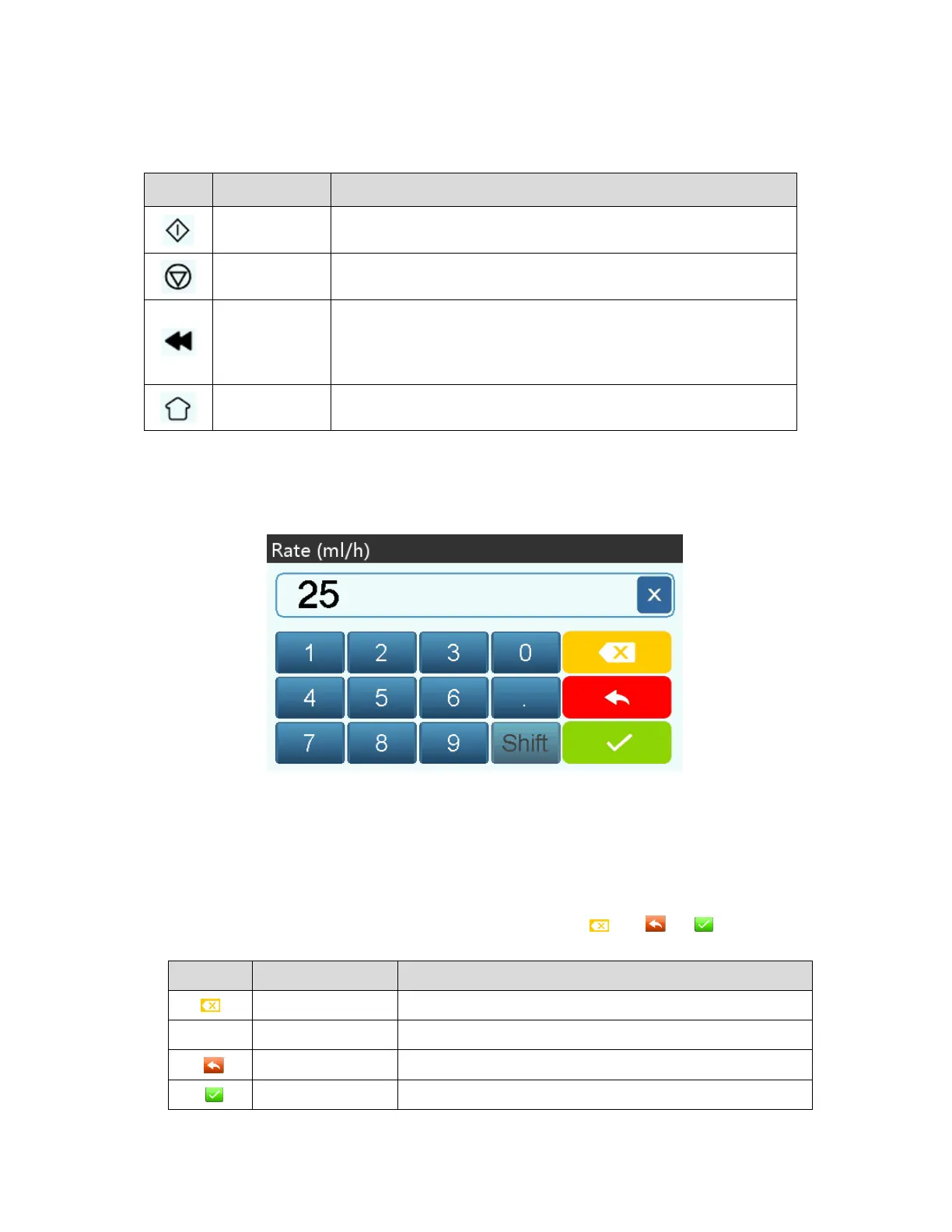
Start Click this icon, start infusion
Stop Click this icon, infusion stop
Bolus/Purge
1. During infusion, it is a『Bolus』function, click it to start bolus infusion
2. Before starting infusion, it is a『Purge』function, click it to exhaust air
from the syringe
Home Click this icon, return to the main interface
Input Method Interface
The input method interface composes of the title bar, input box, and editing box.
1) Title bar: displays the name of current editing parameter.
2) Input box: real-time display of the input content.
3) Editing box: Is composed of the main button area and function button area.
The main button area composes of numerical values, letters, and icons.
The function button area composes of the clear button, cancel button, 『 』, 『 』,『 』and『Shift』.
Icon Paraphrase Description
Backspace button Click it to backspace delete
Shift Shift button Click it to switch the capital and lowercase English letters
Cancel button Click it to cancel editing and exit
OK button Click it to save editing and exit


 To Next Page