General Information
60
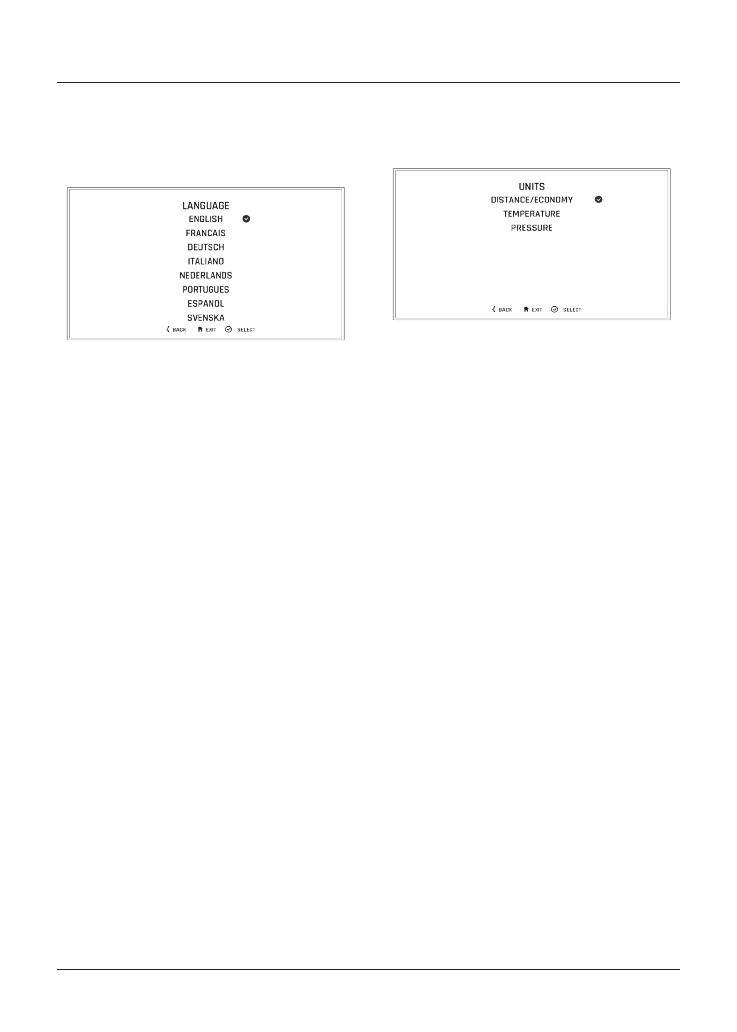
Display Set Up–Language
The Language menu allows the
preferred language to be used as the
instrument display language.
To select the required language for the
instrument display:
• From the DISPLAY SET UP menu,
push the joystick down to select the
LANGUAGES option.
• Press the joystick centre to confirm
and display the available language
options.
• Scroll the menu by pushing the
joystick down/up until the required
language option is highlighted.
• Press the joystick centre to select/
deselect the correct LANGUAGE.
A tick is shown to indicate the
selected option.
• Press the joystick centre to confirm
the language option.
Display Set Up–Units
The Units menu allows the selection of a
preferred unit of measurement.
To select the required units of
measurement:
• From the DISPLAY SET UP menu,
push the joystick down and select
UNITS.
• Press the joystick centre to confirm.
To change the unit of measurement:
• Push the joystick down/
up to highlight the required
option (DISTANCE/ECONOMY,
TEMPERATURE or PRESSURE).
• Press the joystick centre to select.
A tick is shown to indicate the
selected option.
• Push the joystick down/up to select
the required unit of measurement.
• Press the joystick centre to confirm.
A tick is shown to indicate the
selected option.
The options available are:
Economy:
• Miles & MPG (UK)
• Miles & MPG (US)
• KM & L/100KM
• KM & KM/L











 To Next Page