General Information
65
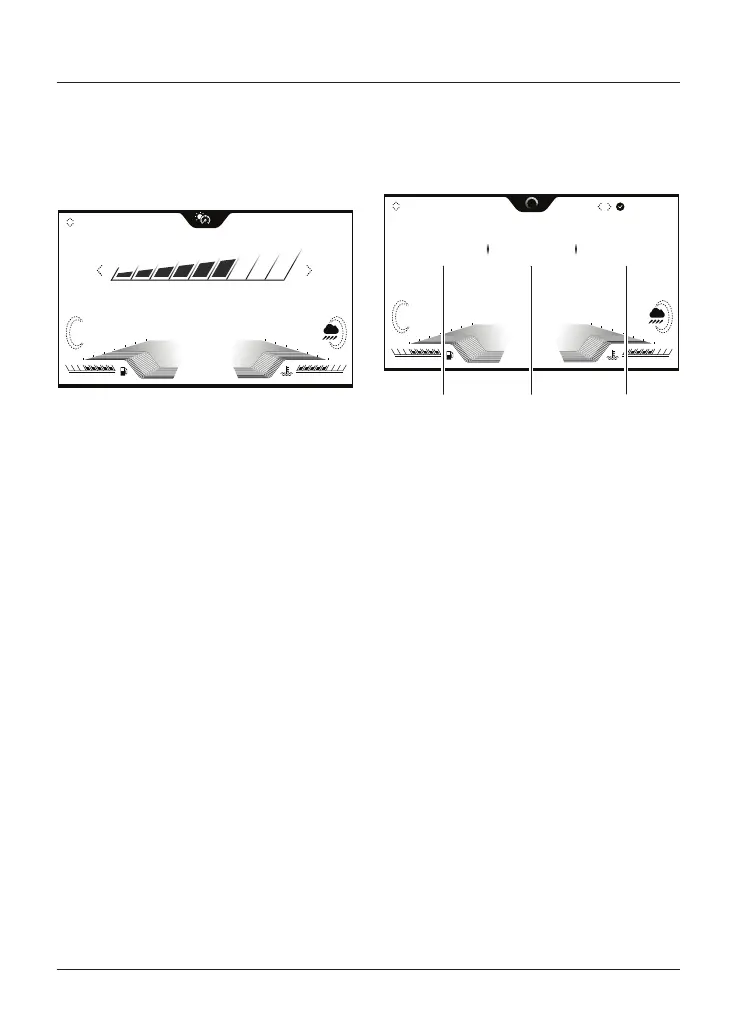
Brightness
The Brightness information tray allows
the brightness of the display screen to
be adjusted.
3
0 0
2 2
4 4
6 6
8 8
10 10
12 12
52
FE
21.5 10:55
AM
C
o
x1000rpm
SET 100
9
ABS
+
MPH
BRIGHTNESS
To adjust the brightness of the display
screen:
• Push the joystick left/right to
increase/decrease the level of
brightness.
• Press the joystick centre to confirm
the required level of brightness.
Note
In bright sunlight, low brightness
settings will be overridden to make sure
that the instruments can be viewed at
all times.
Note
Do not cover the light sensor on the
display screen as this will stop the
screen brightness and contrast from
working correctly.
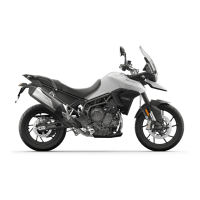
Trip Meter
There are two trip meters that can be
accessed and reset in the information
tray.
1234
3
0 0
2 2
4 4
6 6
8 8
10 10
12 12
34.5
52
23:45
mi mph hh:mm
DISTANCE
FE
21.5 10:55
AM
C
o
x1000rpm
AVG SPEED
SET 70
9
ABS
+
MPH
DURATION
HOLD TO RESET
TRIP 1
1
1
1. Distance travelled
2. Average speed
3. Duration of trip
To view a specific trip meter:
• Push the joystick down/up to scroll
through the information tray items
until Trip 1 meter is shown.
• Select TRIP 1 or TRIP 2 by pushing
the joystick left/right.
Note
TRIP 2 meter can be shown or hidden
from the information tray. For more
information, see page 58.
To reset a trip meter:
• Select the trip meter to be reset.
• Press and hold the joystick centre
for more than one second.
• The trip meter will then be reset.
The trip meter can also be reset from
the Main menu, see page 57.





 To Next Page