EasyManua.ls Logo

Trojan VELOCITY 400 - User Manual

Trojan VELOCITY 400
20 pages
Print Icon
To Next Page IconTo Next Page
Loading...
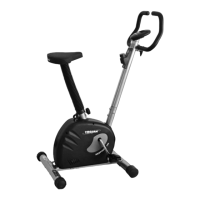
VELOCITY 400
STATIONARY CYCLE
STATIONARY CYCLE CARE INSTRUCTIONS
AND ASSEMBLY MANUAL
TROJAN
MY SPACE MY TIME
®
#
1
HOME
FITNESS
SOUTH AFRICA’S
SINCE
1981
CAUTION
READ ALL PRECAUTIONS AND
INSTRUCTIONS IN THIS MANUAL
BEFORE USING THIS EQUIPMENT
KEEP THIS MANUAL FOR
FUTURE REFERENCE
1 YEAR
warranty
CALL
0861 876526
0861 TROJAN
1522
Question and Answer IconNeed help?

Do you have a question about the Trojan VELOCITY 400 and is the answer not in the manual?

Summary

1. Safety Instructions

General Safety Warnings

Read all precautions before using the stationary cycle to prevent injury.

2. Pre-Assembly Check List

Parts Identification and Preparation

Familiarize yourself with labeled parts before assembly.

3. Hardware List

Component Parts and Quantities

List of all hardware components required for assembly.

4. Assembly Steps

Step 1: Stabilizer Assembly

Assemble front and rear stabilizers to the base construction using bolts and nuts.

Step 2: Pedal Installation

Screw the left and right pedals onto the crank arms.

Step 3: Seat Assembly

Attach the seat post and seat to the main frame, securing with a knob.

Step 4: Handlebar Post Installation

Insert the handlebar post through its cover and attach to the main frame.

Step 5: Handlebar Attachment

Mount the handlebar onto the fixture using clamps, washers, and bolts.

Step 6: Computer and Power Connection

Connect computer cables and mount the console, then connect the power adapter.

5. Computer Functions

Initial Setup and Mode Selection

Power-on display, calendar setting, standby mode, and selecting training modes.

Program Mode and Load Settings

Details on using PROGRAM mode and adjusting load levels.

Specific Training Modes

Operation of MANUAL, USER, HRC, and WATT training modes.

User Profiles and Body Fat Analysis

Setting user data and performing body fat measurement.

Console Button Functions

Explanation of each button on the computer console.

6. Fitness Tips and Techniques

Muscle Chart for Cycle Exercise

Visual guide to muscles worked during cycling.

7. Conditioning Guidelines

Exercise Intensity and Heart Rate

Guidelines for setting exercise intensity using heart rate.

8. Warm-Up and Cool-Down

Suggested Stretches

Step-by-step instructions for basic stretches.

9. Frequently Asked Questions

Console Error Troubleshooting

Solutions for common console errors like E2, E4, El.

10. Part List

Component Breakdown and Quantities

Detailed list of all parts with their respective quantities.

11. Exploded Drawing

Visual Assembly Diagram

Illustrated diagram showing how parts fit together.

12. Trojan 1 Year Limited Warranty

Warranty Coverage and Exclusions

Details on what the warranty covers, exclusions, and waivers.

Warranty Claim Procedures

Procedures for making a warranty claim within specified timeframes.

13. Trojan Repairs Procedure

Procedure for Repairs

Steps to follow when experiencing faults or breakdowns for professional repair.

Cost of Repairs

Information on costs for under-warranty and out-of-warranty repairs.

Summary

1. Safety Instructions

General Safety Warnings

Read all precautions before using the stationary cycle to prevent injury.

2. Pre-Assembly Check List

Parts Identification and Preparation

Familiarize yourself with labeled parts before assembly.

3. Hardware List

Component Parts and Quantities

List of all hardware components required for assembly.

4. Assembly Steps

Step 1: Stabilizer Assembly

Assemble front and rear stabilizers to the base construction using bolts and nuts.

Step 2: Pedal Installation

Screw the left and right pedals onto the crank arms.

Step 3: Seat Assembly

Attach the seat post and seat to the main frame, securing with a knob.

Step 4: Handlebar Post Installation

Insert the handlebar post through its cover and attach to the main frame.

Step 5: Handlebar Attachment

Mount the handlebar onto the fixture using clamps, washers, and bolts.

Step 6: Computer and Power Connection

Connect computer cables and mount the console, then connect the power adapter.

5. Computer Functions

Initial Setup and Mode Selection

Power-on display, calendar setting, standby mode, and selecting training modes.

Program Mode and Load Settings

Details on using PROGRAM mode and adjusting load levels.

Specific Training Modes

Operation of MANUAL, USER, HRC, and WATT training modes.

User Profiles and Body Fat Analysis

Setting user data and performing body fat measurement.

Console Button Functions

Explanation of each button on the computer console.

6. Fitness Tips and Techniques

Muscle Chart for Cycle Exercise

Visual guide to muscles worked during cycling.

7. Conditioning Guidelines

Exercise Intensity and Heart Rate

Guidelines for setting exercise intensity using heart rate.

8. Warm-Up and Cool-Down

Suggested Stretches

Step-by-step instructions for basic stretches.

9. Frequently Asked Questions

Console Error Troubleshooting

Solutions for common console errors like E2, E4, El.

10. Part List

Component Breakdown and Quantities

Detailed list of all parts with their respective quantities.

11. Exploded Drawing

Visual Assembly Diagram

Illustrated diagram showing how parts fit together.

12. Trojan 1 Year Limited Warranty

Warranty Coverage and Exclusions

Details on what the warranty covers, exclusions, and waivers.

Warranty Claim Procedures

Procedures for making a warranty claim within specified timeframes.

13. Trojan Repairs Procedure

Procedure for Repairs

Steps to follow when experiencing faults or breakdowns for professional repair.

Cost of Repairs

Information on costs for under-warranty and out-of-warranty repairs.

Trojan VELOCITY 400 Specifications

General IconGeneral
TypeMountain Bike
ForkSuspension Fork
ShiftersShimano
DerailleursShimano
Frame MaterialAluminum
Brake TypeDisc Brakes
FrameAluminium
WheelsAluminium Alloy
BrakesDisc Brakes
HandlebarAlloy Handlebar
StemAlloy Stem

Related product manuals