EN 6
Operating manual – dehumidifier TTK 68 E / TTK 69 E
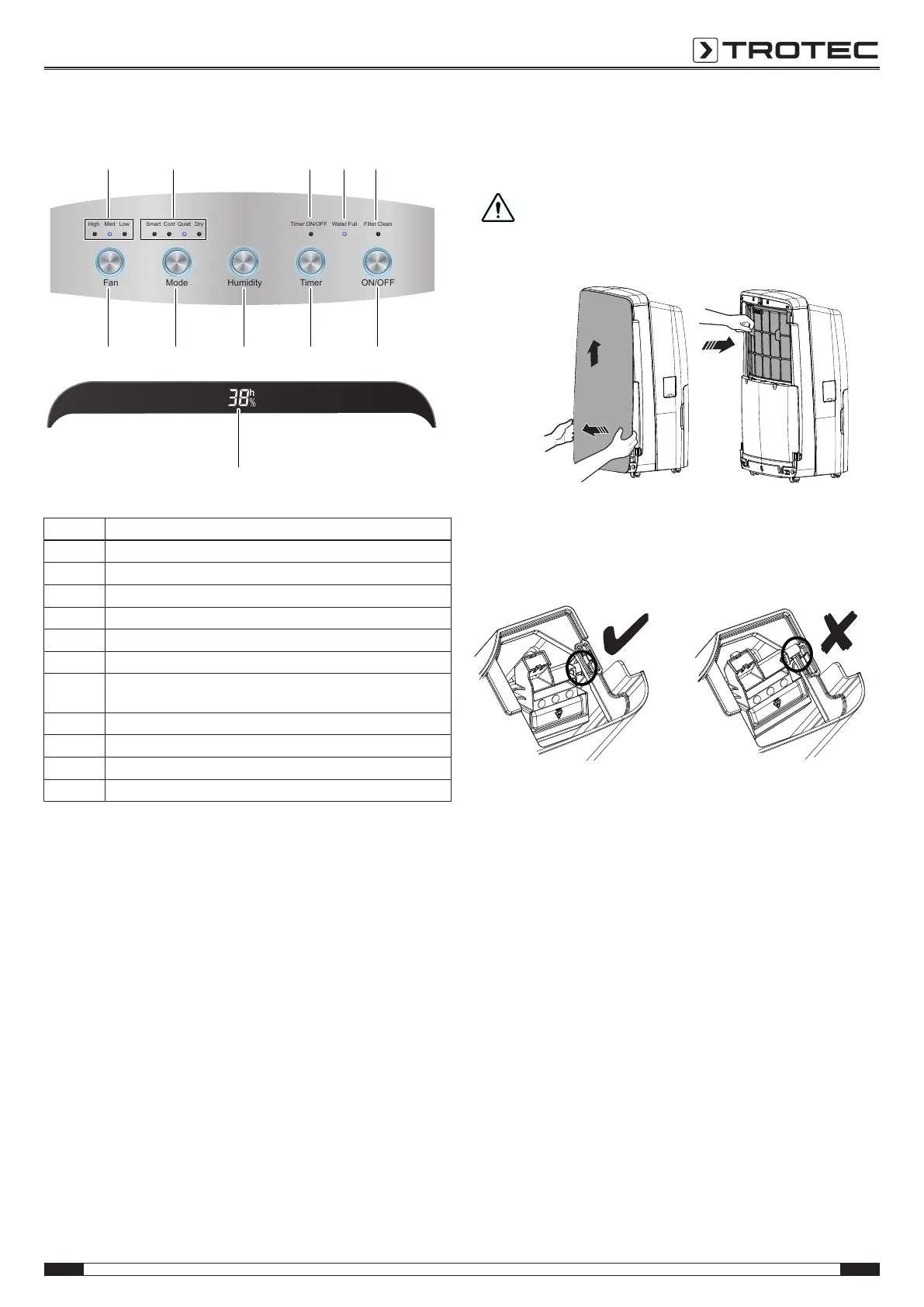
Operating elements TTK 69 E
Fan
High Med Low Smart Cont Quiet Dry Timer ON/OFF Water Full Filter Clean
Mode Humidity Timer ON/OFF
No. Designation
10 Fan stage indication
11 Operating mode indication
12 LC display (front of the device)
13 Timer ON/OFF indication - timer switched on
14 Water Full indication - condensation tank full
15 Filter Clean indication - clean the air filter
17 ON/OFF button for switch-on and -off; is illuminated in blue when
the device is switched on.
18 Timer button for programming the time
19 Humidity button for setting the desired humidity level
20 Mode button for setting the desired operating mode
21 Fan button for setting the desired fan stage
The LC display of the TTK 69 E is located on the device's front
face, directly below the control panel.
Inserting the air filter
Make sure that the air filter is installed before switching the
device on.
Caution!
To avoid damages to the device, do not operate the
device without an air filter inserted!
Switching the device on
1. Ensure that the float is inserted correctly in the
condensation tank.
2. Ensure that the condensation tank is empty and inserted
correctly.
3. Insert the mains plug into a properly secured mains socket.
ð As soon as electrical current flows, the ON/OFF
button(17) will be permanently illuminated, even if the
device has not been switched on.
4. Press the ON/OFF button(17).
Setting the humidity level
You can adjust the preset humidity level at any time during
operation.
1. Press the Humidity button in order to set the desired value
(ranging from 30 % to 80 % in steps of 10 %).
ð The desired humidity level is indicated on the LC
display (12) for approx.5s.
ð The desired humidity level is set.
ð The room's current humidity level will be indicated on
the LC display(12) again.



 To Next Page