10 Section 3— ASSembly & Set-Up
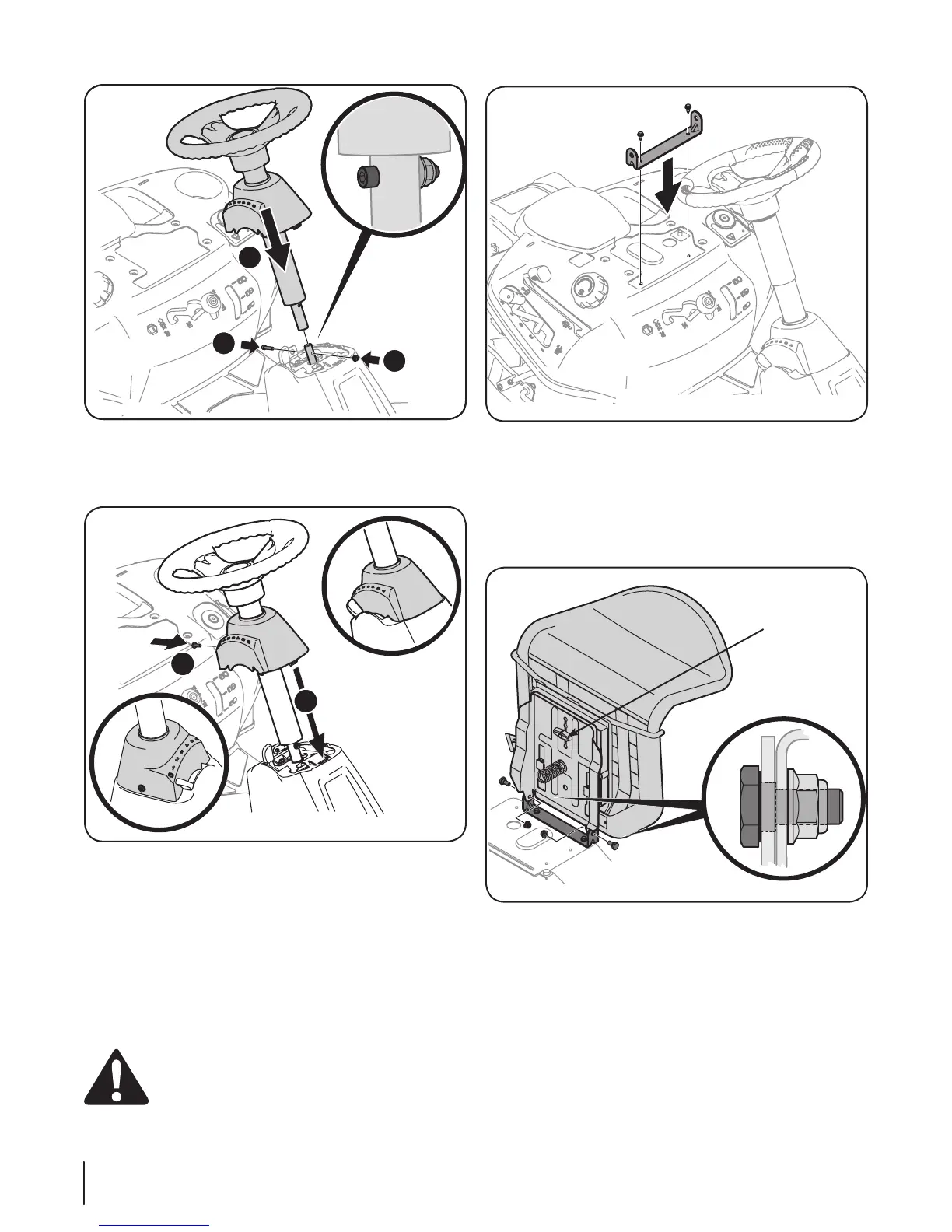
3. Position the seat assembly over the seat mounting bracket,
aligning the holes provided.
4. Install two shoulder bolts included with your hardware
pack and secure with two lock nuts. See Figure 3-5.
Note: Make sure that the bolt’s shoulder is completely
recessed into the seat bracket when securing the lock nut.
6. Slide the pedestal cap down onto the tractor (1) and clip
into place. Secure the pedestal with the hex screw (2) from
the hardware pack. See Figure 3-3.
Attaching The Seat
If the seat for your tractor was not attached at the factory, follow
the applicable instructions below to attach it.
1. Remove the two self-tapping bolts factory installed on the
tractor and place the seat bracket in place over the holes.
See Figure 3-4.
2. Using a /-inch drive ratchet with a /” socket, secure the
seat bracket with the self-tapping bolts.
CAUTION: Do not use any type of power tool (e.g.
impact gun or electric drill with nut driver attached)
when tightening the self-tapping bolts to attach the
seat bracket.
Figure 3-2
Figure 3-3
Figure 3-4
Figure 3-5
Wing Knob
10




 To Next Page