Removingthe Hail Screen
If the discharge area becomes clogged, remove the flail screen
and clean area as follows:
1.
2.
3.
4.
f
Stop the engine. Make certain the chipper/shredder
vacuum has come to a complete stop.
Before unclogging the discharge chute, disconnect and
ground the spark plug wire to retaining post.
Remove the vacuum bag from the unit as instructed in the
OPERATION section to obtain access to flail screen.
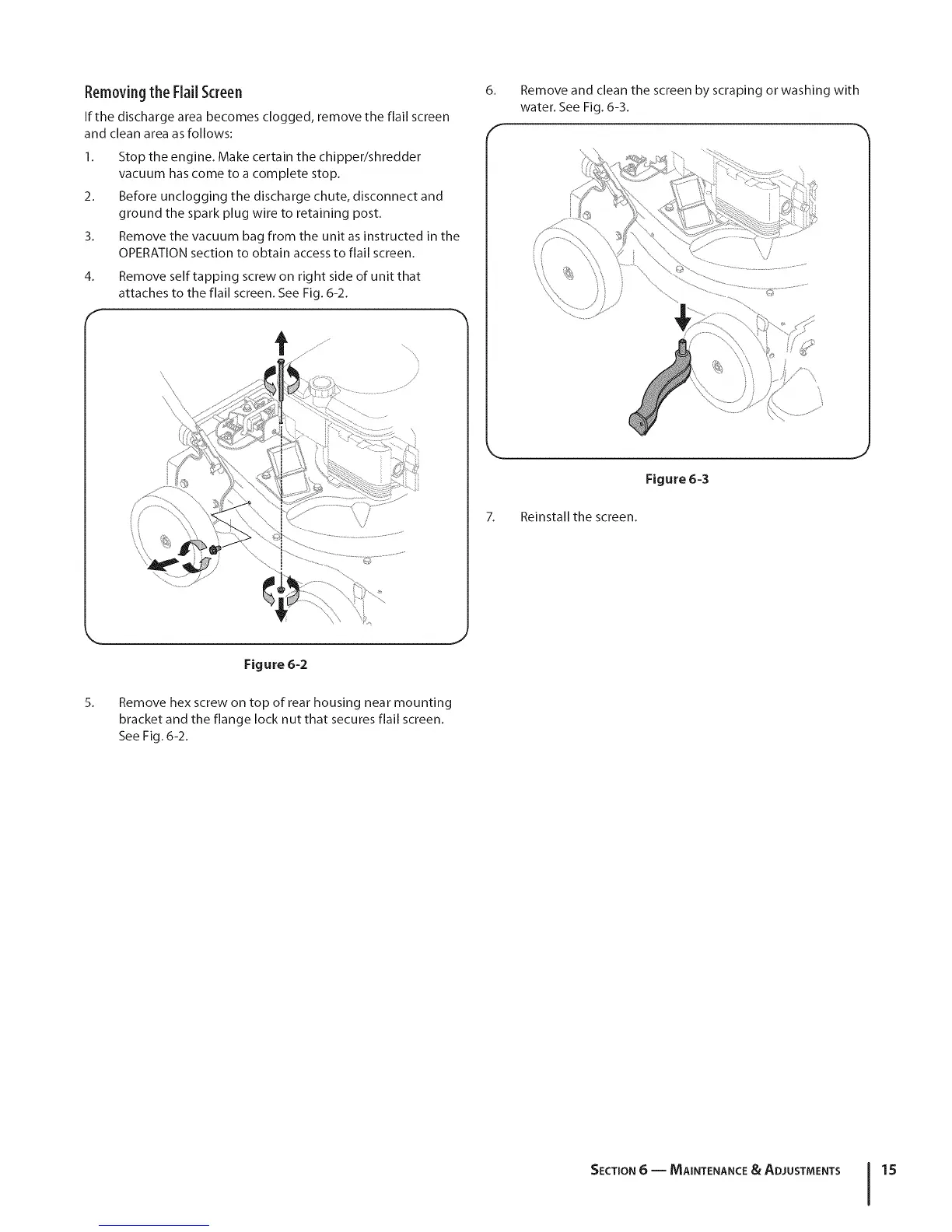
Remove self tapping screw on rig ht side of unit that
attaches to the flail screen. See Fig. 6-2.
6. Remove and clean the screen by scraping or washing with
water. See Fig. 6-3.
7.
Figure 6-3
Reinstall the screen.
,J
5.
Figure 6-2
J
Remove hex screw on top of rear housing near mounting
bracket and the flange lock nut that secures flail screen.
See Fig. 6-2.
SECTION 6 -- MAINTENANCE & ADJUSTMENTS 15


 To Next Page