AIS CTRX GRAPHENE Class B AIS Transponder Manual
1.4E 34 CTRX GRAPHENE Manual
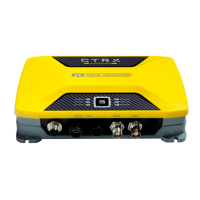
The blue SILENT LED will light when AIS CTRX GRAPHENE is set in silent mode,
which turns off the transmitter. This puts the transponder in receive-only mode. This
is referred to as ”SILENT MODE”.
The transponder can be switched to SILENT mode by either holding the “S” button
on the front panel down for 3 seconds or by using an external switch (see page 21 for
wiring instructions) To switch off the SILENT mode hold the “S” button down for 3
seconds. The blue LED will turn off after approximately 1 second.
A third way to switch the unit to SILENT MODE is to use the software button (marked
Silent Mode) in proAIS2 status window were the function can be remotely switched
on and off.
NOTE that this is a special function in proAIS2 and that it is separate from the
hardware control to set the silent mode with the switch.
The green STATUS LED means that everything is OK.



 To Next Page