II. Specicaons
Power: 1600 Was
Voltage: 120v / 60Hz
Temperature Range: 150°F - 450°F (exact temperature sengs)
Level Selecon: Select sengs 1 through 10
Max Time: Set mer up to 150 minutes
Material: Glass Ceramic Top
Single Burner Unit Measurements: 12” width x 15” length x 1.2” height
III. How To Use
Plug the power plug into a standard outlet.
The ON/OFF switch will light up and the unit will sound to indicate on.
The device will remain in standby mode, awaing user direcon.
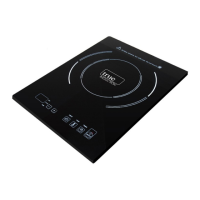
Place ferromagnec cookware (with water, oil, or food already inside) on the center of the glass ceramic
top center.
Now press ON/OFF buon on the control panel, this will turn the cooktop on. The power display will blink
and sound another indicator.
The pre-set power level “5” is the default selecon as the device turns on.
Using the +/- keys, you can change the sengs at any me, ranging from 1-10. This is considered to be
the HEAT funcon.
Using the Temperature Seng:
Aer the unit is turned on, you can opt to use the TEMP seng. To do this, press the funcon key labeled
TEMP one me. The pre-set temperature is 270 degrees Fahrenheit.
Using the +/- keys, you can change the temperature seng at any me. Sengs range from 150-450 de-
grees Fahrenheit. (Exact temperatures: 150, 180, 210, 240, 270, 300, 330, 360, 390, 420. and 450°F)
2


 To Next Page