15
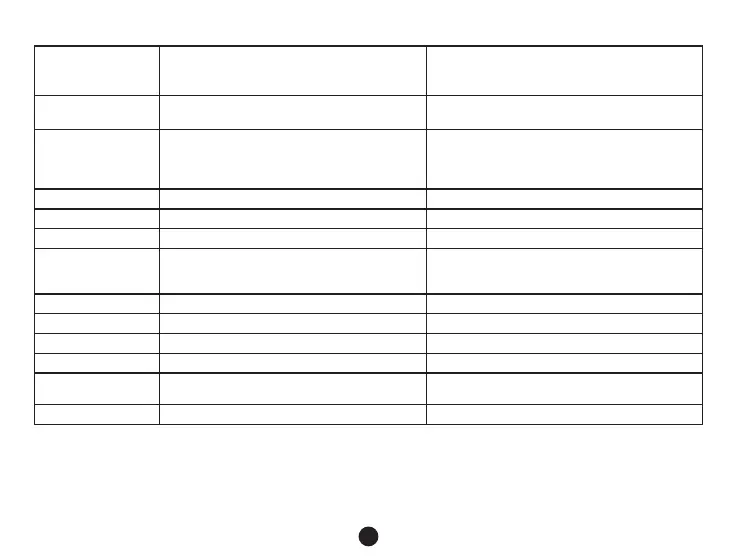
Auto Power Off Off / 1 minute / 3 minutes / 5 minutes
By setting the time, the camera switches off
automatically in the standby mode after a given
period of time if it does not detect any motion.
Beep Sound Off / On Sets the camera's tones On/Off.
Screensaver
Speedometer: 1 min / Speedometer: 3 min
/ Speedometer: 5 min / Display off: 1 min /
Display off: 3 min / Display off: 5 min / Off
Instead of playing recorded footage, the
camera screen can be turned off after a
certain time interval, or the Speedometer
function can be set.
Keyboard backlight Auto / Off / On Sets the backlighting of keys.
TV mode NTSC / PAL TV mode settings NTSC or PAL.
Frequency 50 Hz / 60 Hz Sets frequency NTSC(60Hz) PAL(50Hz).
Language
English / French / Spanish / Portuguese /
German / Italian / Hungarian / Czech / Polish
/ Serbian / Chinese / Russian / Japanese
Language settings.
Time zone setting Chooses the time zone.
GPS Watermark Off / On Sets the display of the GPS in a video.
Spped Watermark Off / On Shows the speed in a video.
Format Cancel / OK Formats data on the memory card.
Default setting Cancel / OK
Resets the camera to the original factory
settings.
Software version TRCM_A4 V1.7 Displays the installed FW version.


 To Next Page