14
Settings menu
The device uses two modes – recording and playback.
a) In recording mode
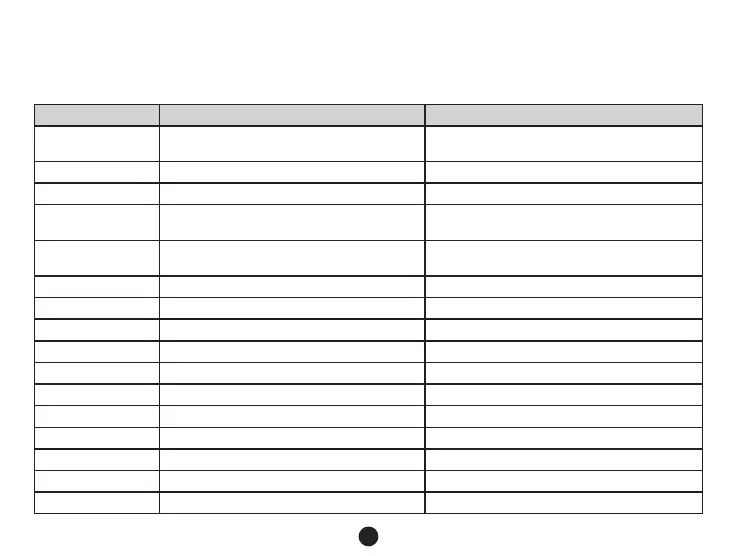
Function Menu item Remark
Resolution
1080P 1920x1080 / 720P 1280x720 /
WVGA 848x480 / VGA 640x280
Set video resolution.
Loop recording Off / 2 min / 3 min / 5 min Sets the length of the video time loop.
Picture resolution 12M / 8M / 5M / 3M / 2MHD Set photo resolution.
Exposure
-2.0 / -1.7 / -1.3 / -1.0 / -0.7 / -0.3 / 0 / 0.3 / 0.7
/ 1.0 / 1.3 / 1.7 / 2.0
The "+" increases recording brightness. The "-"
decreases brightness and darkens the recording.
White balance
Auto / Daylight / Overcast / Tungsten /
Fluorescent
We recommend setting it to Auto. White
Balance depends on light conditions.
WDR Off / On Set Wide Dynamic Range
Motion detection Off / Low / Medium / High Motion Detection function settings.
G-sensor Off / Low / Medium / High G-Sensor sensitivity settings.
Record audio Off / On Audio Recording settings.
Date stamp Off / On To set the time stamp on video.
Driver name stamp - - - - - - Sets the driver's name.
Driver label Off / On Sets the display of the driver's name.
Image rotation Off / On Rotates the image 180 degrees.
Date / time YY/MM/DD Date and Time settings.
Power on delay Off / 10 seconds / 20 seconds / 30 seconds Sets the delay when turning the camera on.
Power off delay Off / 10 seconds / 20 seconds / 30 seconds Sets the delay when turning the camera off.


 To Next Page