10
Function display / troubleshooting
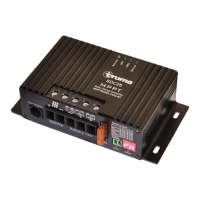
On the Charge Controller front face, status LED’s are
positioned. The following table details the indicating condition
of each LED.
Display
Status
Batt Low -
illuminated
•
10.5
• D
•
Insufficient battery connection
•
MPP - illuminated
• CC
MPP-short flashing
•
>80% - illuminated
•
Main battery is almost fully
>80% - flashing
1 pulse/sec
•
>80% - flashing
2 pulse/sec
•
Batt Full -
illuminated
•
All LED flashing
•
Battery selection is incorrect
Maintenance
–
The power supply must always be disconne
performing any maintenance work.
must first switch off any central control (power distribution)
devise and remove the charge controller supply fuse OR
cover the solar panels to prevent power generation.
Clean the device with
battery voltage is below
volts.
arged battery.
Insufficient battery connection
Main battery is almost fully
-heated
Battery or solar panel
(batteries) are fully
Battery selection is incorrect
The power supply must always be disconne
cted before
performing any maintenance work.
a competent person
must first switch off any central control (power distribution)
devise and remove the charge controller supply fuse OR
cover the solar panels to prevent power generation.
-free cloth.


 To Next Page