DIRECTION
SETUP
SETUP
DIRECTION
■Programming■
BRIGHT
RIGHTLEFT
Increasingvaluemakesthelightingbrighter,anddecreasingvaluedimsthelighting.
BRIGHT
■Programming■
SET
SET
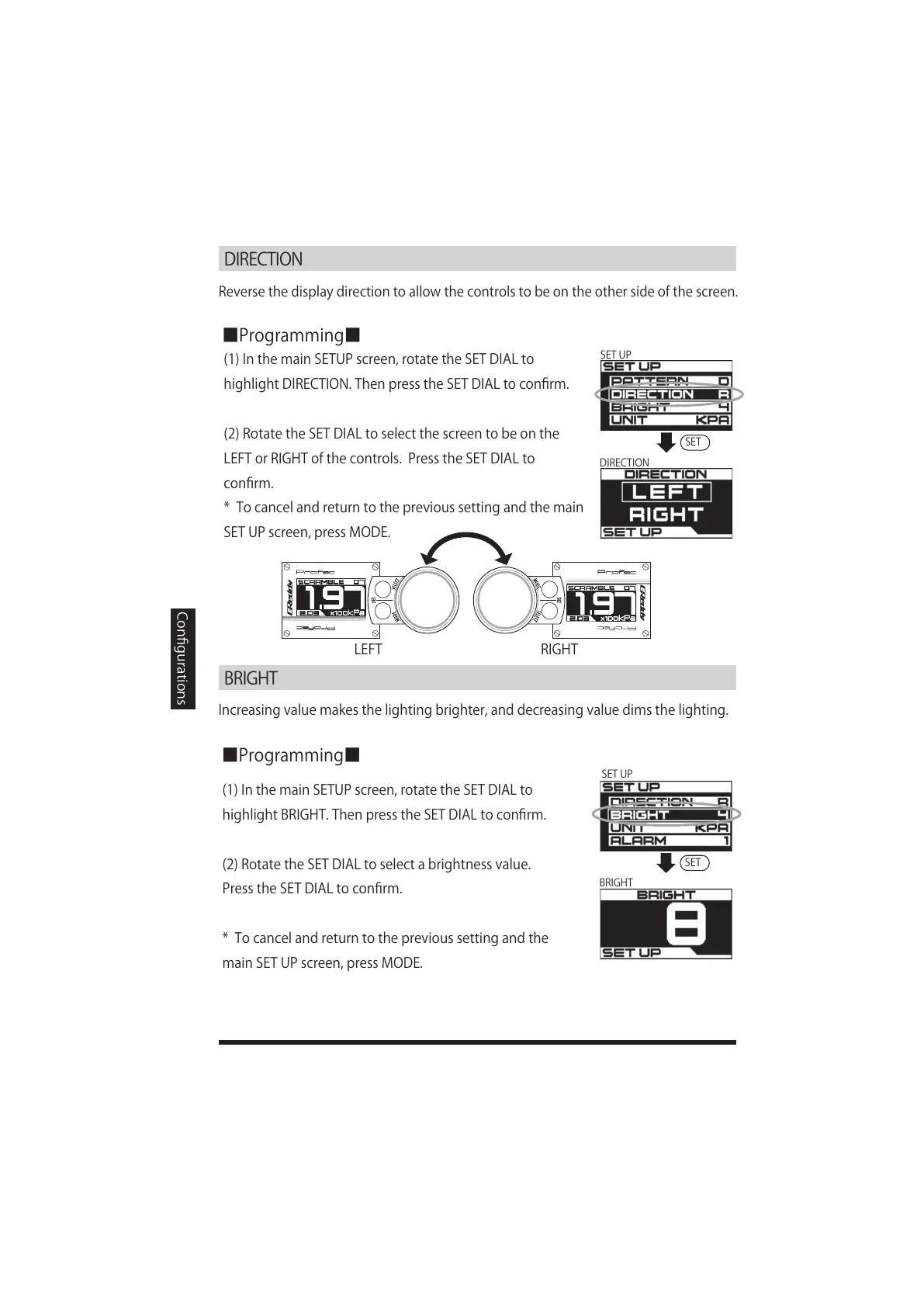
Reversethedisplaydirectiontoallowthecontrolstobeontheothersideofthescreen.
(1)InthemainSETUPscreen,rotatetheSETDIALto
highlightDIRECTION.ThenpresstheSETDIALtoconfirm.
(2)RotatetheSETDIALtoselectthescreentobeonthe
LEFTorRIGHTofthecontrols.PresstheSETDIALto
confirm.
*Tocancelandreturntotheprevioussettingandthemain
SETUPscreen,pressMODE
.
Configurations
(1)InthemainSETUPscreen,rotatetheSETDIALto
highlightBRIGHT.ThenpresstheSETDIALtoconfirm.
(2)RotatetheSETDIALtoselectabrightnessvalue.
PresstheSETDIALtoconfirm.
*Tocancelandreturntotheprevioussettingandthe
mainSETUPscreen,pressMODE.



 To Next Page