24 25
14. Recording settings
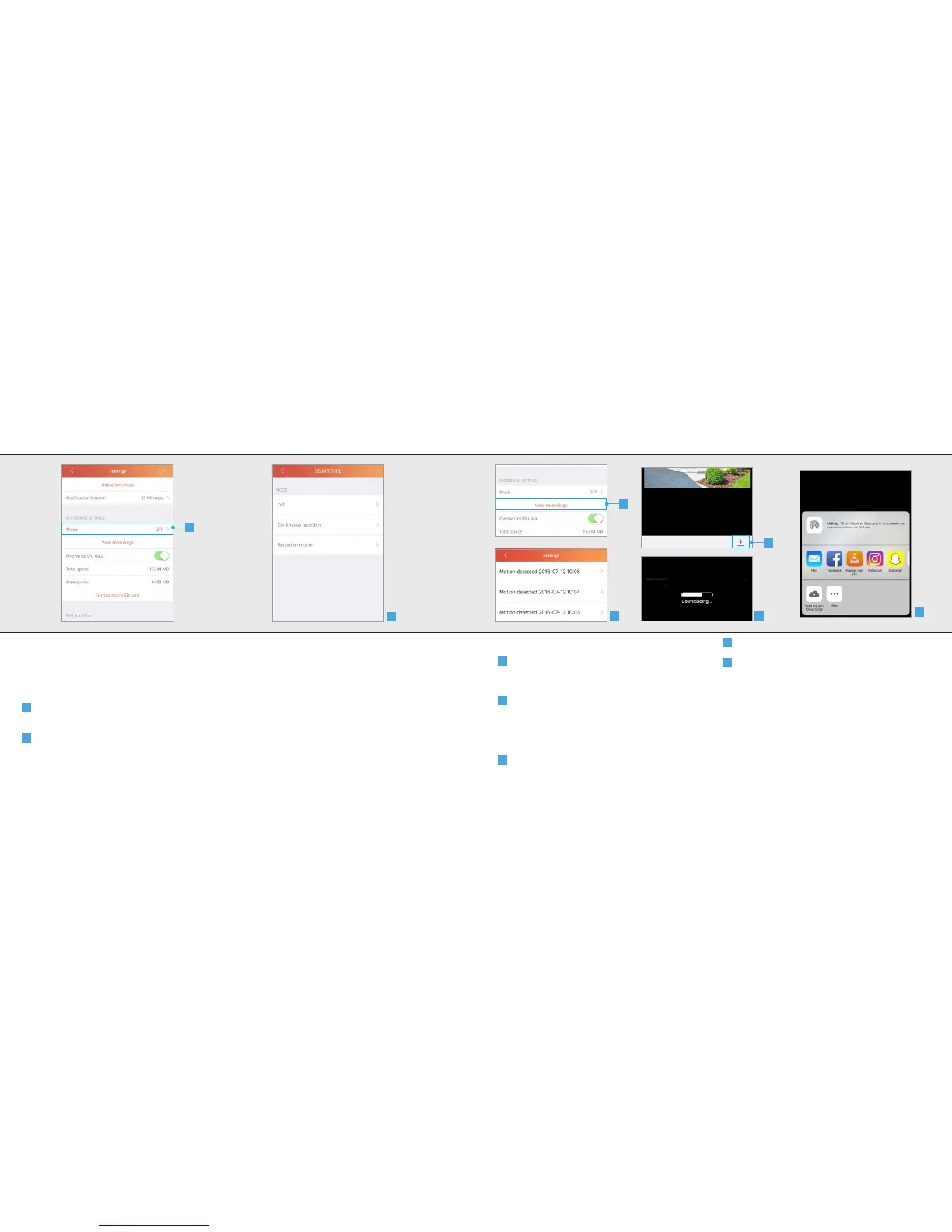
14.1 Mode
You can change when the camera records the
video stream
A
To change when the camera records the video
stream press Mode.
B
A list is shown of the recording modes. Select
the desired recording mode.
O: With this option the camera will not record
the video stream
Continuous recording: With this option the
camera keeps recording the video stream
Record on motion: With this option the camera
only records the video stream when motion has
been detected.
After selecting the recording mode the app will
return to the settings screen.
A
IPCAM-3000 OUTDOOR CAMERAIPCAM-3000 OUTDOOR CAMERA
B
14.2 View recordings
A
When the video stream has been recorded
you can view the recording by pressing View
recordings
B
A new screen is opened with an overview of
the recorded video streams. Press the recording
you want to view.
The recorded video is played back.
C
To download the recorded video press the
download button on the bottom of your screen.
D
The recorded video is being downloaded.
E
(For IOS) Choose the desired location where
the video stream needs to be saved. Note: To
play the saved video on an IPad or IPhone use
VLC.
(For Android) The recorded stream will be saved
in the screenshots folder.
A
B
C
D
E



 To Next Page