14 www.ttfone.com
Icons on Screen
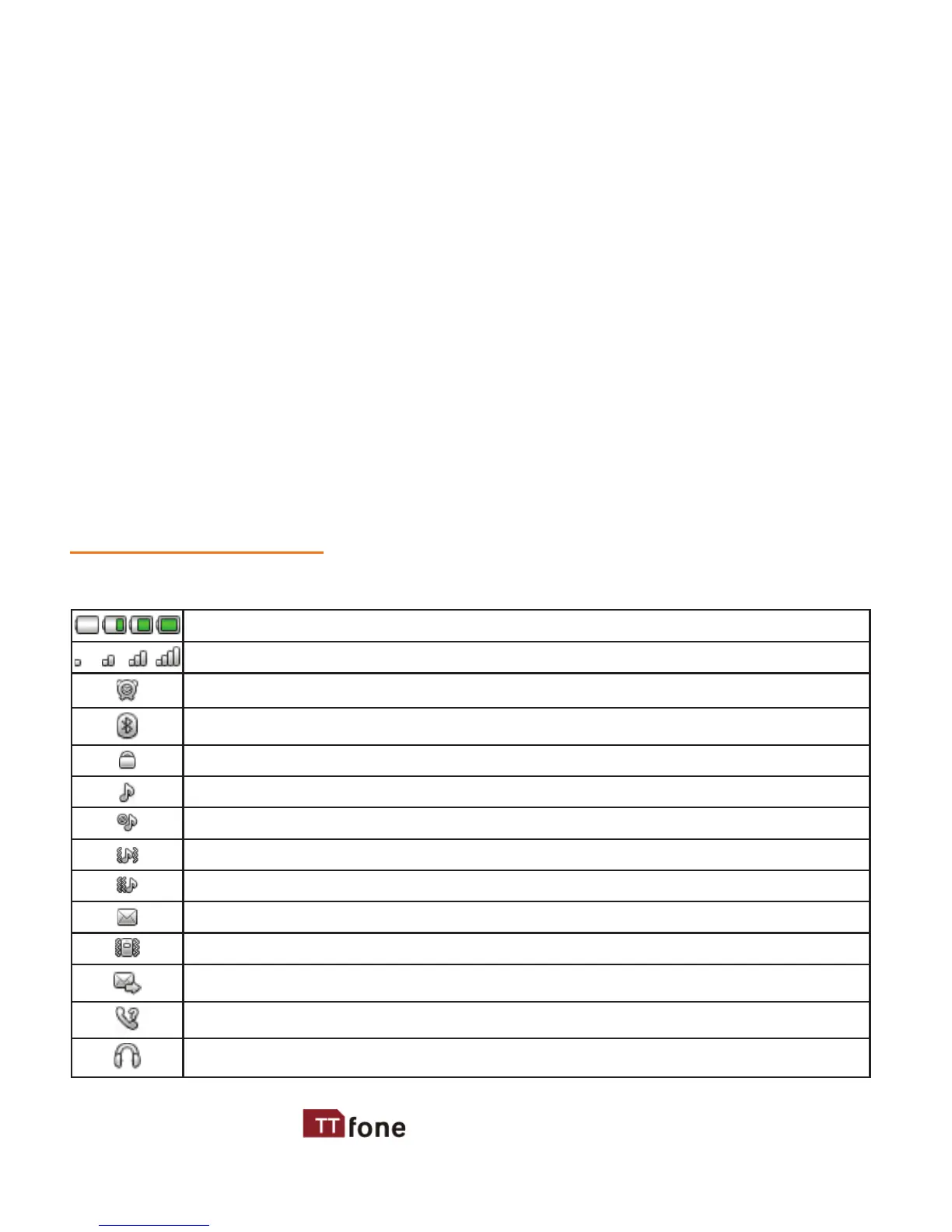
Following icons may be displayed on the screen:
Battery Status
Network Signal Status
Alarm
Bluetooth
Keypad locked
The phone in ring-down status
Silent mode is activated
The phone in Vib and ring status
The phone in vib rst and then ring status
New message
The phone in Vib status
Sending message
Missed call
Headset is Connected
Menu Right Key - This key will do what is written above it on the
bottom right of the screen, when in home screen press to access
the phonebook
# Key - Press and hold this key to activate silent mode press and hold
again to go back to General mode
* Key - Press and hold to access the international calling symbol + and
the pause P
Volume Button - + for up and - for down
FM Radio Switch - Slide this up to switch on the radio
Torch Switch - Slide up to switch on the torch
Lock Switch - Up to unlock and down to lock the keypad
SOS Button - Press and hold to activate the Emergency feature, press
and hold again to cancel



 To Next Page