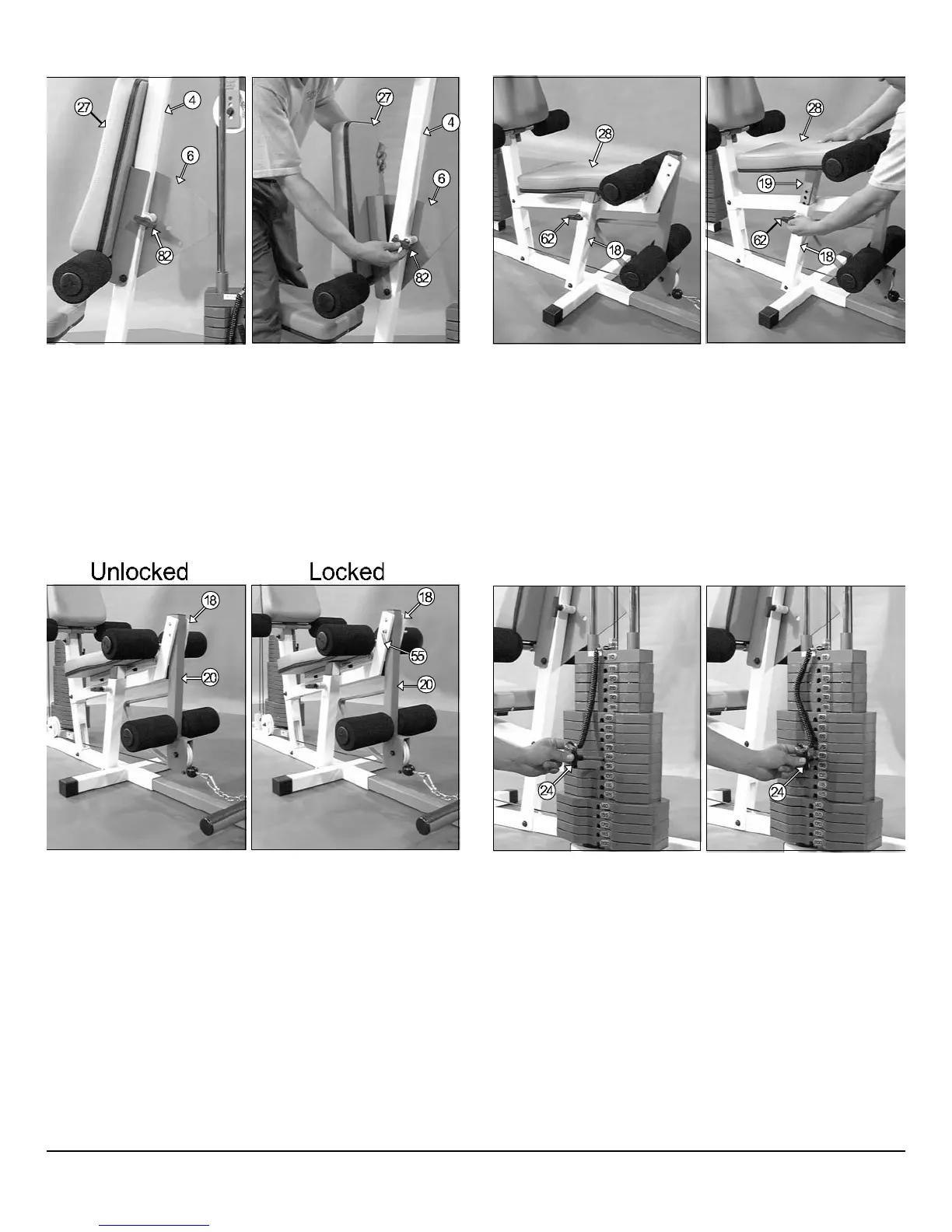
ig. 60 Back Pad (#6) adjustment:
Grasp the Back Pad (#27).
Pull the Push Pull Pin 1/2 Special (#82) to release the Back Pad
Bracket (#6).
Keep the Push Pull Pin 1/2 Special (#82) released and adjust the Back
Pad (#27) to the desired position.
Release the Push Pull Pin 1/2 Special (#82) and make sure it has been
fully engaged into the selector holes of the Back Pad Bracket (#6).
Fig. 61 Seat Pad (#28) adjustment:
1. Grasp the Seat Pad (#28)
2. Pull the Push Pull Pin 1/2 (#62) to release the Bench Press Adj Sea
Tube (#19).
3. Keep the Push Pull Pin 1/2 (#62) released and adjust the Seat Pad (#2
to the desired position.
4. Release the Push Pull Pin 1/2 (#62) and make sure it has been full
engaged into the selector holes of the Bench Press Adj Seat Tub
(#19).
us
men
ea
ures
ig. 62 Locking the Leg Extension Arm (#20)
Locate the L-Locking Pin (#55).
Insert the L-Locking Pin (#55) through the Leg Extension Bench
Frame (#18) and the Leg Extension Arm (#20), as shown above.
Leg Extension Arm Unlock Used on Exercises:
Leg Extension
Leg Curl
Leg Extension Arm Lock Used on Exercises:
Low Row
Standing Arm Curl
Inner / Outer Thigh
Seated Row
Seated Chest Press
Seated Shoulder Press
Fig. 63 Weight Selection
1. Grasp the Weight Selector Pin (#24).
2. Insert the Weight Selector Pin (#24) into desired Weight Plate. Th
Decal Weight Number (#86) on the selected Weight Plate will sho
the amount of weight selected. The Top/ Plate Selector Bar (#2
must be resting on top of the Weight Stack.
3. Make sure the Weight Selector Pin (#24) has been fully inserted int
the selected Weight Plate.
CFM-500 Compact Frontal Machin
21



 To Next Page