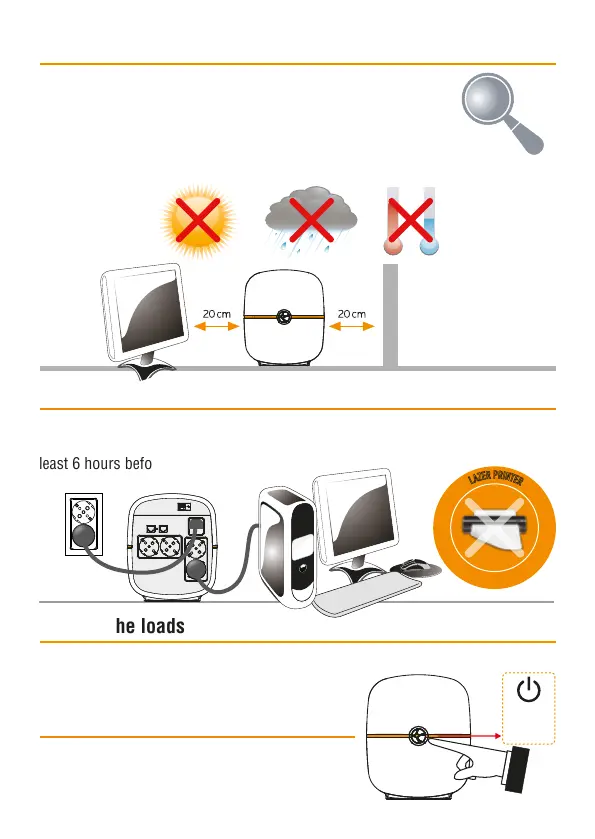
Please place the UPS
away from other units
at least 20cm to avoid
interference.
Plug in the AC input cord to the wall outlet. The unit charges its battery while
connecting to the utility. For the best results, suggest to charge the battery at
least 6 hours before initial use.
• Before installation, please inspect the unit. Be sure that nothing
inside the package is damaged.
• Install the UPS in a protected area that is free of excessive dust
and has adequate air flow.
• Do NOT operate the UPS where the temperature and humidity is outside the
specific limits. (Please chech the technical specs for the limitations)
Installation and initial startup
Connect to utility and charging
Plug in the loads to output receptacles on the rear panel of the UPS. Simply turn
on the power switch of UPS unit, then devices
connected to the UPS will be protected by UPS unit.
Connect the loads
Turn on the UPS unit by pressing the power
switch. Turn off the UPS unit by pressing again
the power switch.
Turn On/Off the unit
D
O
N
’
T
C
O
N
N
E
C
T
A
L
A
Z
E
R
P
R
I
N
T
E
R
T
O
T
H
E
U
P
S
U
N
I
T
T
H
I
S
M
A
Y
C
A
U
S
E
T
H
E
D
A
M
A
G
E
O
F
T
H
E
U
N
I
T
Power
Switch


 To Next Page