Operator Accessible Parameters
10
Setting the Operator Accessible Parameters
With the Oven in ‘Stand-By’ mode:-
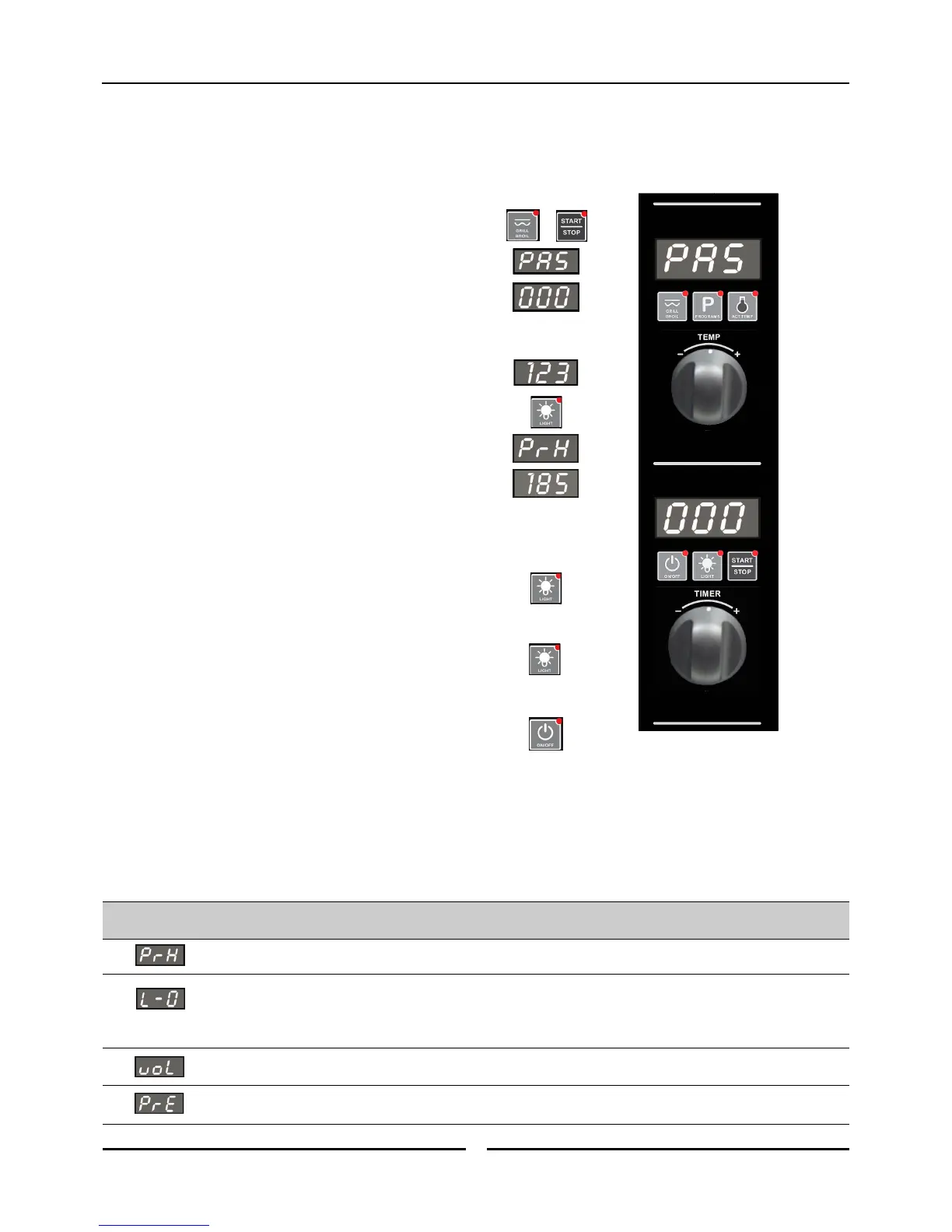
1. ENTER THE OPERATOR PARAMETER MODE.
Press 'Grill / Broil' and 'Start / Stop' buttons together.
‘Temperature’ Display will show ‘PAS’.
The ‘Time’ Display will flash.
2. SET PASSWORD.
Rotate ‘Timer Control’ to set password;
(123) (Operator Password).
Press ‘Light On / Off’ button to confirm password.
‘Temperature’ Display will show one of Parameter Codes.
‘Time’ Display will show value of the parameter.
3. SETTING THE PARAMETERS.
Rotate ‘Timer Control’ to parameter required.
Press ‘Light’ button to confirm parameter. ‘Time’ display will flash.
While ‘Time’ display is flashing, rotate ‘Timer Control’ to
select value required.
Press ‘Light’ button to confirm value. ‘Time’ display will stop flashing.
4. EXITING THE PARAMETER MODE.
Press ‘On-Off’ button, to return to ‘Stand-By’ mode.
Table of Operator Accessible Parameters
Parameter
Number.
Description
Default
Setting
Turn -On Pre-Heating Temperature. (60 - 260˚C / 140 - 500˚F).
150ºC
(325ºF)
Light Auto ‘Off’ Setting Time -
0 = ‘On/Off’.
1 = 1 minute auto ‘Off’.
2 = 2 minutes auto ‘Off’, etc.
1
Buzzer Volume - Can be adjusted from ‘0’ to ‘10’. 5
Program Pre-Heating Condition - (Can be adjusted from 0 to 30ºC {0 to 54ºF} above pre-heat
temperature).
20ºC
(36ºF)



 To Next Page