E09 TD-4100XD
Addendum: Clean-In-Place System
PN 106169
Rev B
E09 TD-4100XD Oil In Water Monitor
Clean-In-Place Addendum
A-9
A.2 OPERATING THE CLEAN-IN-PLACE SYSTEM
Prior to operating the clean-in-place system:
1. Remove the cleaning solution tank cover.
2. Fill the tank with cleaning solution to a minimum of 5 U.S. gal [19 L]. The volume of the tank is
10 U.S. gal [38 L]. The cleaning solution will depend upon what is likely to cause the fouling.
Your water treatment chemical supplier should be able to help you with a recommended
cleaning solution based upon your site-specic situation. Make sure the cleaning solution is
compatible with the materials of the CIP system and monitor, including 316 stainless steel and
CPVC.
3. Replace the cleaning solution tank cover.
4. Make sure that power is provided to the monitor.
5. You must congure the cleaning system operation on the E09 monitor, as described in the
following procedure.
The following procedures supplement the one described in Section 9.6.1.1 Online Cleaning, which is
specic to the ow cell rather than the entire sample system.
NOTE: Determining the appropriate durations for your cleaning settings will depend on the location
of the actuated CIP inlet valve. The following recommended settings were determined with a test
conguration that used 50 ft of 1/2 in. piping (25 ft inlet, 25 ft outlet). The piping was installed at a
3° slope. See Section A.5 Clean-In-Place General Arrangement Drawings.
To congure the automatic cleaning cycle
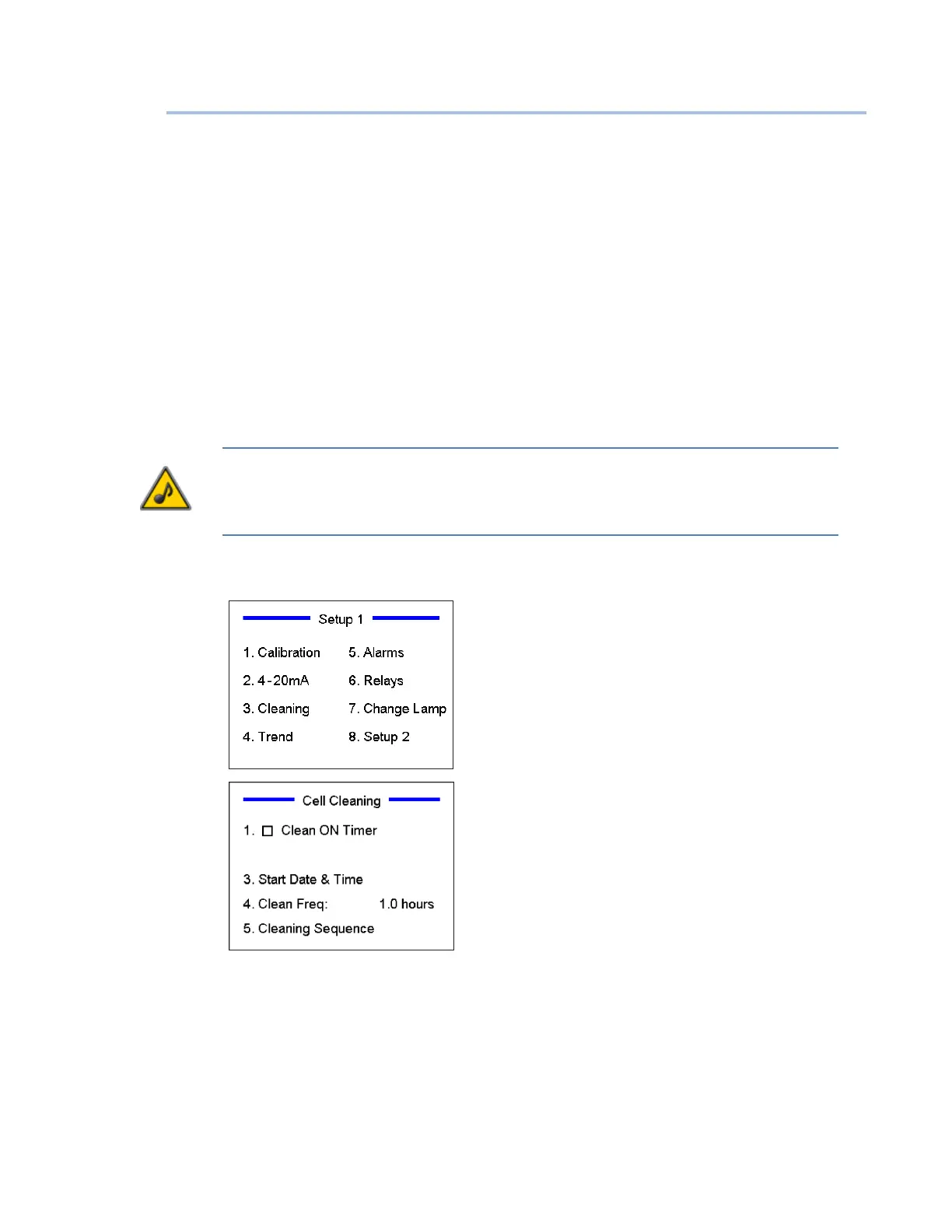
At the Home screen, press “Setup” on the keypad.
Press “3” to access the cleaning system settings.
Enter the user access code (8520) when prompted.
You can choose whether you want the monitor to go
into automatic cleaning on a regular timer. If you select
cleaning on a timer, the cleaning will occur starting on a
specic programmed date and time.
To select cleaning on a timer, press “1” to check the box.
Pressing “1” again will uncheck the box.
You must also program the starting date and time (press
“3”).


 To Next Page