WWW.TURTLE-BEACH.COM
11
Audio Advantage Micro
LISTENING TO 3D GAME AUDIO
When playing games using EAX2, A3D1 or DirectSound3D, the surround sound processor will convert the
3D positional sounds into HRTF positional audio so that the 3D effects of the game can be used in
headphones or stereo speakers.
LISTENING TO MUSIC FROM CDS
If your CD ROM drive’s audio output is using an analog connection to your sound card or motherboard
audio, the music will not be processed by USB audio devices, including the Audio Advantage. This is because
USB audio requires that the analog signal be converted to digital in order to be used as a USB audio stream.
If you have no sound when playing a CD in the PC’s CD ROM drive, check that the “Enable digital CD
audio for this CD-ROM Device” option is enabled in the CD drive’s Properties settings (using Windows
XP). Access this by clicking Start Æ Control Panel Æ System Æ Hardware Tab Æ Device Manager Æ
DVD, CD Drives Æ Right click on the name of the CD drive in question Æ Click Properties Æ
Select Properties Tab.
S/PDIF OPTICAL DIGITAL OUTPUT
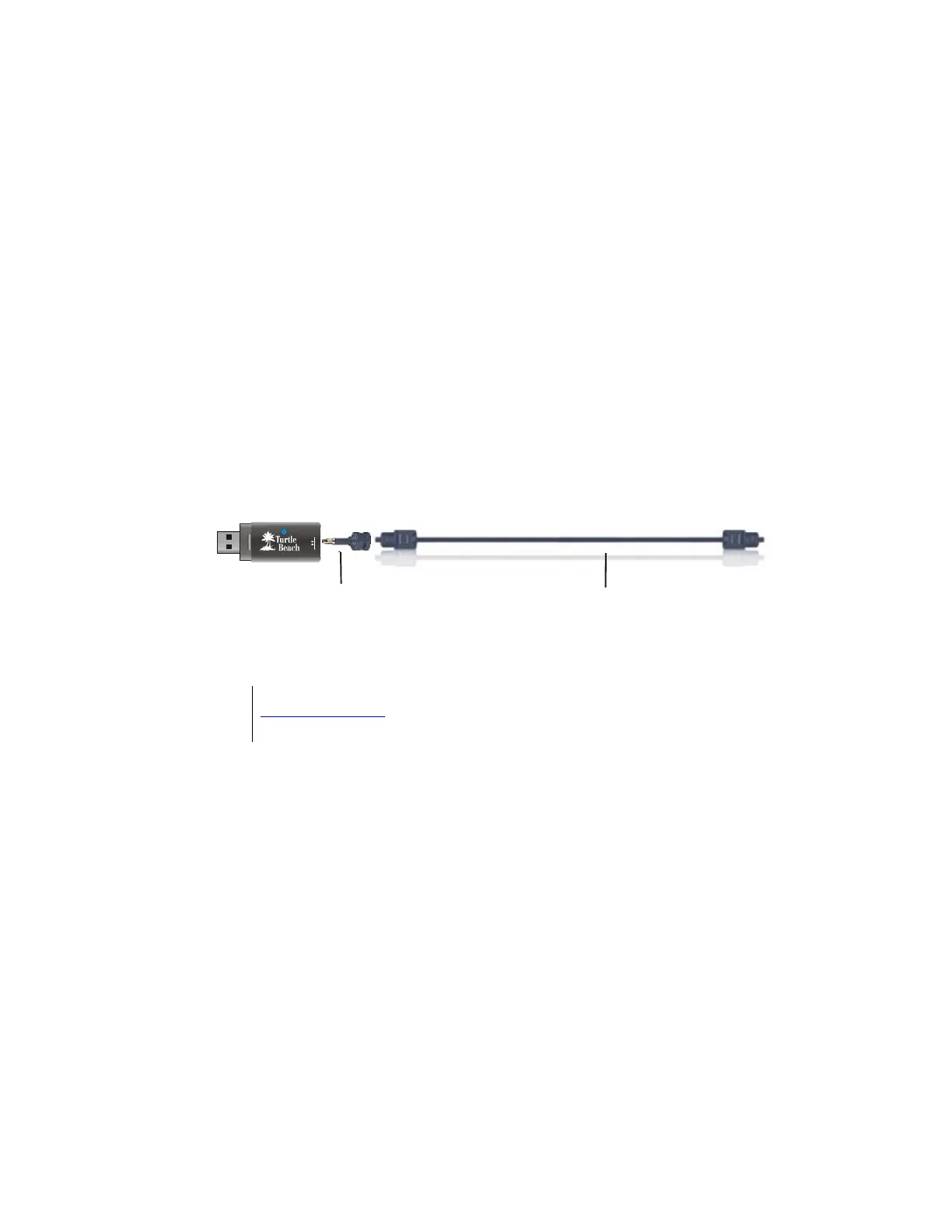
To activate the S/PDIF Optical Digital Output, select S/PDIF from the Audio Advantage Control Panel
Main Settings tab. The included S/PDIF optical adapter should be inserted into the headphone jack to
enable connection of a TOSLINK fiber optic cable used for transferring the digital audio signal to external
devices.
SPDIF Out
C
S/PDIF Digital Adapter (included)
Insert this adapter into the mini jack
to connect a TOSLINK optical cable
when using the digital audio output
TOSLINK Optical Cable (not included)
Insert a TOSLINK optical fiber cable into the S/PDIF
adapter to connect the digital output to
external digital audio equipment
Â
The TOSLINK Optical Cable may be purchased at the Turtle Beach web site
www.TurtleBeach.com
.
The S/PDIF optical digital output may be used to transfer stereo audio in digital format to external digital
audio devices, such as Mini Disc recorders, A/V receivers, professional audio equipment, etc. The data rate
on the S/PDIF output is fixed at 48kHz.
The S/PDIF output may also be used to transfer multi-channel audio to an external system with built-in 5.1
decoder for Dolby® Digital or DTS® formats. This mode may be used for sending surround sound digital
audio from a DVD played on your laptop or PC to an external digital speaker system or A/V home theater
receiver. DVD playback of Dolby Digital or DTS signals requires a software DVD player that transmits this
audio format.



 To Next Page