User’s Guide
12
USING THE CONTROL PANEL
The Audio Advantage Control Panel is installed from the Turtle Beach Installation CD. Once installed, the
control panel can be launched by clicking on the Turtle Beach icon located in the Systray on the right side of
the Windows Start menu, by clicking on Start Æ Turtle Beach Audio Advantage Micro Æ Turtle Beach
Control Panel, or from the Windows Control panel by clicking on Start Æ Control Panel Æ Turtle
Beach icon.
MAIN SETTINGS TAB
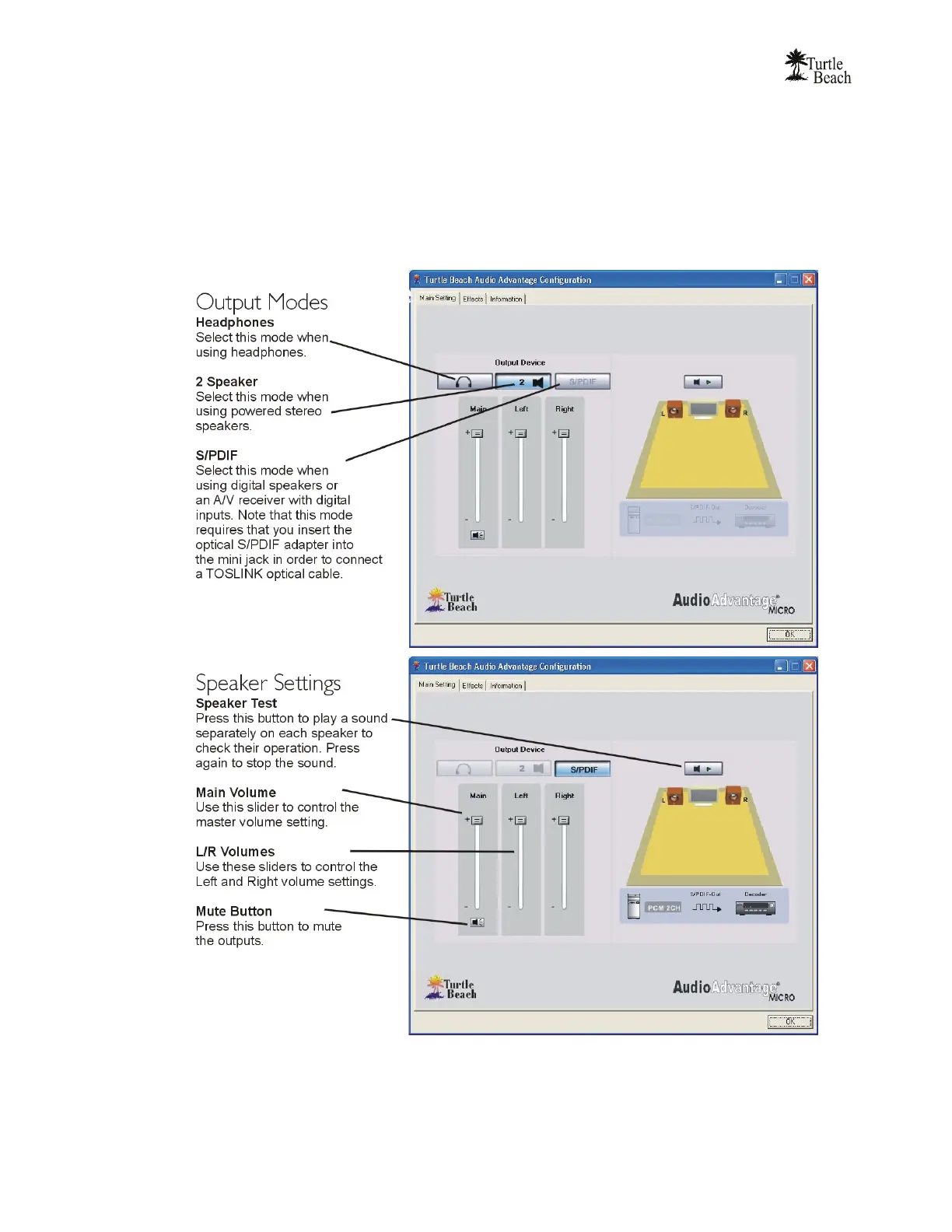
Note that clicking the “S/PDIF” button deactivates the headphones and speakers buttons, since certain
features that apply to those buttons will be deactivated when S/PDIF is turned on. When S/PDIF is on, the
grayed-out S/PDIF illustration under the speaker illustration will turn on, indicating that the unit is in Digital
Mode. To turn off S/PDIF, simply click on the S/PDIF button once again.



 To Next Page