16
Go to Table of Contents
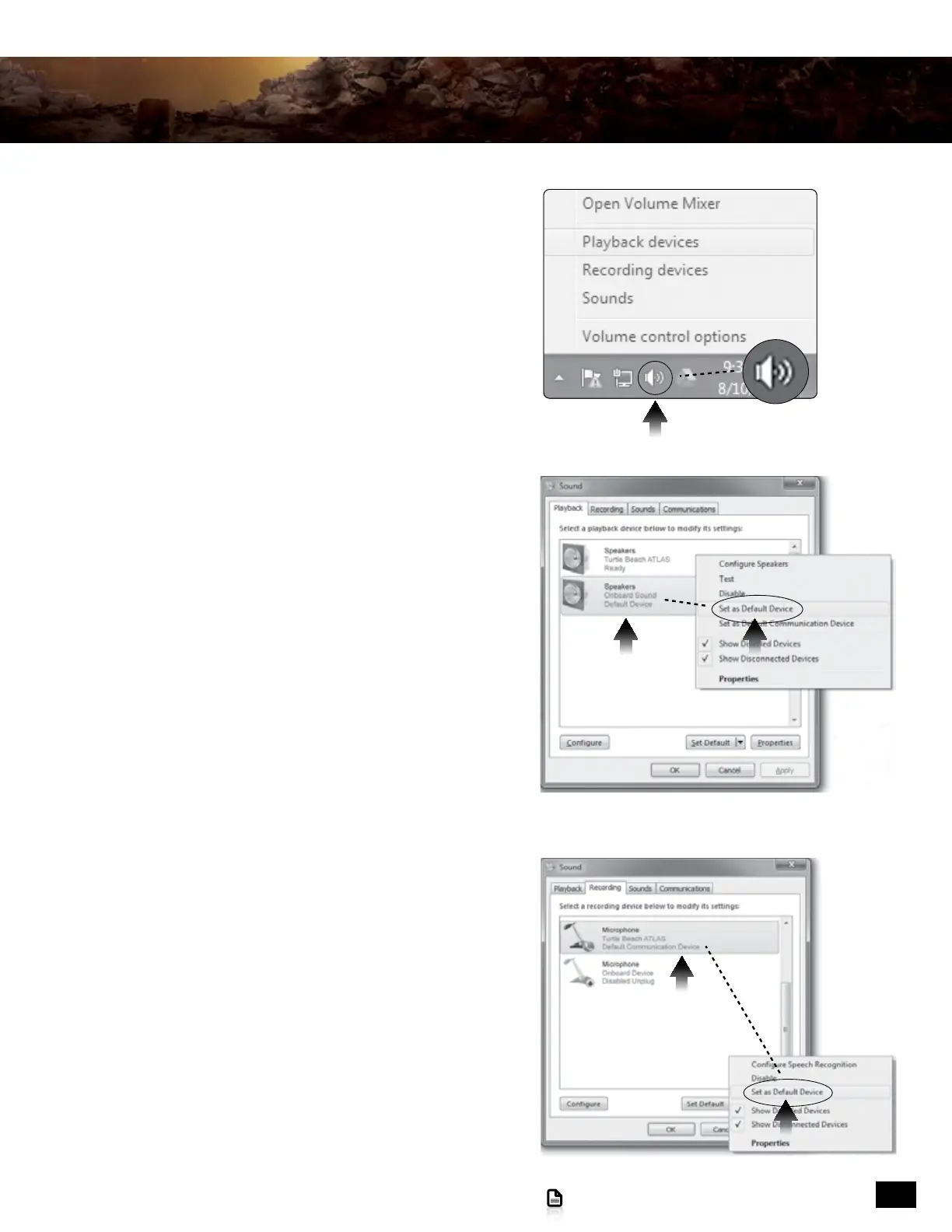
5. With the PC powered up and running, right-click the
speaker icon in your task bar and select “Playback Devices”
from the pop-up menu.
(NOTE: Depending your operating system version, your
screens may differ from the ones shown here; but the
procedure remains the same.)
7. Left click on the “Recording” tab.
8. Right-click on “Microphone/Turtle Beach ATLAS/Ready”
and select “Set as Default Device” from the pop-up menu.
9. Click on the “OK” button to accept the changes and close
the “Sound” dialog box.
6. Do NOT select “Turtle Beach ATLAS”. Confirm that
“Speakers/Onboard Sound” or something similar
is the default device. If necessary, right-click on
“Speakers/Onboard Sound” and select
“Set as Default Device” from the pop-up menu.
Setup and Connections: PC










 To Next Page