5
Xbox 360
®
Setup
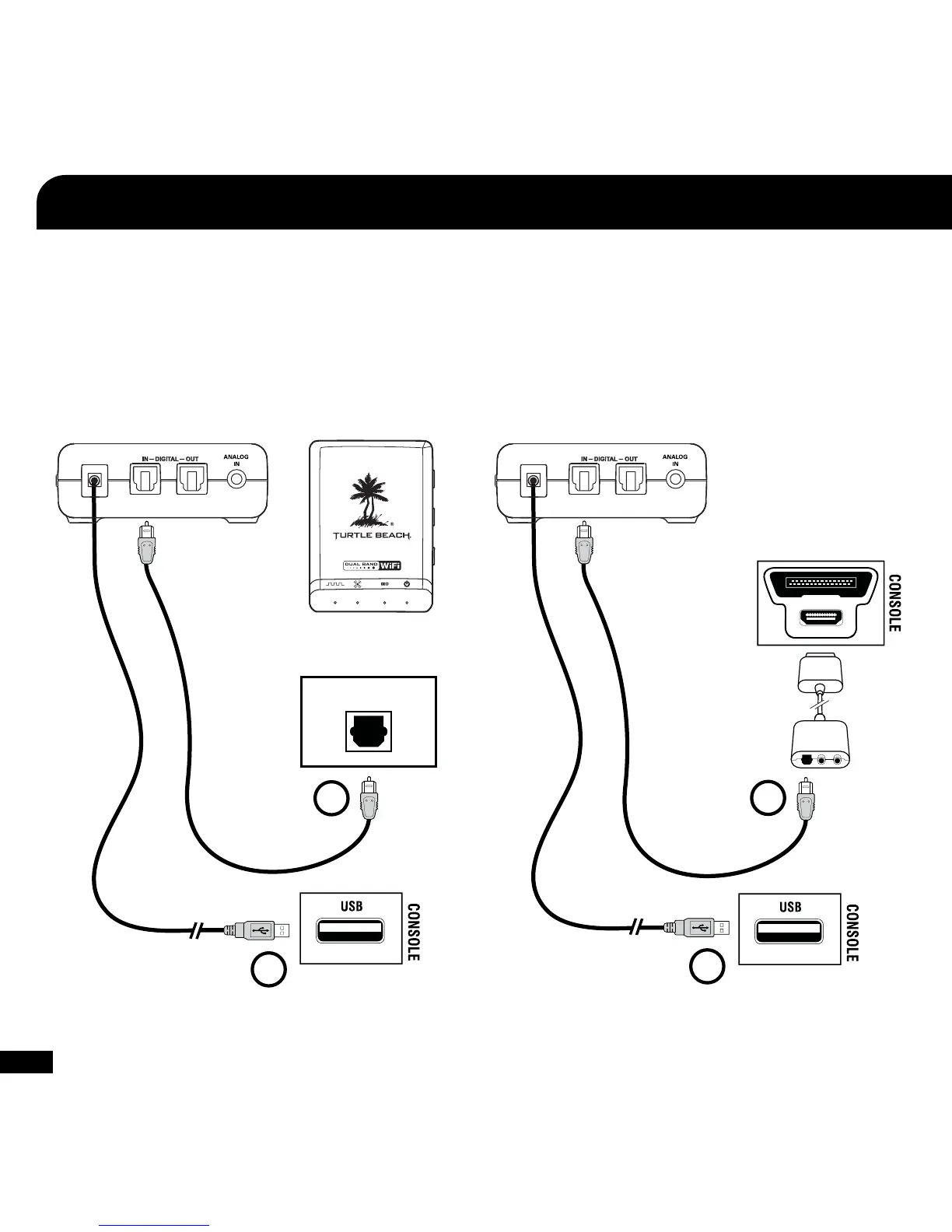
1. Connect the Digital Optical Cable
NOTE: Remove the protective caps from each end of the
optical cable before inserting it into the jacks.
2. Connect the Transmitter Power
1
2
Xbox 360 (Newer Models)
Xbox 360 (Older Models)*
1. Connect the Digital Optical Cable*
(Requires Xbox 360 Audio Adapter, sold separately)
NOTE: Remove the protective caps from each end of the optical cable
before inserting it into the jacks.
2. Connect the Transmitter Power
* Xbox 360 Audio Adapter required (sold separately, available on TurtleBeach.
com). If your HDTV has an optical AUDIO OUT jack, you can use it to con-
nect the optical cable to the transmitter.
DIGITAL OUT
CONSOLE
1
2















 To Next Page